We remain fully operational. Our teams are working around the clock to ensure your deliveries continue safely.

Laden Sie die App herunter


Kundendienst
Copyright © 2025 Desertcart Holdings Limited
Laden Sie die App herunter


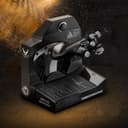
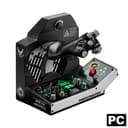

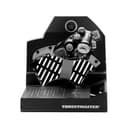

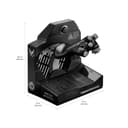
🛫 Own the Skies with Military-Grade Precision
The Thrustmaster Viper TQS is a 1:1 scale metal throttle quadrant system licensed by the U.S. Air Force, featuring 21 action buttons, 5 axes, and ultra-precise 16-bit H.E.A.R.T magnetic sensors. Designed for PC flight sims, it offers realistic mechanical detents for Idle, Cutoff, and Afterburner, plus an iconic CHAFF/FLARE switch, delivering unmatched immersion and plug-and-play compatibility with DCS World.


| ASIN | B0C3FKBB53 |
| Additional Features | Wireless |
| Best Sellers Rank | #11,687 in Video Games ( See Top 100 in Video Games ) #31 in PC Game Flight Controls |
| Brand Name | Thrustmaster |
| Button Quantity | 21 |
| Color | Black |
| Compatible Devices | PC |
| Connectivity Technology | USB |
| Controller Type | Throttle Quadrant |
| Customer Reviews | 4.4 4.4 out of 5 stars (107) |
| External Testing Certification | Não Aplicavel |
| Hardware Platform | PC |
| Item Weight | 4.18 Kilograms |
| Manufacturer | Thrustmaster |
| Model Name | TQS Viper |
| Package Quantity | 1 |
| Power Source | Corded Electric |
| UPC | 663296423733 |
| Warranty Description | One year |
M**L
I went with just getting the Viper Panel instead of the Viper TQS Mission Pack mostly because of the cost. Just the Panel on its own is about a quarter of the cost of the complete Throttle Pack. I mounted the Viper Panel next to my Thrustmaster Warthog Throttle and it works great. I have ordered the WinWing F16 Throttle combo with the Orion II base, hopefully will be here soon, which is way cheaper than the Thrustmaster Viper Mission Pack and I can use the Orion II base for other planes/helicopters. I only use my flight sim for DCS, F16C BLK50 for now and for the upcoming Heatblur F4 Phantom and Gazelle later, and this Panel works great for the Viper. I binded the buttons and switches to DCS ,and also managed to get the lights working ( Landing Gear, Speedbrake, Threat Warning Aux ) by using the TARGET software. I have only given 4 stars cause it was difficult to get the lights working ( I found a work around in DCS Forum) , the ACT/PWR square button light still doesn't work but works fine in DCS, and I cant get the virtual buttons to work in Windows, so some switches are still not working correctly- update on this issue, Diesel Thunder has a video showing how you can bind a switch in DCS and then select the OFF key binding for that switch. Update... got my Winwing F16 Throttle and Orion II base, works great along side the Thrustmaster Viper Panel. With the Thrustmaster Warthog Throttle, I have almost all the buttons and switches I need for the DCS F16
S**H
Pretty much plug and play for DCS. There are logical buttons for the detents for both going into and out of throttle, and into and out of afterburner. If the game doesn't detect those, you can determine the button number from the software and select that as your activation button. There are are a couple rotary buttons that aren't used in DCS that I rebound to zoom and other functions. The realism and quality for a sim HOTAS is awesome.
C**R
Super nice and great feeling buttons
T**M
what you expect from thrustmaster products very good quality and metal construction.
R**.
When you rest your hand on the throttle it just fits. All the switches are right there. I worked on the F-16 for many years and it just feels right in your hand. The lower assembly has a lot of switches and knobs all are programable. The gear handle is handy especially with VR. I may print an extension for the zoom lever to make it easier to move, it’s a bit short. There’s a lot more to talk about than I will comment on here. It is an investment and I personally think it’s worth it. Time will tell how well it holds up. It’s not quite the beast the Warthog is but then again it’s for and entirely different aircraft. .
TrustPilot
vor 3 Wochen
vor 2 Wochen