We remain fully operational. Our teams are working around the clock to ensure your deliveries continue safely.

Laden Sie die App herunter


Kundendienst
Copyright © 2025 Desertcart Holdings Limited
Laden Sie die App herunter

Buy anything from 5,000+ international stores. One checkout price. No surprise fees. Join 2M+ shoppers on Desertcart.
Desertcart purchases this item on your behalf and handles shipping, customs, and support to GERMANY.
⚡ Connect Fast, Charge Faster, Work Smarter.
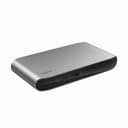
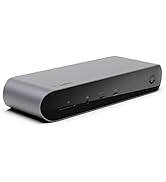
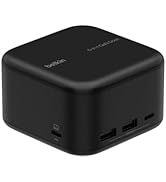
The Belkin Connect Thunderbolt 4 Docking Station is a premium 5-in-1 USB-C hub designed for professionals who demand high-speed data transfer, powerful 96W charging, and stunning display support up to 8K. Compatible with Mac and Windows, it features Thunderbolt 4 ports for daisy-chaining multiple devices, supports dual 4K monitors at 60Hz, and is built sustainably with recycled materials. Backed by a 2-year warranty, it’s the ultimate all-in-one solution to streamline your workspace and stay ahead in a fast-paced digital world.































| ASIN | B0CGJ1M5BX |
| Best Sellers Rank | 16,188 in Electronics & Photo ( See Top 100 in Electronics & Photo ) 209 in Docking Stations 4,636 in Hi-Fi & Home Audio Accessories 8,231 in Home Cinema, TV & Video Accessories |
| Brand Name | Belkin |
| Colour | Silver/Grey |
| Compatible Devices | Thunderbolt 4, Thunderbolt 3, USB4® and USB-C enabled devices |
| Country of Origin | Vietnam |
| Customer Reviews | 4.1 4.1 out of 5 stars (264) |
| EU Spare Part Availability Duration | 2 Years |
| Hardware Interface | Thunderbolt 4, USB 3.2 Gen 2 |
| Item Dimensions L x W x H | 13.4L x 7.4W x 1.8H centimetres |
| Item Weight | 1.27 Kilograms |
| Manufacturer | Belkin |
| Number of Ports | 5 |
| Product Warranty | 2 year |
| Total USB Ports | 5 |
| UPC | 745883854332 |
| Wattage | 96 watts |
A**N
Triple computer setup
This has enabled me to use my desktop's monitors, audio interface and speakers with my laptops and switching is seamless. This is the one cable solution I was looking for for my laptops. I have a separate USB switch for the audio interface which the speakers are connected to, but the monitors are plugged into both the dock and my desktop at the same time. I am able to run the monitors with HDMI and DP mode USB-C at high resolution AND refresh rate (1440p 144Hz and 1080p 144Hz) which was important for me. The only quirk with was with my M1 Pro MacBook, where I had to use DP mode USB-C for the second monitor because of something to do with what the graphics hardware itself supports. This was not an issue with my Intel Windows laptop. Power delivery is more than enough for my MacBook, which charges super quick with this. It's technically not quite the 140W the Dell laptop can use but I haven't noticed performance being affected much or battery charging slowly (even though Windows keeps telling me it is). It's easy to miss and doesn't stand out too much visually sitting under my main monitor, which is what I was looking for.
N**E
Good dock
Works well. I bought reused (like new) and it is working great. I am happy with the purchase.
T**G
Good - but at a price
There is, in theory, a lot to like, a couple of bits to love and a few things to dislike (the price of course being the main one!) with the new pro 4 dock from Belkin. Design wise, it’s incredibly sleek and professional looking with a mix of aluminium and plastic. It’s AC adapter is a bit of a brick but can thankfully be masked away pretty easily due to the cord length. The front has some pretty standard io at first glance with a few surprises at closer inspection – a multi functional SD card reader, 3.5MM audio jack in and out, USB-c 3.1 gen 2 port which supports fast charging and upstream (for connecting to your laptop) thunderbolt 4 port, next to a power button that allows you to stop the dock from delivering any power to devices when not in use (which I personally find pretty useful!). At the back, we’ve got power in, 2 HDMI ports (both supporting HDMI 2.0) , a downstream (for connecting to an external accessory or monitor) thunderbolt 4.0 port, a gigabit ethernet port and 4 USB-A ports (only two of these are 3.1 ports, with the other two being 2.0 ports). It can supply up to 90W pass through charging of a device, which is actually on the lower end when comparing against other similar priced docks. If you’re the type of power user that this level of dock is aimed at, this could well be a limiting factor depending on what beast of a machine is supposed to be connected to the dock! The dock can be fiddly when being used by Mac users. You won’t be able to make the most of both HDMI ports simultaneously for Mac Users, you’ll need to user a thunderbolt port for one display and a HDMI port for the other. This massively sways use of the dock towards favouring PC users, or a setup where Mac use is the very occasional use. This with the price bracket in mind is disappointing and very much worth bearing in mind. With the right laptop mind, you could in theory get a total of three displays connected at once – which is an impressive feat for a dock this size. The dock can support a single display at 8k (upto 30 hz), or dual 4k at 60hz, so it’s display options and flexibility is likely where this dock stands out to other competitors currently. For the right setup, this is a lovely professional dock. It seems to be tailored more towards adaptable office setups rather than homes with little additions like the power button and chosen ports but assuming you’ve got the right setup to make the most out of it (I personally wouldn’t consider this dock if my main driver was a Mac), it could well be a contender !
M**R
An expensive cable tidy solution*
I love this product. I've only had it since yesterday but it's been a pretty flawless setup for me. One 4k 60hz monitor, audio interface, midi keyboard, webcam, and laptop cooling pad all go into this and are all fed by a single USB C cable into my MacBook Air m2 for faster charging than the default brick gives me. I have had no issues getting the monitor to work properly as other reviewers have noted, but that could be the newer chip? The downside is that my work laptop needs 120w power and so I didn't quite eliminate cable clutter, as I still have to use the existing power supply, but it's freed up every other port. Doesn't make any noise, doesn't seem to get too hot, it just sits there being unobtrusive.
M**R
Flawed design - avoid - stop selling this amazon
3 exchanges and every single one defective: I thought I had a defect with one of these, but i'm on my third exchange now and I can safely conclude the product is defective and has a fundamental design flaw. Firstly, it cant achieve the spec advertised. 1Gbit. Can't do it. I can get 1gbit by bypassing this device, same lead, same port. This device also had a broken audio port. Secondly, on my second device the display just totally went. Showed snow, like the old analogue tv's. Unusable. Very embarrassing during work when I cant see my screen. (also cant achieve 1gbit) Third swap, the screen is constantly flickering two days into use. It's going to go the same way as the second. (also cant achieve 1gbit). Such an expensive and useless piece of tech. I love the idea of it, I love the brand. Thats why ive patiently gone through 3 exchanges. But enough is enough. You can't get three duds. The product is fundamentally flawed and incapable of delivering what is expected. Additional info: i'm def not overloading it. I am using 1 of the HDMI ports. I still have free slots available. The speed can't even be achieved when nothing else is plugged into the hub. I've tried swapping the HDMI ports (as there are two) and its the same problem
S**K
Highly recommended
Great piece of kit. Purchased to use with my Mac mini. Highly Recommended.
A**H
Flickering monitors, poor support
Fairly expensive for what it is, but looks tidy and has a decent number of connections. However, I have had problems with displays repeatedly going black when connected to HDMI which persists with different laptops; I have resorted to using a HDMI to USB-C adapter to overcome this. Belkin support are not especially helpful and there are no driver or firmware updates for this dock so it looks like I'm stuck with it.
A**T
Doet wat moet. Plug and play.
Y**V
I am pleasantly surprised with the dock - even though the notebook I am using has Thunderbolt 3, there's no problem attaching 2 1440p monitors via HDMI, bookshelf speakers(via the 3.5mm headphone output on the front), LAN connection, and a USB type C webcam. Works great. Some nitpicks: - the power button on the dock doesn't command the laptop, but turns on/off the dock itself; - the input for the notebook is on the front - for me, it's a plus, because of the short provided cable, but for some might be a bother; - the store page here doesn't say anything about compatibility with macs - on Belkin's website there's a diagram for single/dual/triple screen setups with Windows and Mac machines(M1 and intel based);
S**E
Se avete un Macbook e volete collegare 2 monitor esterni attenzione, leggete fino alla fine! La Dock in se é ottima e funziona bene, ci sono dei "peró" da elencare: - Contrariamente ad altre Dock, il cavo di collegamento al PC si trova sulla parte frontale, mentre tutti gli altri connettori (alimentazione/schermi ecc) stanno sul retro, quindi ci sará sempre questo cavo un po "ingombrante" attaccato davanti. - Se acquistate questa dock per collegare 2 monitor esterni a Macbook/Macbook Pro con processore M1 o M2 (varianti NON pro), evitate. I processori M1 ed M2 base non supportano piú di 1 monitor esterno (vedi specifiche sul sito apple), anche se la dock ha 2 prese HDMI e 2 prese Thunderbolt sul retro. - Se acquistate questa dock per collegare 2 monitor esterni a Macbook Pro con processori M1 Pro o M2 Pro (comprese varianti MAX), potete collegare 2 schermi, ma non entrambi alle 2 HDMI posteriori. Le 2 HDMI sul retro con i Macbook non funzionano in contemporanea. Se volete collegare 2 monitor dovete collegarne uno su un'HDMI e uno su una Thunderbolt sfruttando per esempio un adattatore Thunderbolt -> HDMI anche da 20 euro (io ne ho preso uno della "Uni" per esempio e funziona benissimo). In questo caso se il monitor ha un refresh rate elevato (es 144Hz da gaming o simili) collegatelo preferibilmente alla Thunderbolt e non all'HDMI, perché spegnendo e riaccendendo spesso la dock con 2 monitor collegati potrebbe "perdere" la risoluzione e scalare ad una inferiore per qualche strano motivo (collegato alla thunderbolt non succede). Ricapitolando, buona dock una volta che capite i suoi limiti e come "trattarla" per farla funzionare come dovrebbe.
F**O
A día de hoy es casi imprescindible tener una de estos ya que la tendencia como se está viendo en los últimos modelos de PC, es a reducir conexiones, pero claro, los puertos que vienen son escasos y si queremos conectar dos monitores, un a impresora, un usb… pues no tenemos mas remedios que ampliarlos. Belkin ha fabricado este Hub de gran calidad que consta de 4 puertos USB C y un puerto USB A, siendo 3 de entrada 1 de salida y un USB A de 96w y además es compatible tanto con MAC como con Windows. Está fabricado con terminación en aluminio y plástico color negro piano en el frontal y la trasera. La calidad de construcción es impresionante, tanto por los materiales como por la velocidad de trasferencia de información, datos de hasta 40gbps y carga. Permite además la conexión con monitores llegando a alcanzar los 8k y los 4k a 60Hz Cuenta con corriente y ha de enchufarse a la red eléctrica para su funcionamiento, viniendo en la caja 3 modelos de cables de conexión. Es un HUB de alta calidad lo que hace que el precio sea elevado, pero hay que tener en cuenta la relación calidad precio para entender el porqué. Merece mucho la pena si como yo lo vas a usar para edición de video.
A**E
Erfüllt seinen Zweck vollauf!
TrustPilot
vor 2 Monaten
vor 2 Wochen