We remain fully operational. Our teams are working around the clock to ensure your deliveries continue safely.

Laden Sie die App herunter


Kundendienst
Copyright © 2025 Desertcart Holdings Limited
Laden Sie die App herunter

🎨 Elevate your digital art game with precision and freedom!
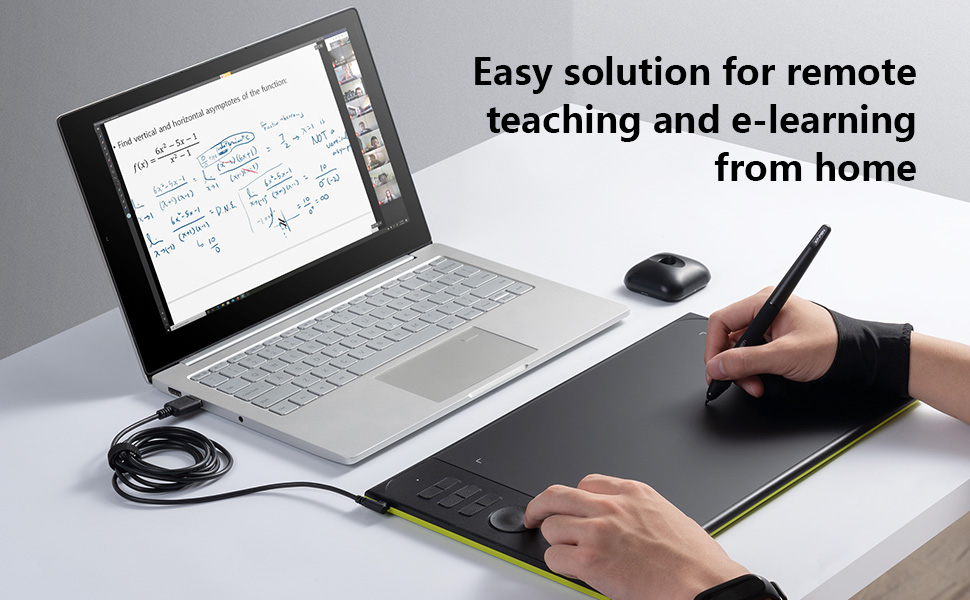
The XP-PEN Star06C is a professional-grade 10x6 inch graphics tablet featuring an ultra-sensitive 8192-level pressure battery-free stylus, a high refresh rate of 266RPS, and 5080LPI resolution for smooth, natural drawing. Equipped with 6 customizable shortcut keys and a dial, it enhances productivity and supports major creative software on Windows and Mac OS, making it ideal for artists, designers, and educators seeking a reliable, responsive digital drawing experience.





| ASIN | B0779K7LPF |
| Are Batteries Included | No |
| Best Sellers Rank | 151,037 in Computers & Accessories ( See Top 100 in Computers & Accessories ) 242 in Graphic Tablets |
| Brand | XP-Pen |
| Colour | Black |
| Customer Reviews | 4.2 4.2 out of 5 stars (412) |
| Date First Available | 1 Jun. 2017 |
| Guaranteed software updates until | unknown |
| Item Weight | 798 g |
| Item model number | 8541661557 |
| Manufacturer | Ugee |
| Operating System | Windows |
| Product Dimensions | 20 x 15 x 10 cm; 798.32 g |
| Screen Resolution | 1920x1080 |
| Series | Star06C |
| Standing screen display size | 10 Inches |
N**R
Perfect for me, a beginner
I bought this art tablet as I wanted to get into digital art, but had no tablet before now. It works fine, not really gotten to grips with all the buttons, but can draw on it perfectly fine. Love the fact that it comes with a glove to stop your hand sticking to the tablet's surface, and also the extra pen nibs. Very easy to install on the computer as well. Won't need to upgrade for a long time, I think!
D**S
Comfortable size, good price
Easy to install the driver, easy to setting keys, comfortable size, good performance - I love it :) I bought for hobby digital drawing and learning to digital painting, work perfectly with Clip Studio Paint, Mischief. Autodesk Sketchbook Pro does not support this product, pressure sensitivity is not working. Very short time need to learn use it, similar feeling like paper and pen usage, the texture is very comfortable.
C**N
I've owned one for 9 months and I'm generally pleased
I bought this as someone who has been drawing on paper for a few years and wanted to try out digital art, but I had no idea whether I would like it or not. I decided to go for this tablet as it was cheap enough to the point where if I didn't like digital art and couldn't get a refund, it wouldn't be too much of a loss, but if I did end up liking it, it has enough features to carry me through, and this tablet comes with everything that you need to get started. It also comes with a 4GB USB stick that had a text file on there telling you to go to XP-PEN's website in order to download the drivers instead of having the drivers on the stick itself, but this isn't an issue and I now use the USB stick to back up my drawings in case anything happens, which is quite convenient. The pen at least for me is slightly uncomfortable if using the tablet for long sessions, but the main reason why I've given 4 stars instead of 5 is not because of this, but rather because there is an issue with XP-PEN tablets where the pressure sensitivity will occasionally stop working properly which interrupts my workflow (it's not exclusive to the Star06 either). XP-PEN is yet to address this in any driver updates as far as I'm aware, and this is the only gripe that I have with the tablet that is worth mentioning. If you're on the fence about buying this tablet, then I still would recommend it overall, especially if this would be your first. It's quite cheap for the features that it has, has decent build quality, is a good size, and it's more than sufficient to create good quality art if you pair it with with a good drawing program (Medibang/Firealpaca and Krita are free programs that are worth looking at if you have no money to buy software as well).
A**X
Really good but..
The product itself is great and works fantastic. Big and major drawback for me was that it came with no pen nibs unlike in the pictures. The pen nib that was included in the pen was also chipped which resulted in my leaving a nasty scratch on the tablet itself. Overall its a great product and I would've given it a 5 if it were not for this 1 issue.
R**E
Do not buy! - arrived faulty and does not work!
I ordered this item and it came very quickly but I was sent a faulty device which seemed to be a used or refurbished. I’m very unhappy and need some assistance!
J**S
Star 06c
Never normally feel the need to do reviews but i feel xp pen deserves some good feedback for this product. Im used to using an old wacom intuos and have been debating the new pro version but decided to take a gamble on a lesser known brand to save a few pennies (about 2500 pennies). I can say whole heartedly that this tablet is incredible, honestly no need to spend hundreds more for an eraser on the pen and tilt, thats just plain daft. This is all you need so hats off to xp pen, the days of wacom monopolising the industry are well and truely over.
J**S
Perfect
With solid driver software, the Star06C allows you to very easily switch to a full hands-off workflow for concept art with Photoshop. With tool cycling enabled, I can now switch between brush types, pressure toggles, erasers, selections, scale, zoom and colour picking without lifting my hands off the tablet. It is incredibly responsive, and draws smooth lines. The included accessories are of equally high quality; the anti-fouling glove has hepled me to keep the tablet spotless since purchase. I honestly can't recommend this enough.
A**N
Hiç sorunsuz kullandım.. tuş atamaları da çok kullanışlı oluyor ama daha küçük boyut alsaymışım olurmuş ☺️ özellikle ps programında çok rahat ediyorum
J**.
This is my second drawing tablet, and the third one I've ever used. My art program of choice is a free one called Medibang Paint Pro. I upgraded from a bamboo create 6" tablet. The price is incredible. The tablet, pen, and accessories all feel sturdy and of good quality. The tablet program is very simple, with programmable buttons and some small adjustment options. The drawing area is very large and the texture is smooth yet not slippery. The monitor settings are easy to understand, and it is able to be used for individual and multi-monitor setups. I've only run into one issue, which is some input lag when making sketchy type lines. It isn't constant, and very well could be an issue with how I'm using it. Not a deal breaker but it is a bit annoying. I will update this review with a solution if I find one. All things considered, I would recommend this for anyone who is interested in using a drawing tablet.
Y**N
I am not an artist per se, though I have couples of friends are quite good. I gave myself a Christmas gift by getting one XP-Pen Star06C Though a little bit more instruction will definitely shorten the learning curve, by the end of the day I am very impressed nonetheless. I am extremely impressed with the accuracy. In the past weeks, I also tried some other tablets from my friends: one UGEE M708, one Huion, and one Wacom Bamboo. Star06C is noticeable more sensitive (and more accurate). After a while, I found that the hotkey and dial (knob) are more convenient than I thought. Again, I believe with more practice, more confidence and application will be found. It works perfectly on Adobe PS, SAI. I had a problem with the driver, and it turned out I will have to uninstall the old driver from tablets. The support is quite prompt, which is another surprise. In a word, It is an amazing gadget with decent support. I would highly recommend to a friend or a family member.
I**N
Eldiven paket içerisinde mevcut. Ayrıca sipariş vermeye gerek yok. Ürün anlatıldığı gibi çok güzel
A**N
I've been exclusively using Wacom tablets since the late 1990's, when I used them in the graphic design program at a local two-year junior college. I bought my first Intuous in 2001 and it lasted for six years. My last tablet, a Wacom Intuous 3, finally needed to be replaced (it was 8 years old), so I started looking for a new one and was intrigued by the alternatives now on the market. After reading reviews on several tablets, I decided on this one. I received it the same day via Amazon Prime Same-Day delivery. After unpacking the tablet, I downloaded the drivers from the XP-Pen website, uninstalled my Wacom drivers (important) and installed the drivers for this tablet. Installation was very easy. The pen was immediately recognized by my system and worked in Photoshop with minimal fuss. A few notes: - If you have a previous tablet and it isn't an XP-Pen tablet, make sure you uninstall the drivers before installing the drivers for this device. - Download the most recent drivers from XP-Pen's website to save yourself time and hassle. - If you use Creative Cloud applications, make sure you have Wintab drivers installed so that your applications will recognize pressure sensitivity. The tablet works exactly as expected, with very good pressure sensitivity and no issues across my two-monitor setup. Switching from pen to mouse mode is as easy as checking and unchecking the Windows Ink checkbox. I also like how lightweight and functional the tablet itself is. The buttons are sturdy and scroll wheel moves smoothly. I am also now realizing just how useful a scroll wheel is for zooming in/out as I work. I've never had a scroll wheel before. I like it! Why four instead of five stars? - As with other third-party tablets (i.e. non-Wacom tablets), the pen does not have tilt or rotation capabilities. I only tend to use this on my iPad Pro due to the design of the Apple Pencil though, so for me, it isn't an issue. But, for some, it might be. So, -1/2 star - The USB plug is in a rather awkward location, so the cable run across my desk while I"m working and it falls into my lap periodically. It's only mildly cumbersome though, certainly not enough to make me feel like I should have gone with the wireless model (the Star06 is wireless, while the "c" in Star06c denotes the use of a cable). So, - 1/2 star Overall, I like this tablet a lot and I am quite satisfied with my purchase. It is well worth the money spent and an excellent tablet at this price point. If I run into any issues, I will update this review.
TrustPilot
vor 1 Monat
vor 1 Monat