
Laden Sie die App herunter


Kundendienst
Copyright © 2025 Desertcart Holdings Limited
Laden Sie die App herunter

🚀 Elevate your home WiFi game—never settle for slow or spotty again!
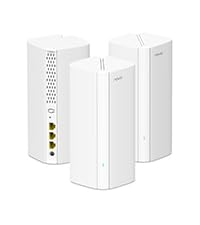
The Tenda Nova MW6 Mesh WiFi System is a 3-pack AC1200 dual-band mesh network solution designed to blanket up to 6000 sq.ft. of home space with fast, stable WiFi. It replaces traditional routers and extenders by delivering seamless roaming, supporting over 90 devices with MU-MIMO and Beamforming technology. Easy to set up via the Tenda app, it offers robust WPA2 security and guest network options, making it ideal for modern smart homes seeking reliable, high-capacity wireless coverage.


| ASIN | B076JLJVTG |
| Antenna Location | Home |
| Antenna Type | Internal |
| Best Sellers Rank | #17,940 in Electronics ( See Top 100 in Electronics ) #81 in Whole Home & Mesh Wi-Fi Systems |
| Brand | Tenda |
| Built-In Media | Mesh3 x 3, Power adapter x 3, QIG x 1, RJ45 Gigabit Ethernet cable x 1 |
| Color | white |
| Compatible Devices | Smartphone |
| Connectivity Technology | Ethernet, Wi-Fi |
| Control Method | App |
| Controller Type | google_assistant |
| Coverage | 6000 sq.ft |
| Customer Reviews | 4.2 out of 5 stars 9,164 Reviews |
| Data Transfer Rate | 1200 Megabits Per Second |
| Frequency | 5 GHz |
| Frequency Band Class | Dual-Band |
| Global Trade Identification Number | 00885397270898 |
| Has Internet Connectivity | Yes |
| Has Security Updates | Yes |
| Is Modem Compatible | No |
| Item Dimensions L x W x H | 3.94"L x 3.94"W x 3.94"H |
| Item Type Name | nova Mesh Wi-Fi System MW6 (3-pack) Total-Home Wi-Fi Coverage w/ 2 Gigabit Ports / Unit (router replacement) |
| Item Weight | 831 Grams |
| LAN Port Bandwidth | 10/100/1000 Mbps |
| Manufacturer | Tenda |
| Maximum Upstream Data Transfer Rate | 600 Megabits Per Second |
| Model Name | MW6 3PK |
| Model Number | MW6-3 |
| Number of Ports | 6 |
| Operating System | Android 4.0+ or iOS 8+ |
| Other Special Features of the Product | Guest Mode, Parental Control |
| Router Firewall Security Level | basic |
| Router Network Type | mesh |
| Security Protocol | WPA2-PSK |
| Special Feature | Guest Mode , Parental Control |
| UPC | 885397270898 |
| Unit Count | 3.0 Count |
| Voltage | 12 Volts |
| Warranty Description | 3 Years |
| Wireless Communication Standard | 802.11a, 802.11ac, 802.11b, 802.11g, 802.11n |
| Wireless Compability | 802.11a, 802.11ac, 802.11b, 802.11g, 802.11n |
Y**O
WiFi Mesh recommends 💯
I’ve been using the Tenda Nova MW6 Mesh WiFi System for a while, and it’s been fantastic! Setting it up was super quick and easy through the app, and now the coverage around my home is seamless—no more dead spots or dropped connections. The speed is consistent, and the system automatically connects my devices to the strongest signal. It’s reliable, affordable, and perfect for anyone who wants strong WiFi in every room. I highly recommend it!
P**W
First, no luck. Then, OMG This Really is an Effective Mesh Solution
If you want a mesh router for your house, buy the Tenda Nova MW6. I got tired of multiple routers and SSIDs and extenders. Be careful as some of the “mesh” products marketed over the past year are really just powerful extenders. Broad brush, the advantage of a mesh system is that you can more effectively use the 5 Ghz band to get stronger/faster throughput (over somewhat shorter distances) compared to the 2.4 Ghz (farther/weaker throughput/noisier “Wild West of WiFi”) band. I bought the Nova MW6 Mesh Router from Amazon. My review would have been 1 star. The Tenda product support team was superb and efficient in helping me to overcome a problem. (The problem I experienced may be common in the US so I explain it below.) For $200, Amazon ships. The product is 3 mesh nodes in an elegant box. The product delivers an elegant solution: • 802.11r (fast roaming) and 802.11v (as well as 802.11 b/g/n/a/c • Dual bands, broadcasting simultaneously in the 2.4 Ghz and 5 Ghz bands • You set up with an iOS app or Android app. • The suggestion is to keep nodes no more than 45 feet apart. However, I have 2 nodes that are at least 70 feet from each other. YMMV. • 3 nodes, not 2. • If you have a truly huge house, buy more sets of 3 for less than the other alternatives. (3 was enough for me.) I believe that Tenda’s Nova MW6 product also supports Ethernet backhaul, but I am not sure that has been built yet into the app. You need the app to set up main node and satellite nodes. However, you do not need to create a cloud account with Tenda to set up the mesh network. I am not sure in December 2017 you can configure from Web GUI by just plugging Ethernet cable into the Nova. The problem I ran into was that, because of a restriction by Comcast, Tenda’s Nova MW6 did not work easily when plugged directly into the cable modem. Tenda support recommended that I instead plug the nova into my old router. The mesh system from Tenda now works behind my old router and broadcasts to the other 2 nodes (also connected to each other). Once I plugged directly into my old router, it took 10 minutes to setup. (Could have been 2 minutes but I use extremely long passwords.) My main knock is that I wish the option to plug into my old router had been explained as a setup option in the quickstart guide. The only other knock I might have would be that there is only 1 more LAN port from the main node. If you need more LAN ports for wired Ethernet at your main node (near your broadband connection), you need add an Ethernet switch OR . . . . install by plugging into your old router.) I disagree with the reviews posted here about lack of support from Tenda. My experience was different. Tenda was all over trying to support and truly patient. Maybe Tenda has amped up its support so those reviews are an artifact of the past? In my case, Tenda’s support was super responsive and ultimately effective Here are 2 videos on YouTube: https://www.youtube.com/watch?v=4-2hs05ZqKA and https://www.youtube.com/watch?v=mW02nXksDeI If you want to move toward efficient deployment of a mesh (where the remote nodes connect to each other) versus star pattern system, Tenda Nova MW6 is a compelling choice. The price is about half of the Netgear Orbi (does not yet support Ethernet backhaul), Google Wifi (that sucks all your data), or Linksys Velop. Compared to Zyxel Multy X, you get 3 nodes and not 2. I am not sure D-Link has a true mesh (nodes connect to each other) product yet. Luma may not support Ethernet backhaul. I had never heard of Milo, but it appears to just be an extender (“connect wirelessly from the edges of your existing network”). The price of the Tenda Nova MW6 is slightly cheaper than the TP-Link Deco set of 3 nodes. If you are installing a mesh WiFi in your house, consider Tenda Nova MW6.
D**A
Great product for the price
It works extremely well in my 1 story ranch style house. Like most things in life though, sometimes things just don't work the way you want them right out of the box. Ok, I would have given 5 stars but, one of the 3 cubes did not want to behave when it was being setup and bricked itself. If you get them setup correctly these are fantastic. The trouble is, it's too easy to get a failure when you are initializing them. The good news is, the factory and company have awesome support and were only too happy to replace the bricked cube with another. Read the installation and configuration instructions at least a couple of times before you launch these. Once you get through it, great product. I have a 4 bedroom 2 bath house with living room and family room. Distance between nodes is about 30 feet. I am getting 300+ mbps speed from all of the house.
D**K
Easy to install and use.
Worked for purpose intended. Extended existing router throughout our residence.
C**.
Everything you need to know about the FLAWS of MESH routers and smart home devices.
SO we moved to a MESH supposedly WHOLE HOUSE system to cover the dropouts we were experiencing in Wifi signal. We started with 1 set of the MW6, thinking this would solve our problems since the MW6 is supposed to provide a saturated Wifi signal over up to a 6000 sq ft home according to the manufacturer. NOT! ... First off this system has the inherent problem of having your devices AUTOMATICALLY CONNECT to the FARTHEST not the closest MW6 Nova that it can find, which of course degrades the speed and quality of the Wifi signal to that device and since the only way to control this system is through the smartphone app (no web interface) and your phone is going to connect to the farthest unit it can find you can imagine how this plays havoc with everything regarding control of this system, sometimes not even being able to find a network signal to connect to! ...and to make matters worse, there is no way to ASSIGN a device to the CLOSEST MW6 Nova! YIKES! Additionally, when running a system analyzer, come to find out that even though there is a competitive neighbors Wifi in the area using the same Channel, the MW6 is not changing channels to avoid the low SNR (signal to noise ratio) we are seeing and to make it worse, this system has NO WAY TO MANUALLY CHANGE CHANNELS to avoid the interfering Wifi signal! After contacting Tenda's tech support multiple times regarding these issues, I was offered no solutions and was told my feedback was valuable input. I was furious since Tenda seems to have adopted so many other big tech companies philosophy of put the product out there and let the consumer tell us how to make it better! ...I'm not buying anyones product to do their R&D to make their systems better! UPDATE... The FLAWS of ALL MESH SYSTEMS and AMAZONS ECHO and other smart home devices. Thinking of a buying MESH router to use with smart home devices… DON’T! After almost a year of putting up with the inherent FLAWS in MESH and smart home technology, I’ve come to the conclusion that none of the manufacturers of either technology have tested using them together! Otherwise, they would have FIXED the issues plaguing BOTH technologies when being used together as most people do these days! The Good… MESH routers with multiple nodes do provide excellent signal coverage and can overcome areas in your home with weak or no wifi coverage. The Bad… MESH router systems regardless of the number of nodes installed will provide you nothing but headaches if you intend to use ANY smart home devices that are 5ghz capable such as Amazon’s echo devices and the plethora of others out there. ANY smart home deice that supports 5ghz by default also supports 2.4ghz. This typically results in the device constantly switching back and forth between bandwidths attempting to find the best signal. A Major FLAW in the design of todays systems regardless of manufacturer. This Bouncing between bandwidths plays havoc with so called “smart” systems that have voice and other ways of controlling other devices on your network. Devices such as Amazon echo’s that trigger timers, routines and carry out voice commands, require both the echo and the device being triggered to be on the same bandwidth. Since 5ghz enabled devices are always searching for the strongest bandwidth to use between the 2.4ghz (designed for distance) and 5ghz (designed for speed) and since you can’t restrict them OR your MESH router as to which bandwidth to stay on. Another flaw of MESH routers is they are notorious for intermittent device dropouts regardless of bandwidth possibly due to flipping channels seeking the best channel to broadcast on. The Ugly… 1. MESH routers currently do not allow for disabling the 5ghz bandwidth which would prevent the bouncing between bandwidth problem. 2. You cannot use the “Guest” network feature with smart home devices. Another culprit adding to the bouncing issue! 3. Another FLAW of MESH systems is that they do not allow for control to “statically bind” specific devices to their closest nodes. There is no reason that any device within a local area (3-10ft) of any node should decide to connect to a more distant MESH node 40 feet away on the other side of the house! While I’m sure that manufacturers will have to address these issues in the future, until manufactures of BOTH technologies step to the plate and FIX their respective FLAWS, if you intend to use your Wifi setup with ANY smart home device that supports BOTH 2.4 and 5ghz, expecting it to work as the manufacturers advertise, for the sake of your sanity DON’T BUY A MESH ROUTER! Current options for a SOLUTION… Bearing in mind you will need to disable 5ghz and the Guest network features on any router, don’t spend a lot of money by buying the Best router available! Buy a router along with multiple wired access points preferred over wireless wifi extenders/repeaters that will further slow your network speed and may cause buffering issues on streaming devices. The SETUP…Your router along with wired access points to blanket the house with coverage all must be named the same SSID and password and the 5ghz and the Guest network features MUST be disabled! This will stop the bouncing around between bandwidths and/or guest networks of the ECHO and other 5ghz smart home devices thus ensuring all wifi signals are kept on the same 2.4ghz SSID for all smart home devices to recognize, allowing you to keep your sanity when expecting a voice command, timer or routine to trigger something!
M**N
An amazing product that provides Mesh Wifi at a Realistic Price!
I have been using this product for a week and no issues. Prior to my purchase, I had purchased a router from a big box store that was a pain in the rear to set up. When I was unable to make a small change I returned it a few days after the purchase. I have gone through a few routers in the past and they were a HUGE HASSLE to set up. WOW is all I can say. I was impressed from the moment I opened the Amazon box and saw the silhouette of the Tenda MW6. The device(s) or elegant cubes as my wife calls them came in a handsome box that is not typical for what the Netgear and Linksys giants offer. Upon opening the well crafted black box you find the three "elegant cubes" positioned equally in foam along with the power adapters. I have to admit I watched a youtube video to make sure the install went smoothly. You are directed to download the app to set up the device. WOW WOW WOW, Super Easy and efficient! I am shocked that my prior Netgear routers were not this easy. This is a great product that helps spread and balance the bandwidth stress from all of the computers. phones, tablets, and smart tv's in my home. The guest wifi was a snap. The hardest part was creating a password. I give this product 10 stars due to its price. It may not be the fastest but I now have a strong signal in parts of my house that were dead zone, Great Product, Great Value! By this before you consider buying an over priced mesh wifi system.
D**.
Great value mesh solution!
I am an experienced network tech and am more than happy with the Tenda Nova solution. First, price - I purchased two three packs for the special price of $120. One was for a neighbor and the other for me. A brief word regarding the two houses these units were placed in. My neighbor and I both live in Ecuador. Almost all houses here have concrete wals, floor, and ceilings. This makes connectivity throughout a house extremely difficult. My neighbors house is approximately 3,000 sq feet and relatively thin and long. Her ISP’s connection is at the extreme end of the house and she has never had reliable connectivity at the opposite end of the house. My house is a three story building. I have always had a wifi router placed in my attic, and a repeater on the first floor. The performance on the first floor was spotty AND streaming video in my TV room on the second floor (Roku) was inconsistent at best. Setup - I had already downloaded the Tenda IOS app prior to receving the units so I was ready to go. Plugged in the first unit and received a notification that it was using a DHCP connection in less than a minute. Then it was time to add the next two units. Because the Tenda units are pre-linked all that is required is that you locate the two companion units in a suitable location and wait while they boot up and connect. I have significant experience with Google Wifi and Eero and although I love both of these products their setup is a bit more involved. Also, because the Tenda units are pre-linked (and the notice to simply plug in the 2 additional units is rather small) users might try to use the Tenda app feature to add another Tenda unit (which will fail). Just follow the directions and plug the other two units in, check they have a good signal, and you’re good to go. Performance - living in Ecuador bandwith is expensive. My neighbor only has a low speed DSL connection at 5Mbps (on a good day) mine is a fiber connection at 50Mbps. Many of the online performance tests for the Tenda unit put them a little below or above the Google wifi product and below the Eero. For the speeds we have here in Ecuador the aggregate throughput of the Tenda is MORE than ample. In my neighbor’s house i had 100% wifi signal throughout the entire house. A solid 3.5Mbs on speedtest throughout the house (this is her typical wired performance with DSL). Similar experience in my house. A consistent 49Mbps everywhere. IOS App - the Tenda app is almost identical in look to the Eero application. I don’t like the upload/download indicators at the top of the Tenda app as much as Eero’s bandwidth testing results. Tenda’s app gives you an instantaneous measurement rather than a bandwidth test history (which I prefer). I also wish there was a restart option to reboot the units (although I haven’t yet had any need to reboot anything). Nice and simple app that gives you access to the basic things you need. If you’re a tech or advanced user used to a web based router interface with access to deep features this will be dissapointing but that’s not who or what this sytem (or Google wifi, eero, etc) is geared towards. Tech support - I have seen some negative comments in people’s reviews of Tenda’s tech support. I had no need to speak with technical support during or after purchase (yet). I did however contact them prior to purchase to ask some questions. Got through instantly. The agent realized my questions were more technical than she could answer and suggested I speak with an engineer who she promised would call back. Got a call later that day and got knowledgeable answers to my questions. In summary, the product in my experience is a great, low cost, mesh solution. Incredibly easy to install. Decent application. Good tech support. Great performance (for my situation). Amazing value for the money. Highly recommended.
A**A
2nd Node Drops
Update: The second node won’t stay connected to the main node. I’ve had to reset the system to add the second node back several times. For my needs this isn’t better than just having a regular router because all my devices connect to the primary node only. There’s also no improvement in range and I get less Mbps than my ISP provider’s system. Original: It looks nice. Its sleek, modern, and compact. Initially it set up with no issues. However, after my internet service provider provisioned my new modem to connect to their service appropriately, I had an issue with it recognizing both boxes and had to delet them and add them back to the app which took a couple of tries before it worked. I bout this instead of Eero to save a little money, but it isn't that much cheaper so i'm not sure if I will keep it. It says I will get about 500 sqft range more and so I decided to try it. I'm really not sure if I am getting the advertised range or not, I've not tried to test the range and have only installed it yesterday . My house is 3,000 sq ft so I wanted a little overage to cover the cameras outside, keyless doorknobs and wifi garage. Our house isn't heavy gadget loaded and we don't have a big yard, so 3,500 -4,500 is sq ft coverage is good for us. It is supposed to get up to 300 Mbps upload speed on 2.4g, but I'm not seeing this. I'm seeing 200 Mbps or less even within close range. The max I've seen so far is about 250. On 5g I can get very close to 300Mbps but its quoted at a higher rate. In that regards, I'm not impressed. With my internet service provider's equipment, I was seeing over 350 Mbps upload speed on 2.4g. My plan is 400 so this is what I would expect. I knew this equipment would only reach up to 300 but I expected to see closer to 300 since other reviewers boasted that it improved thier speed. The speed issue is 99% due to this mesh system. The modem I bought to replace the one provided by my internet service provider has ability to provide up to 857 Mbps upload speed It doesn't come with a lot of ethernet connection ports. I think this is a slight downside. I do like that each box comes with at least 1 ethernet port however. The tri-band one this brand sells has 3 ports for a higher price tag, but it doesn't suggest higher Mbps upload speed so I'm not really sure its worth it. There doesn't seem to be a way to control if you connect to 2.4g or 5g. Which means you can't control how to best maximize the internet traffice. If there is one, its not clear how to do it. I thought the app would have this option but I don't see it. The app doesn't seem to let you remove devices that are no longer online nor does it automatically remove them from your device list once they go offlie. It sits there in your list of devices. That's a little annoying. If you have a household using a lot of gadgets, this list will get big and make it harder to manage. It has an option to block devices on the app but I haven't tried it out. The app isn't the best. Its extremly basic. This may be good for some but I feel its lacking. I will test it a few weeks, but I'm thinking I may get the Eero and return this, primarily because the Eero boast the ability to provide up to 500 Mbps upload speed. For my household, we can manage even on 100 Mbps, its only 2 of us, but I pay for 400 so I'd like to have access the speed I have or at least very close to it. I bought this one over the Eero because of the range and the look, but the tradeofffs of the upload Mbps is making me reconsider.
TrustPilot
vor 1 Monat
vor 3 Wochen