We remain fully operational. Our teams are working around the clock to ensure your deliveries continue safely.

Laden Sie die App herunter


Kundendienst
Copyright © 2025 Desertcart Holdings Limited
Laden Sie die App herunter
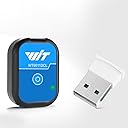
![[Bluetooth 5.0 Accelerometer+Inclinometer] WT9011DCL MPU9250 High-Precision 9-axis Gyroscope+Angle(XY 0.2° Accuracy)+Magnetometer with Kalman Filter, Low-Power 3-axis AHRS IMU Sensor for Arduino](https://m.media-amazon.com/images/I/51P2Z1ByfHL._AC_SL3840_.jpg)
Buy anything from 5,000+ international stores. One checkout price. No surprise fees. Join 2M+ shoppers on Desertcart.
Desertcart purchases this item on your behalf and handles shipping, customs, and support to GERMANY.
🎛️ Elevate your sensor game with precision and wireless freedom!
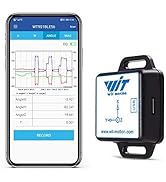
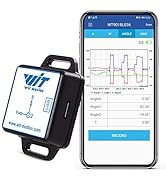
The WT9011DCL is a high-precision 9-axis IMU sensor featuring Bluetooth 5.0 wireless connectivity with a 50-meter range, 0.2° angle accuracy, and low-power consumption enabling up to 10 hours of use. Designed for professional-grade applications, it integrates accelerometer, gyroscope, magnetometer, and inclinometer data fused via Kalman filtering. Compatible with Android, iOS, and Windows platforms, it includes a Type-C interface and comprehensive SDKs, supported by WitMotion’s 8-year expertise and lifetime customer service.




| ASIN | B0BQ9QTS4D |
| Best Sellers Rank | #77,536 in Industrial & Scientific ( See Top 100 in Industrial & Scientific ) #20 in Acceleration Sensors |
| Brand Name | WITMOTION |
| Customer Reviews | 3.8 3.8 out of 5 stars (72) |
| Item Dimensions | 1.26 x 0.92 x 0.45 inches |
| Item Weight | 30 Grams |
| Manufacturer | WitMotion Shenzhen Co.,Ltd |
| Material Type | Acrylonitrile Butadiene Styrene |
| Maximum Supply Voltage | 5 Volts |
| Measurement Accuracy | High |
| Measuring Range | Acceleration: ± 16g, Gyroscope: ± 2000 ° / s, Magnet Field: ± 4900 uT |
| Model | WT9011DCL |
| Mounting Type | Flange Mount |
| Output Type | Digital |
| Sensing Distance | 50 Meters |
| Style Name | Type-C |
| UPC | 604787286772 |
| Upper Temperature Rating | 85 Degrees Celsius |
M**Y
Sensor is great and wireless works great. Company support is A++
The sensor works great, USB-C to charge, lasts all day it seems. Connects via bluetooth and its simple. The software that comes with it (via google drive) is good. The company support is great. I had different needs on the scales in the graphing software and they updated the software and sent me a personal link with the update I needed. You can't beat that. The output can be several container types and I can import that sensor data to most other software no problem via CSV or txt, etc, and even Open Office reads it fine in SpreadSheets for custom graphing as needed (images included). Their custom software has great features (see my first image of all the real time data streaming in and graphing). I use this to measure acceleration changes to understand relationships of vibration and coupling as a form of tactile response with audio and transducers.
S**N
I wish I could speak to a lawyer about how bad this is.
Ships with pathetically bad software, it's actually so bad in comparison to the hardware, I actually refuse to believe the people that made the machine made the software,unless they were enginners, in which case that explains everything they did wrong. Very very expensive piece of junk as it is, but only because to actually use this thing in any remotely useful way, you also need to know how to develop software from the ground up, starting with sending handshakes as the bit level. Very sensitive hardware, lovely hardware. The software is so bad I wish I could sue for psychological damages, and no I am not joking, it's worse than windows 95 era software, and looks like it too. zero data for accuracy, zero data for battery life, zero data for sensor quality. Software quality: I'd rather put my nuts in a blender than touch this STD again.
J**E
Does more than show acceleration in XYZ axis. Does rotation around 3-axis.
Took off 1-star because App needs further work when it comes to display's chosen language. Too much is still in Mandarin, even when English is selected as language. As accelerometer it works in all 3-axis XYZ and rotation around those 3-axis. Not sure about what one menu selection is trying to show when it comes to moving differentiation.
A**R
Cost effective and convenient
Very easy to use, great battery life, and pretty accurate too. Make sure you set sampling rate and other settings within the app before use. To use these accelerometers with your phone, follow the below instructions: 1. Install the WITMOTION ap 2. Turn on the device(s) 3. Open the app and click the link icon in the top right. This will show you the list of devices the phone sees. Connect to your devices. 4. Navigate to the tab of interest (ex. The 'Acc' tab is for viewing acceleration). If you have multiple of these devices connected, you will see multiple data plots if you scroll down 6. Make sure you click the settings button for EACH DEVICE PLOT. Here you can adjust things like bandwidth and sampling rate. The max sampling rate is 200 hz. 7. Hit the red record button when you want to record. Make sure your phone is nearby the devices, as the bluetooth range is not very strong. 8. When you stop the recording, you will have the option to save the file to your device or upload it to the cloud, like Google drive. Tip: When handling large data files, I have had better luck pasting the CSVs into VScode rather than excel or google sheets. It tends to handle the format better. From VScode, it's also easy to use AI coding tools (claude code, github copilot) to process your data.
J**T
Very hard to get working, then pretty cool. Excellent customer service.
The package is supposed to include a QR code that leads you right to the correct software. Mine did not. Nor could I find an app by searching the Google Play store despite what their website says. And there's no download section on their website. Very frustrating. Eventually I found a YouTube video which told me to click on a certain symbol on their website which led me to a list of apps that were in zip format. Apparently with motion has many versions of this accelerometer and none of the apps had my exact product number so I chose the closest one. I had to use two programs to unzip it and get it to run. The label on the device has a different product number than what shows up on the Bluetooth list. Needless to say if I wasn't a power user and very interested in getting this thing to run I would have given up by now. But after about an hour I got the thing loaded onto my Android 13 phone and it looks pretty good, however there's no way to set and fix the range setting on their chart even though there's a button to do that it's not functional. Without this feature it will be hard to compare acceleration plots from the various devices I wish to try. Update April 2024: I tried again to contact this company because I was unable to use the recorder or even set permissions for file access. To my surprise they responded immediately (and how rare is that these days) and fixed the problem. For that I had to bump them up to five stars.
Z**M
Lots of latency if you can get it to connect
Don’t know if my unit is just hinky but this is the worst WIT IMU I’ve used yet. It will eventually connect but then it appears to update between 1 and 20 times per second
C**I
Brilliant design, nicely executed
What an amazing little device! I'm using it to measure involuntary leg movements at night (by taping it to my foot). It was a cinch to set up, and has worked perfectly so far. It's so small and light that I don't even notice it. I can imagine all sorts of potential applications in sports, beyond the industrial-type uses it was intended for. Highest recommendation to anyone interested in tracking and recording motion in 3d.
S**H
Not what I was expecting with connectivity issues with all 3 devices I used it for
I was hoping for more out of this but the constant connectivity isssues with all 3 devices I tried, made it a quick return.
A**.
Got it for a hobby project. The hardware device works well. Setting up the phone app was easy. Documentation is pretty lacking and the PC software was a little hard to set up, but i eventually got it. I was able to write a simple python program to connect via bluetooth and extract the data feed in real time.
M**G
Good sensor for acceleration but up to now, I haven't found a way to augment the resolution for the vibration I need to monitor.
I**R
Very cool device in a super compact package. Interfaces with smartphone effortlessly and provides reliable, quick data. Ideal for drones. I used it in a model rocket
D**Y
amazing. great value so fun
A**T
It only has TWO accelerometer axes. Too bad. And it did not connect well.
TrustPilot
vor 2 Wochen
vor 2 Wochen