
Laden Sie die App herunter


Kundendienst
Copyright © 2025 Desertcart Holdings Limited
Laden Sie die App herunter


🔥 Elevate your game with precision and freedom 🎮
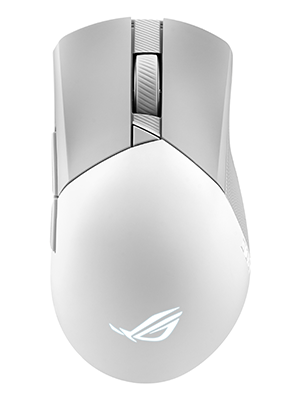
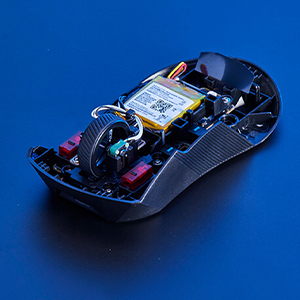
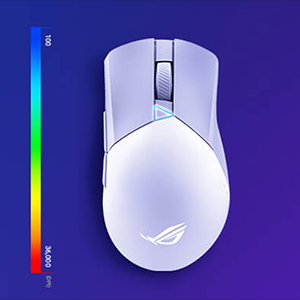
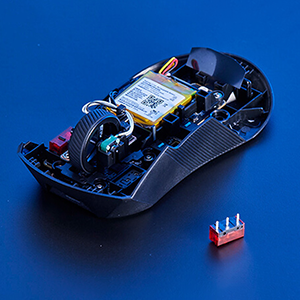
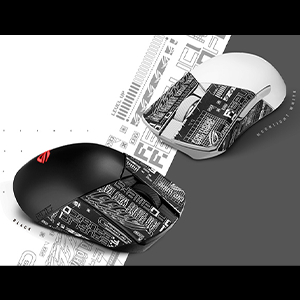
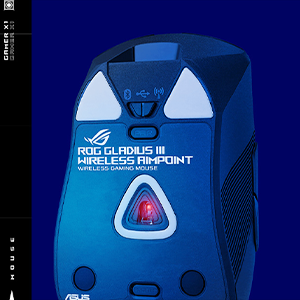
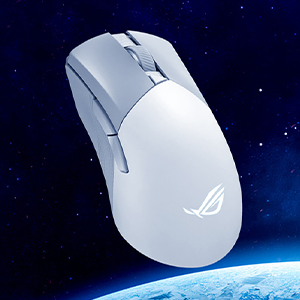
The ASUS ROG Gladius III Wireless Gaming Mouse combines cutting-edge 36,000 DPI optical sensor technology with tri-mode connectivity and a lightweight 79g design. Featuring up to 119 hours of battery life, customizable mechanical switches, and a durable paracord cable, it’s engineered for pro gamers and enthusiasts seeking precision, comfort, and versatility in one sleek white package.




| ASIN | B0BRTJNQQ8 |
| Additional Features | Lightweight, Portable, Pro gamer, Wireless |
| Antenna Location | Gaming |
| Are Batteries Included | Yes |
| Are Batteries Required | Yes |
| Battery Average Life | 119 Hours |
| Best Sellers Rank | #124,541 in Computers ( See Top 100 in Computers ) #3,313 in Computer Mice |
| Brand | ASUS |
| Built-In Media | 2m ROG Paracord, Micro switches (2),ROG switch remover, P711 ROG GIII WL AIMPOINT/WHT mouse, ROG mouse grip tapes (4),USB dongle, USB dongle extender, ROG sticker, 1 set of ROG Mouse Feet, user manual, warranty booklet |
| Button Quantity | 6 |
| Color | White |
| Colour | White |
| Compatible Devices | Personal Computer |
| Connectivity Technology | Bluetooth |
| Connectivity technology | Bluetooth |
| Customer Reviews | 4.6 out of 5 stars 189 Reviews |
| Embellishment Feature | No Embellishment Feature |
| Enclosure Material | Plastic |
| Finish | Smooth |
| Hand Orientation | Ambidextrous |
| Hardware Platform | Mac, PC |
| Item Dimensions L x W | 12.3L x 7.1W centimeters |
| Item Type Name | Computer mouse |
| Item Weight | 127 g |
| Manufacturer | ASUS |
| Model Name | P711 ROG GIII WL AIMPOINT/WHT |
| Model Number | P711 ROG GIII WL AIMPOINT/WHT |
| Mouse Maximum Sensitivity | 36000 Dots per Inch |
| Movement Detection | Optical |
| Movement detection technology | Optical |
| Number of Batteries | 1 Lithium Ion batteries required. (included) |
| Number of buttons | 6 |
| Operating System | macOS, Windows |
| Power Source | Battery Powered, Corded Electric |
| Range | 119 hours |
| Special features | Lightweight, Portable, Pro gamer, Wireless |
| Style Name | Wireless |
| UPC | 195553757737 |
| Unit Count | 1 Count |
A**M
estupendo mouse gamer
increible y maravilloso, para juegos esta estupendo y de todo tipo, el material es demasiado resistente y se siente de muy buena calidad
م**د
ممتاز بس ما يصلح لألعاب الشوتر
افضل ماوس قد جربته بحياتي من ناحية الجودة والراحة بس ملاحظة هذا ما تقدر تحترف فيه بسبب وزن الماوس وحجمه يعني العاب شوتر لا ما انصح ومستحيل تحترف لكن العاب قصص يناسبك والبطارية ممكن تقعد شهر معك عشان تشحنها ممتاز افضل خيار بين المنافسين خذيته ب 230 وقت العروض
M**H
Disappointed! Item is not brandnew!
I registered the product and warranty started already around August 2024. Box is not sealed.
D**L
Excelente calidad precio
Es un mouse que lleva la sencillez a su maximo esplendor, una forma unica para una ergonomia agradable y estéticamente perfecto ✨
A**R
Excellent ergonomics and seamless wired/wireless performance on Linux
I'm using this mouse full-time on Arch Linux for gaming, art and design. I really like the textured sides since they provide good grip and the shape is ergonomic for my hands (right-handed). For reference, my previous mouse was a Logitech G403 Hero wired. As a varying claw/palm grip user who enjoyed the shape and size profile of the G403, I find I'm enjoying the Gladius III quite a bit more. I think the side texture and better shaped right side of the mouse make it a lot easier to grip regardless of task. My primary reason to switch away from Logitech mice is that I've had 7 various Logitech mice break in 7 years. It always came down to double-clicking issues or broken scroll wheels. Unacceptable to the degree that they've permanently lost my business. Since I've had so many subpar Logitech mice break from regular usage, budget was not a factor and any price-point was acceptable to get a durable mouse. I went with ASUS because of the replaceable switches rated at 70 million clicks. They have a qualified vendors document on their website that lists compatibility with Omron and Kailh for the Gen 2 push fit sockets this mouse has. Here's the current list of compatible switches for reference: Omron Model D2F-01F, D2FC-F-7N (10M), D2FC-F-7N (20M), D2F-F-3-7, D2FC-F-K (50M) Kailh CMI126603D08-5 (20M), CMI126603D09-3 (30M), CMI126601D01 (60M), CMI126601D03(80M) ~ Clicks are satisfying and not particularly louder or softer than I'm used to, a click is a click. The DPI button works great and feels good, side buttons are solid across their width like a balanced spacebar. The bottom profile button is great, I use the green light profile that reacts to clicks since I don't like RGB. Performance is the same across wired and wireless (dongle) for me. I like that it saves on battery by shutting off the mouse when I step away for an extended period of time. A couple clicks and it's active again. Battery life is excellent, I've been running it wireless full time with zero charges for over a week and it's still holding up strong. Included cable is braided and so soft, reminds me of a couch pillow's plush cotton knit. It slides across my large mouse pad and doesn't catch on anything in my cable management. Speaking of, I always hated playing shooters with a wireless mouse but I've noticed no difference playing wired or wireless with this mouse. In my mind, it boils down to excellent shape, texture and ergonomics because I'm not having to counterweight the mouse's cable drag against a poorly designed mouse body to feel centered. I've also seen no discoloration with heavy use despite this being a white/grey colorway. This must be due to the plastic appearing to be a smooth injection-style color (Legos) instead of a low quality spray-on paintjob (Logitech G203). ~ I'll wrap up with a deep dive on the daily experience with this mouse and Arch Linux. This mouse is incompatible with Piper, the software I previously used to manage my Logitech mouse's DPI, shut off the RGB and remap the side buttons into media keys. I knew that going into this (search for libratbag devices list on Github), so I utilize my Keychron Q3 for media key functionality and actually prefer it. I'm limited to managing the features of the Gladius with the built-in hardware buttons and yet I have no regrets. The DPI settings out of the box are perfect for the full range of settings I switch between and one of the onboard profiles has reactionary RGB based on clicks, which is very close to my optimal no-RGB setup. ~ TL;DR Gladius III is my favorite mouse I've ever used out of Corsair, Logitech and now ASUS. No discoloration with heavy use despite being white/grey colorway. Great out of box experience even without software manageability (for Linux), robust profile / DPI selections and the best ergonomics I've ever used as a hybrid claw/palm grip user coming from the G403. Reminds me of my original Corsair Sabre mouse, but improved. I have high hopes for this mouse long-term with the hot-swappable switches.
TrustPilot
vor 1 Monat
vor 3 Tagen