We remain fully operational. Our teams are working around the clock to ensure your deliveries continue safely.

Laden Sie die App herunter


Kundendienst
Copyright © 2025 Desertcart Holdings Limited
Laden Sie die App herunter
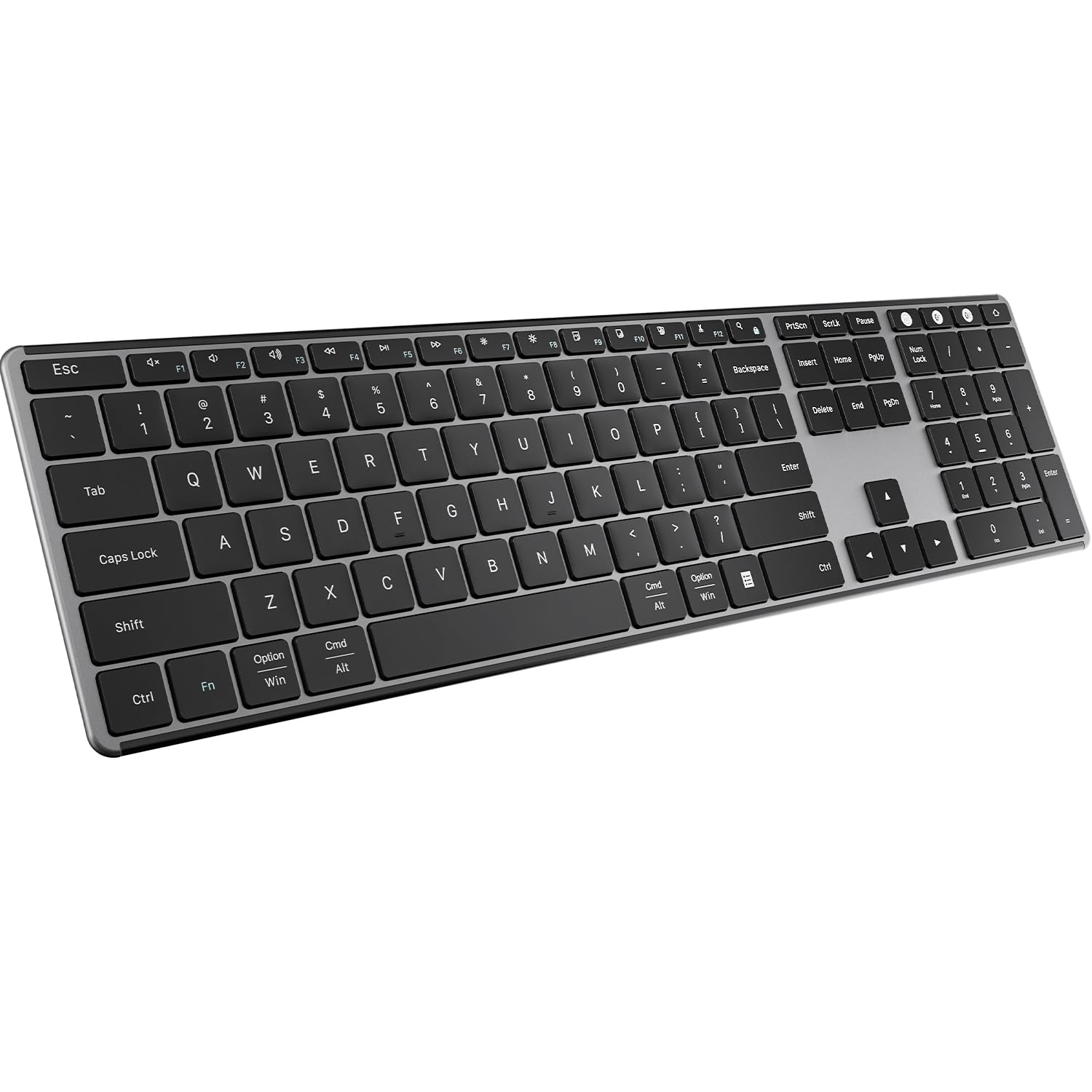
⌨️ Elevate your desk game with silent, sleek, and smart typing power!
The AUSDOM 2.4G Wireless Bluetooth Keyboard combines a full-size, ultra-slim design with multi-device Bluetooth 5.0 and 2.4Ghz connectivity. Featuring quiet scissor-switch keys, a rechargeable battery lasting over 30 days, and broad OS compatibility, it’s engineered for professionals who demand seamless switching, portability, and a premium typing experience.


| ASIN | B0BKT1MS2P |
| Additional Features | Lightweight, Low-Profile Key, Rechargeable, Silent, quiet |
| Antenna Location | Business, Office, Student, Study Education |
| Best Sellers Rank | #369 in Computer Keyboards |
| Brand | AUSDOM |
| Built-In Media | 1*USB Receiver, 1*Wireless Keyboard, USB Cable, User Manual |
| Button Quantity | 104 |
| Color | Black Grey |
| Compatible Devices | Laptop, PC, Smart TV, Smartphone, Tablet iPad |
| Connectivity Technology | 2.4G RF, Bluetooth |
| Customer Reviews | 3.9 out of 5 stars 1,194 Reviews |
| Enclosure Material | Aluminum, Plastic |
| Hand Orientation | Ambidextrous |
| Item Dimensions L x W x H | 16.73"L x 4.49"W x 0.5"H |
| Item Weight | 16.4 Ounces |
| Keyboard Description | 2.4GHz Wireless + BT 5.0 |
| Keyboard Layout | QWERTY |
| Manufacturer | AUSDOM |
| Model Number | Sofkeys 4 |
| Number of Keys | 110 |
| Power Source | Battery Powered |
| Recommended Uses For Product | Business, Office, Student, Study Education |
| Special Feature | Lightweight, Low-Profile Key, Rechargeable, Silent, quiet |
| Style Name | Modern |
| Switch Type | Scissor-switch |
| Unit Count | 1.0 Count |
| Warranty Description | we provide one year warranty service |
P**W
Power button stuck
I was okay with it as a replacement for my laptop keyboard while working at home, and it seemed to be working okay. I was annoyed a little with its sometiumes difficulty connecting with the laptop bluetooth but if you were patient for a little while it would eventually get connected. Battery life seems fine and it certainly is lightweight. My only disappointments were minor such as it tends to warp so that while typing it clackity-clacks if it's not flat. But it's overall a pretty good value for the money. Unfortunately, I came home today to find that the power button would not operate - it is stuck in the off position and will not power up. Now it's a useless hunk of plastic and springs. My return window closed a month ago. Alas. I will contact the manufacturer and see if they will voluntarily send me a replacement. UPDATE: THE SELLER OFFERED TO SEND ME A NEW ONE OR TO REFUND, MY OPTION. EXCELLENT CUSTOMER SERVICE VERY RESPONSIVE. Upgrading from three stars to five.
D**N
INSANE quality for a GREAT price!
Every part of my experience with this keyboard has been fantastic. Unboxing: Starting from the unboxing. I really was expecting a lackluster box with cheap materials, but it was a surprisingly premium experience. After the Apple-esq box opening (The box itself being made of very nice material), you are greeted with a semi-opaque leaflet bearing the company's name stamped in silver, as if to put their best foot forward. It was a very good first impression to be sure. The keyboard itself was contained in a minimal bag for sanitation. The box also contains an instruction booklet as well as a USB A to C charging cable. The box itself is very similar in feel and structure to that of an iPad or other Apple product so it is clear that AUSDOM is very interested in a premium experience. Physical Features: They keyboard itself is very firm/sturdy and does not flex very much when twisted. Its rubber feet keep it firmly in place when on a smooth surface. This keyboard comes with the ability to use Bluetooth as well as the included Bluetooth/RF dongle, with the ability to hot swap between the dongle and 2 other bluetooth paired computers by using dedicated buttons. (Allow me to talk about this dongle for a minute. This dongle comes with the keyboard embedded in an indentation on the bottom of the keyboard. It is secured there with a dedicated MAGNET that keeps it firmly in place while not being hard to remove. It assists with putting the dongle back in place. This was such a surprising feature! A fine example of going the extra mile! I tip my hat to the engineer[s] that designed each part of this.) The keys themselves are reminiscent of what you would find on a modern MAC book, although lacking the slight dip in the middle of the keys. The tactile experience is not bad. Being an ultra-low profile keyboard, this keyboard uses a membrane for its tactile feedback, so it is similar to that which you might find on an better than average laptop, being a bit more stiff than what you would find on a MAC. The function keys on the top of the keyboard have plenty of useful hotkeys, though some of them being somewhat pointless (F9-f12 being hotkeys for copy, paste, cut, and select all, which are pointless because it is more inconvenient to use them than the normal hotkeys (Ctrl/Cmd+C,V,X,A)). I also somewhat wish that the function keys were divided into groups of 4 which is sortof an unspoken standard practice for increasing accessibility. Software Experience: The dongle works immediately without hassle and connecting via Bluetooth is intuitive and painless. Switching between devices is as easy as it will ever get, with the push of a button letting you switch immediately to the desired device and start typing immediately. Overall: Overall, this product is premium and does everything I expected it to AND MORE. The price I paid ($34 on sale) is more than worth the absolute goldmine of quality you get from this company. It is thin, durable, and feels quite nice to use. It is quiet and wont disturb others, even when typing quite hard on the keyboard. I am very impressed thus far and I will keep this company on my radar. I look forward to seeing products they put out in the future. I plan to take this to my work to use in a very dynamic IT environment which requires constant switching between sources as well as the portability of a wireless keyboard. The USB dongle is absolutely essential for me to use with KVMs and it is the reason I first looked at this keyboard.
J**N
Died after 3 months of use
I have had this keyboard for 3+ months now and have become increasingly frustrated with it. I was thrilled when I got the keyboard because of the low profile keys, quiet keystrokes, and integrated stand. It met all my needs. It was very easy to set up and could use it immediately. I also liked that it was rechargeable instead of requiring batteries. Unfortunately, I very quickly discovered that I couldn't have my keyboard more than 1'-0" from my computer otherwise it would start to glitch. If the keyboard was too far away, less than 2'-0", the keyboard would not register all my keystrokes resulting in A LOT of unnecessary typos. I found this became more frequent as the battery would run out, so I made a point to charge the keyboard regularly. Today, my keyboard started to act up a lot, not recognizing my keystrokes or just intermittently working. I decided to try charging it again to make sure that wasn't the problem. I tried unpairing from my computer and then reestablishing the connection. I also restarted my computer. None of the options worked and it appears that the keyboard will no longer work. I do not like the keyboard on my laptop because the keyboard is undersized and it is crucial for my job to use my keyboard all day. I deliberately chose to buy a keyboard that was more than $20 knowing it was going to be my primary keyboard and would have to possibly travel with it from time to time. The fact that the keyboard quit on me during the work day has really set me back with my work making the situation really frustrating. I tried looking on Amazon to find a way to get help but kept getting taken to a "help" page with worthless information. I also tried going to the manufacturer's site to see if I could get any help there. I did learn on the manufacturer's website that they have a 12 month warranty for their products, but they deferred back to Amazon and said that I would have to get my issue resolved there since I purchased the keyboard from Amazon. Honestly, I wouldn't be leaving such a bad review if Amazon's customer service was much easier to deal with. I would like to be optimistic and hope that I received a defective keyboard and would be willing to replace it with a new one. Sadly, I'm having trouble speaking with someone from Amazon that understands my request to resolve the issue.
H**T
What you need to know between PC and Mac
I have used apple magic keyboards for a very long time. I needed a keyboard that allowed me to switch between PC and multiple macs seamlessly. I attached the 2.4ghz receiver to a KVM switch, and this has met the promise of switch seamlessly. Initial impressions - The keyboard feel is very similar to apple's keyboard. I am typing this review on the new keyboard, and I am not making too many typos. This is something I could not achieve with logitech keyboards for instance, the key feel is just slightly off. - In mac, I had to remap the command and option keys. Annoying, but one time, and it is "per keyboard", so not a big deal. You do this in system settings\keyboard\modifier keys .. ensure you pick the right keyboard as you make this change. - The function key is in a different spot than the apple keyboards, this is going to take some getting used to - you can remap the function key, but then you lose the function keys functionality. - If the function lock gets stuck, press the Fn + Search button (right of F12) to unlock. - Physically speaking, the keyboard is nice to look at, is lighter than apple keyboard, and much lighter than logitechs (1/2 weight). But heavy enough that does not feel flimsy or not stay put on the desk. Although I would have preferred a slightly heavier keyboard, this is not a huge big deal. - I like apple's wedge design. This has a nub where batteries are, and the underside is hollow. I would have preferred they had filled the entire underside with batteries, that would give us better battery life and more weight. But then the cost would go up. One odd thing, I plugged it to charge on USB-C and it was drawing no power, yet the charging light was red. I'll update this review once I have a better handle on battery life etc. But if it is fully charged out of the box, why is not drawing any power? And if it is not drawing any power, why is that light red? Odd. I'll update this review after having tried it on PC and with a review of battery life. But so far so good. I deducted one star for the position of the function keys. I wish they had kept it exactly the same as apple keyboard, muscle memory is a real issue. Update: I've been using this keyboard for quite some time now. I had some issues with the 2.4g connection being stable. I plugged the receiver into a powered USB hub, and no issues now. I'm happy with this keyboard, I really like it's minimalist design. The logitech in comparison has a bar at the top which just looks ugly and an afterthought. It is always nice to see a third party manufacturer come up with good products at a much lower price point than the established players. Some products have gotten so overpriced for no good reason, keyboards being one of them.
R**2
Good alternative mac keyboard, USB and bluetooth capability
This is a decent alternative for mac users who want a decent keyboard with the number pad. This is an okay color and design as it looks similar to a mac keyboard in terms of color. It looks similar to the older mac mini/pro and such. I really wanted to number pad because I do a lot of excel sheets with number formulas so having this is a great. I got this as it does not cost as much as an apple keyboard but has the same quality. I am unsure if this will work with PC. This device has a USB dongle and bluetooth which is a nice feature. It can be plugged in type c for charging purposes. What is nice is that it is one of the few devices that has a type c as a charging port. In terms of size, it is about the same as the mac keyboard you can get from apple. This is great for when you need to recharge it especially on the newer macs. There does not seem to be much issues with connection. The down side is that many newer macs no longer have a USB port so you have to actually have to use a type c hub to get the usb ports you need. This device runs on a built in battery battery and charged via a type C cable which is provided. It also can work while being charged which is a plus. The keyboard itself is about the size of a standard directional and number pad section of a keyboard. Pairing this device is pretty simple. You just open up your system preference and bluetooth, press and hold the pair button until it lights up, and select the device on the mac. It does turn on and off on its down to save power. It does last for a long time on the built in battery. I did not see any issues with it running low as of yet. The material does not feel as nice as the macbook and the keys are not something you can remove to clean just like a macs. The keyboard is a solid build but I would not say it is exactly as durable. The keys feel pretty decent and responsive. For the distance, I have seen the device go about ten to thirteen feet before it loses connection. The keyboard is fairly light so you could take this with you on the go if you wanted but it will not fit in most bags as it is a long keyboard. Overall I think this is a decent number keyboard and great to have the directional keys but more so the number pad. It is about the same size as a mac keyboard but I do think the price is still close to an apple keyboard. Honestly you save a good amount of money going with this keyboard and the performance is not bad. I did not see much issue with response or connection. It does not feel exactly like apple metal quality but it is still good quality build. The nice thing is that the keyboard has a usb you can attach to the keyboard when not in use. The downside is that most newer macs do not have USB A ports anymore.
L**A
Still great after a year
I’ve had this keyboard for a year now and I highly recommend it! The price was very good and there weren’t a lot of reviews at the time I purchased it so I was a bit hesitant - but I took a risk on it and it paid off! The keyboard is constructed well and doesn’t teeter or slide around my desk. It holds a charge for a very long time; I think I’ve only charged it four times since I got it, and I’ve used it 8 hours, 5 days a week. Wireless USB setup was easy, but there is Bluetooth connection as well if that is what you need. It is compact - but not too compact, and travels well. The letters and numbers have not faded at all and it is easy to clean. 10/10 recommend and I hope I get many more years out of it!
3**S
Disconnect trouble, Bluetooth is nice but disconnects often
Pro - I like the 101 key layout easy to get used to - typing is fast on it - after using this or 6 months it holds a charge for a long time Con - keyboard delay all the time so you are hitting buttons and nothing happens. - I connect to 2 windows devices both have connection loss and bluetooth has to be re-paired overall, I like the keyboard but when my bluetooth disconnects all the time that my more important pc I end up using the usb 2.4 to keep it connected better. Then even with the usb dongle connected I have to remove it and put it back into my pc to reconnect every so often. If I had trouble with 1 pc I wouldn't blame the keyboard but it happends to both of my connected pc's. both bluetooth connections and dongle are with in 12 inches of my pc's (laptops)
D**P
Sturdy but has connectivity issues.
I’ve gone through a few wireless keyboards over the years, and this one is definitely sturdier than most. I travel back and forth between working from home and the office, and toss the keyboard in my backpack. Other ones I’ve had have bent or warped, but this one has held up really well. I also like that the keys are quiet and the keyboard is full-sized with the number pad on the right... it makes it more comfortable when working with numbers. That said, the connectivity is frustrating. Sometimes it won’t connect properly via Bluetooth, and even with the dongle it doesn’t always work with my laptop. The glitches while typing are the most frustrating part, on one occasion the backspace key got stuck and started deleting my entire report on its own (thank goodness for Ctrl+Z). Overall, it’s solid and well-built, but the connection issues and random glitches make it hard to rely on. For me, it’s about a 2.5 to 3-star keyboard. Maybe I just got a faulty one?
TrustPilot
vor 2 Tagen
vor 1 Monat