





🎯 Cube T1 Pro: The smart home controller that’s always one move ahead.
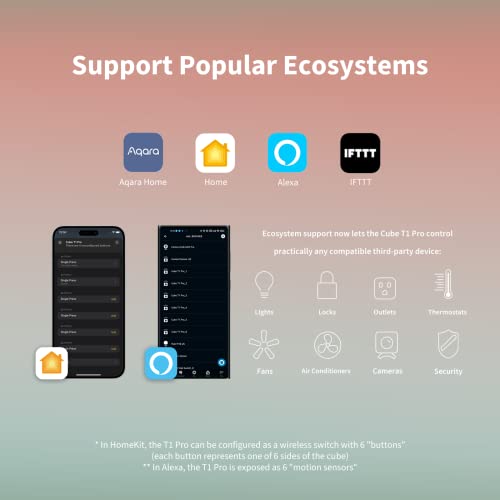
The Cube T1 Pro is a sleek, 6-sided smart home controller requiring the Aqara Zigbee 3.0 Hub. It offers versatile scene and action modes with gestures like rotate, shake, and flip, supports major ecosystems including HomeKit, Alexa, and IFTTT, and features OTA updates for future-proofing. With Zigbee 3.0 connectivity and up to 2 years of battery life, it delivers stable, long-lasting smart home control in a compact, modern design.


| ASIN | B0BHWS3VTZ |
| Batteries | 1 Lithium Metal batteries required. |
| Best Sellers Rank | #80,366 in Tools & Home Improvement ( See Top 100 in Tools & Home Improvement ) #87 in Home Automation Hubs & Controllers |
| Date First Available | October 11, 2022 |
| Department | unisex-adult |
| Global Trade Identification Number | 06970504217614 |
| Item Weight | 2.47 ounces |
| Item model number | AQ-T1P-PRO |
| Manufacturer | Aqara |
| Operating Temperature | 15 Degrees Celsius |
| Product Dimensions | 1.77 x 6 x 0.04 inches |
R**N
Impressive and Fun but Requires Some Effort to Set Up
I love this product! I have been using this for last four months. While I couldn’t use its full functionality since I connected it through HomeAssistant and I had to purchase the Aqara hub separately, this little gadget is so impressive that I still had to give it 5 stars. Every time guests see it for the first time, they are just so amazed. However, if you’re new to home automation, it might not be the easiest to set up. It took me some time to figure things out and I am new to HomeAssistant. Speed to turn on and off: 4/5 Battery Life: 5/5 Accuracy: 3/5 Ease of Installation: 2/5 Once everything is set up, the combination of its price, functionality, and the “wow” factor it brings to guests makes it a solid 5/5. Highly recommend it for smart home enthusiasts!
T**E
A bit finicky but works fine
This unique control device allows you to send a variety of control signals to a Zigbee hub with a unique interface. You could use a remote with buttons, or you could (for example) get this cube, turn it to side 3, and rotate it. The cube has several different events it can send, and you can configure its software to respond to those signals as you like. You can shake or "throw" the cube (don't actually throw it; that's what it calls an action where you hold it, move it through the air, and suddenly stop). You can flip it to one of its 6 sides, and it'll report which side it was flipped from and to. Once it knows it's on a specific side, you can rotate it left or right, slide it, or tap it. Any of these actions can be configured to do something - flipping it to side 1 and rotating it could act as a control to dim/brighten the lights, for example. It does require a Zigbee network - no, it doesn't need an Aqara brand Zigbee hub specifically; I'm using it with a Sonoff Zigbee hub. Once paired, it can send signals to whatever control software you configure to respond to it. I'm using it with Home Assistant, and it works fine. The caveat is that all the actions having to do with flipping the cube to a side and doing something will only work on a hard, level, flat surface. It can only sense what side it's on if you firmly "click" it against a surface - not hard, but firmly enough that you can hear it make contact. I thought it wasn't working or there were signal problems until I realized this. The shaking and throwing actions don't depend on a surface and work anywhere, but all the side-related actions need you to flip it firmly on a solid surface so its accelerometers get clear input. Remember that this uses the Zigbee protocol to communicate - not wi-fi, not Bluetooth (ok, I think the config app might use Bluetooth, but only to configure it, and you don't need the app). You will need to pair the cube with some kind of Zigbee hub to receive its signals. If you aren't using Zigbee, this won't work for you. But if you are, this cube is a unique if somewhat finicky way to control your devices.
I**?
Small yet powerful
Great gadget. Using it with Alexa to fire off routines. Easy to setup. App is easy to use. Not all of the functionality is available unless you are deep into the Aqara ecosystem. I am not so I can only use half of the functionality. Requires a Aqara hub. Reasonably priced for all of the things it can do.
S**N
VERY Limited HomeKit Support
The description of this as HomeKit-compatible is misleading. If your goal is to use it to control non-Aqara devices through HomeKit, you will be disappointed. It only works when you turn the face of the cube to a specific number—shown as a tiny cluster of hard-to-see gray dots on the corner of each face. Good luck using it as a light switch in dim room. Most of the gesture commands only work in certain limited circumstances. Most simply do not work at all.
V**1
Only scene mode with Alexa
For some reason, action mode is not available with Alexa. For me, that's OK, as I think I prefer scene mode anyway. I had to disable and re-enable the Aqara skill in Alexa before it recognized the Cube. Although the —nearly microscopic—documentation says that shaking is available in scene mode, it does not show up in Alexa. I got this primarily because I can't speak to Alexa when wearing my CPAP mask. This is also handy for executing an Alexa command without interrupting music playing on Alexa. Because it is usually dark when I'm trying to sleep, I added glue dots to five sides so that I can identify each side by touch. Take care not to slide the Cube across a surface if you don't want to repeat a routine. I only got the Cube because the buttons (Mini Switches) don't integrate with Alexa. I would prefer to use the buttons.
S**N
Really fun and multi-functional, but it may not last too long
I really got this cube just as a toy to play around with. I am using Home Assistant using ZHA and a SkyConnect for the zigbee connection and it worked great for a while, picking up the shake, rotate (per size), and tap. The only thing I had a problem with is that the tap required quite a bit of force to register, which made it not so fun. No one wants to slam the product down on a face (twice) to initiate a command and it is really hard to make it happen in your hand/lap. But I mostly only use it for a shake to turn on a porch light. I purchased the Cube T1 Pro 8 months ago but the last few months it has lost connection to my zigbee stick and I constantly have to pull the battery to reset it (which is no small feat, the cover is not easy to pop off... which is normally a good thing). The "Link" button will work no problem (event appears in HA), but any shake/tap/rotate/motion to initiate a trigger will do nothing until I pull the battery to reset it. I am not sure if it is just a defect in this device itself or if it is an overall issue of longevity with the device but this is my experience. My kid absolutely loves using it and I wish it would work all the time instead of needing me to fix it every few days.
J**O
Producto de buena calidad tras una semana de uso bastante cómodo para hacer rutinas con luces y ambientes estaría bien que fuese compatible todas las demás funciones con alexa y Apple HomeKit pero ya con las seis caras se pueden hacer bastantes cosas aún así requiere hub para poder utilizar con ambas plataformas
M**L
Note that it need a hub, but it works flawlessly (now since more than 3 months)
M**A
Der Hexaeder ist ein echter Game-Changer in meiner Smart-Home-Welt! Ich bin echt begeistert von den Möglichkeiten und der stabilen Verarbeitung des Geräts. Die Installation ist simpel, und man kann den Würfel super auf seine Bedürfnisse anpassen. Caesar hätte sich sicher auch gern so ein dreidimensionales Polyeder geschnappt, wenn er sein Zuhause smarter machen wollte. Personalisierung & Funktionen: Der Clou: Jeder der 6 Seiten lässt sich mit einer Aktion belegen, also perfekt für kreative Smart-Home-Lösungen. Ich hab zum Beispiel eine "Sleep Mode"-Funktion eingebaut – Schüttel ich den Würfel dann wird nach einer Stunde alles im Smart Home abgeschaltet. Licht. Musik. Und damit das nicht versehentlich ausgelöst wird, nutze ich ein cleveres System mit einem Input Boolean, um den Würfel aktiv zu erkennen, bevor irgendeine Aktion gestartet wird. - Der Kreativitität sind keine Grenzen gesetzt. Die freie Programmierbarkeit ist das, was den Würfel so unfassbar stark macht. In der App sieht man mit den Seiten, was ich wo programmiere - sehr convenient. Das Ding ist echt flexibel – von Musiksteuerung über Dashboard-Anzeigen bis zur Überwachungskamera! Meine Lieblings-Features: Auf Seite 1 startet ein Doppeltipp meine Musik-App, die andere startet dann unsere die Lieblingsplaylist. Mit anderen kann ich Feuchtigkeitswerte alle Kameras auf dem TV im Blick bekommen. Das Ganze geht einfach super schnell und smooth. Steuerung & Komfort Der Würfel ist außerdem gut durchdacht: Kein Wackeln, kein Ruckeln – top Qualität. Die Verarbeitung ist gut. Keine Grate. Hohe Qualität aber nicht so massiv. Einfach, intuitiv und einfach mega komfortabel. Vorteile & Verbesserungspotenzial +Sehr gute Verarbeitung und stabiler Aufbau +Schnelle Reaktion, keine Verzögerung +Leicht zu individualisieren für Smart-Home-Prozesse +Verschiedene Bewegungsoptionen wie Schütteln und Drehen – Kleinere Verbesserungen für die HomeKit-Integration wären nett – Erweiterung der Funktionen innerhalb der Aqara-App wäre wünschenswert. Hier so bei Apple doch einige Einschränkungen. Meine Empfehlung - Nutzt normale gute Android-Betriebssysteme und dann geht alles. Keine Selbsteinschränkung! Fazit Der Würfel hat echt riesiges Potenzial, und das Beste: Er ist voll individualisierbar! Der Hexaeder“wird dem Smart Home ordentlich auf die Sprünge helfen. Und obwohl die HomeKit-Integration noch ein paar Verbesserungen gebrauchen könnte, bin ich insgesamt sehr zufrieden. Ein Muss für alle, die mehr aus ihrem Smart Home herausholen wollen.
M**A
Goed
M**K
Hue Dimmer Switch gibi birkaç farklı kumanda kullandım ve en eğlencelisi, en işlevsel olanı bu. Aqara uygulaması ve Aqara Hub M1S ile kullanıyorum. Cihazı elimde tuttuğumda Aqara Camera E1 gizlilik moduna girmesi için otomasyon kurdum. Aynı zamanda sağa sola döndürme otomasyonu kurup Aqara Roller Shade’e bağlı perdemi açıp kapatıyorum. 1, 2, 3, 4, 5, 6 numaralı yüzlerini de HomeKit üzerinden ışıkları ve sahneleri ayarlaması için kullanıyorum. Aşırı bariz bir gecikme hissetmedim.
TrustPilot
vor 2 Wochen
vor 1 Monat



