We remain fully operational. Our teams are working around the clock to ensure your deliveries continue safely.

Laden Sie die App herunter


Kundendienst
Copyright © 2025 Desertcart Holdings Limited
Laden Sie die App herunter


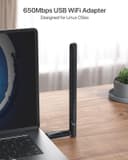


🚀 Elevate your Linux WiFi game with speed and range that won’t quit!
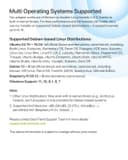
The BrosTrend AC650 USB WiFi Adapter delivers up to 650Mbps dual-band wireless speeds with a powerful 5dBi adjustable antenna, ensuring extended range and stable connections. It supports a wide range of Linux distributions and Windows, making it the ideal choice for professionals seeking hassle-free, high-performance WiFi on desktops, laptops, and Raspberry Pi devices. Compatible with all modern routers, this adapter combines plug-and-play convenience with robust build quality and a 2-year warranty.


| ASIN | B01GC8XH0S |
| Best Sellers Rank | 19,941 in Computers & Accessories ( See Top 100 in Computers & Accessories ) 176 in USB Computer Network Adapters |
| Box Contents | AC650 Linux Compatible USB WiFi Adapter, User Manual |
| Brand | BrosTrend |
| Brand Name | BrosTrend |
| Color | Black |
| Colour | Black |
| Compatible Devices | Desktop, laptop, computer, PC |
| Compatible Operating System Family | Linux, Windows |
| Compatible devices | Desktop, laptop, computer, PC |
| Country of Origin | China |
| Customer Reviews | 4.4 out of 5 stars 2,064 Reviews |
| Data Link Protocol | IEEE 802.11ac, IEEE 802.11g, IEEE 802.11n |
| Data Transfer Rate | 650 Megabits Per Second |
| Data link protocol | IEEE 802.11ac, IEEE 802.11g , IEEE 802.11n |
| Global Trade Identification Number | 00701017579830 |
| Hardware Interface | USB 2.0 |
| Hardware interface | USB 2.0 |
| Item Dimensions L x W x H | 5L x 1.9W x 0.7H centimetres |
| Item Weight | 0.01 Pounds |
| Manufacturer | BrosTrend |
| Manufacturer Part Number | AC5L-Linux-Upgraded |
| Model Number | AC5L-Linux-Upgraded |
| Product Warranty | 2 Years |
| Product dimensions | 5L x 1.9W x 0.7H centimetres |
| UPC | 701017579830 |
| Unit Count | 1.0 count |
C**R
Works with Linux out of the box. Recommended.
Absolutely great product for Windows 11 and LINUX. The antenna is double normal size and penetrates signal through my three layers of bricks over a twenty foot area. Installation was easy and up and running on both system types after you have entered router passkey. You might have to restart the computer before WIFI is connected . I’ve tried cheaper standard dongles with LINUX and it’s a pain to set them up. Good value for money item, sturdy and comes with installation cd and instructions. but I didn’t need them.
P**R
worked like a charm.
Great WiFi Adapter, I was having issues with the on-board WIFI from the RPI4B and bought this and it made the world of difference. Installation was a breeze, plug in the adaptor and run a command line and job done. I never had compatibility issues with using this on bookworm and bulleye (2024-10-22) over all i found this good value and had great software compatibility.
L**E
If you are using Linux
If you're using Linux, then this is a very good option that works out of the box. I have had so much trouble with TP-Link adapters, but I plugged this in, and it worked straight away on multiple distros.
U**N
Works well with Linux
I've tried the adapter on a few machines now, it worked on Windows instantly with plug & play. I then tried it on Garuda Linux (Arch) and using the command they provide, the drivers were installed and working in under a minute. I also noticed very little difference in network speeds compared to my ethernet cable. However, the one complaint I do have is that the antenna feels a bit rattle-y and loose, and the biggest problem is the turning angles. Unfortunately, you cannot turn the antenna any way you like which is a bit of a problem depending on how your setup is structured. Finally, I tried this on a Raspberry PI 1B despite the description stating it is only for 2+, when installing drivers it seemed that the progress had stopped indefinitely, however, after communicating with Alkis from tech support, he was very helpful and explained why these lower models are not listed in the description and the reason it seemed stuck. It turned out that the compilation of the driver would take several hours on such low hardware, it ended up taking roughly 5 hours. After installing the drivers however, the WIFI adaptor works completely fine except that it can't be used to its full potential because it is being bottle necked by the RPI's hardware.
K**N
painless linux instal, Great Support
In the past, I've had problems getting a USB WiFi device working on Linux. This device came as a welcome change. Not wanting to be forced to buy a new machine to run Windows 11 I switched to Linux Mint. Due to past experience, I searched for a USB Adapter that offered Linux drivers, and this device seemed to fit the bill. I installed the Windows driver to try it out and then installed Linux. Before going through the procedure to download and install the drivers, I plugged the device into a USB socket. Linux found it immediately, and a wireless connection was available. It was easier to install on Linux than it was on Windows. I had a problem with the antenna, which I couldn't get to rotate. The reply from the support desk came the next day and encouraged me to use a little more force, and it worked fine.
J**A
Wifi adapter
Brand new condition,fully working with my device, easy to install.
J**N
Unable to use without first connecting to the internet
I'm sure this device works fine but I had a problem, as follows. There is no R45 ethernet socket in the room where I wanted to use my PC so I hoped to connect to the internet via WiFi. But when the device arrived I noticed the instructions said I'd need to download a driver before I could use it. But I couldn't do this because I couldn't connect to the internet via an ethernet cable. In other words: "Catch 22". This is why I gave the median 3 stars, because I can't give an objective rating of how the dongle works as I never managed to use it. In the end I decided to return the device and find an alternative solution for my internet connectivity. Incidentally I found the returns process was excellent and my refund arrived very quickly. I'm left very impressed by this aspect of Amazon.
C**M
Excellent product worked straight out the box with Linux
Having recently switched to Linux I have had lots of problems with Wi-Fi dongles. This one worked straight out of the box on Linux (Zorin 17.2 core). It connected to my phone's Wi-Fi hotspot on 5 gigahertz on channels 36 + 42 ( something none of the other dongles could do). I have an unlimited data plan for £18 a month and I'm getting 100 Mbs + download and 50Mbs+ upload speeds on 4G. So very happy, particularly at the speed and ease with which this product was installed and worked.
TrustPilot
vor 5 Tagen
vor 1 Woche