We remain fully operational. Our teams are working around the clock to ensure your deliveries continue safely.

Laden Sie die App herunter


Kundendienst
Copyright © 2025 Desertcart Holdings Limited
Laden Sie die App herunter


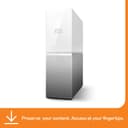



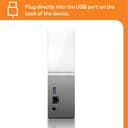
☁️ Your personal cloud, your digital sanctuary — anytime, anywhere.
The WD 2TB My Cloud Home Personal Cloud is a network-attached storage device designed for professionals seeking centralized, secure, and subscription-free storage. It offers 2TB of mechanical hard drive space with 256-bit AES encryption, easy setup via mobile and desktop apps, and remote access from anywhere. Compatible with Windows, macOS, iOS, and Android, it supports multi-device backup and private sharing. While it excels in photo and file organization, some users report slower network transfer speeds and limited diagnostics. Ideal for those wanting a private cloud experience without recurring fees.


| ASIN | B074DXPS6B |
| Best Sellers Rank | 50,775 in Computers & Accessories ( See Top 100 in Computers & Accessories ) 34 in Network Attached Storage (NAS) Devices |
| Box Contents | Cloud storage device, power adapter, Ethernet cable |
| Brand | WD |
| Brand Name | WD |
| Cache Memory Installed Size | 2 |
| Color | White |
| Compatible Devices | Smartphone |
| Connectivity technology | USB |
| Customer Package Type | Standard packaging |
| Customer Reviews | 3.8 out of 5 stars 7,828 Reviews |
| Data Transfer Rate | 60 Megabytes Per Second |
| Digital Storage Capacity | 2 TB |
| Digital storage capacity | 2 TB |
| EU Spare Part Availability Duration | 2 Years |
| Form Factor | 3.5-inch |
| Global Trade Identification Number | 00718037847962 |
| Hard Disk Description | Mechanical Hard Disk |
| Hard Disk Form Factor | 1 Inches |
| Hard Disk Interface | Gigabit Ethernet |
| Hard disk form factor | 1 Inches |
| Hard disk interface | Gigabit Ethernet |
| Hard-Drive Size | 2000 GB |
| Hardware Connectivity | USB 3.0 |
| Installation Type | External Hard Drive |
| Item Dimensions L x W x Thickness | 13L x 5.3W x 17.6Th centimetres |
| Item Type Name | WD - My Cloud Home 2TB Personal Cloud - White |
| Item Weight | 0.96 Kilograms |
| Manufacturer | WD |
| Model Name | WDBVXC0020HWT-EESN |
| Model Number | WDBMYCLOUDHOME0020HWT |
| Network Connectivity Technology | USB |
| Number of Items | 1 |
| Product Features | Portable |
| Product Warranty | 2 years |
| Read Speed | 625 Megabytes Per Second |
| Special feature | Portable |
| Specific Uses For Product | Multimedia, staff |
| UPC | 007180378479 718037847962 |
| Unit Count | 1.0 count |
B**.
Super Product, Excellent Photo storage device
The WD 4TB My Cloud Home Personal Cloud is a nifty little device that brings convenience and security to your photo storage needs. It offers some great features that make it an excellent choice for those who want an accessible storage solution without any fuss. Let's start with the setup process, which is an absolute breeze. Even if you're not the most tech-savvy person around, you'll find it a piece of cake to get the My Cloud Home up and running. Just connect it to your local network, and voila! You're ready to start using it in no time. No complicated steps or headaches involved. When it comes to storing your precious photos, this device truly shines. With a whopping 4TB capacity, it offers more than enough room to store a vast collection of pictures. And the best part? It automatically backs up all your photos from your phone as you take them, ensuring that none of those cherished memories are ever lost. Just imagine the peace of mind you'll have, knowing that your photos are safely stored and easily accessible whenever you need them. One standout feature of the My Cloud Home is its ability to invite different accounts to the drive. This means that each person can have their own private space to access their files, and even the owner of the drive won't be able to peek into someone else's stuff unless they're specifically invited. It's like having your own little digital haven where you can keep your files secure and separate from others. Privacy and control at their finest! Now, let's talk about one minor drawback. Some users have reported that transferring files from their computers to the My Cloud Home over the local network can be a bit slow. It's not a dealbreaker by any means, but it's something to keep in mind if you frequently transfer large amounts of data. However, when it comes to photo storage, this device truly excels. In a nutshell, the WD 4TB My Cloud Home Personal Cloud is a fantastic choice for anyone looking for an easy-to-use and reliable device to store their photos. The setup process is a breeze, and it automatically backs up your precious memories from your phone. Plus, with the ability to create private spaces for different users, you can rest assured that your files are safe and sound. Just keep in mind that if you're looking for lightning-fast transfers over the local network, there might be speed bumps along the way. But overall, it's a wonderful option for hassle-free and subscription-free file storage.
L**S
Worst piece of technology I have ever bought - dangerous, stay away!
****************** Update: After 2 years of use drive failed without any warning taking all data with it. It started as WD update (WD don't even ask you for permission to update! They just do it!) - in the morning I noticed that dive is offline and it stated "updating, we keeping your data safe"... this went for few days until I started worrying and contacted WD support. WD support told me dozen of irrelevant and outright incorrect steps of what to do... until after 2 weeks updating one of WD support staff told me that he believes drive is "bricked". His only advise was to reset the drive to factory settings erasing all the data! Thanks... After further troubleshooting I did, it turned out that one of two drives inside have failed, losing all the data. Now whenever the drives was on the way out or if the update bricked the drive and then bricked the whole device, there is no way to know. Unbelievably, this drive has no self-diagnostics so as a user you can't have any way of knowing if it is going to die imminently. So much for "safe storage" WD... Overall, not only this drive was constant pain for over two years I had it, but as well it has lost me loads of data without any warning and without any way of recovering it (the way it is designed, the data is encrypted on the drives, so you can't take drives out and recover the data form them directly). If you own this thing - I would advise to move your data somewhere else ASAP and throw this device to the bin, it is just huge risk for your data and it is unbelievably poorly designed. I would go as far as calling WD negligent for selling it. ****************** I have bought WD 12TB My Cloud Home Duo thinking that this will be best of both worlds: *access your data anywhere like on cloud *store data locally, in fast drives not limited by obsolete UK internet infrastructure Primary issues with cloud service in UK is that cloud storage is rather expensive. If you have ~100GB of data that is fine, sometimes even free, but if you have much more - say in my case 8.6TB this would cost a lot for a year. Decondly, internet connection in UK is stuck in 90's - I am lucky to have 1Gbps, but that is not generally the case. Talking specifically about my example - uploading 8.6TB into the cloud would have taken weeks if not months and then it would take time every time you want to use data to download it again. So based on what WD has marketed My Cloud Home should be ideal! Right?! They offer 1Gbps data transfers via network ~which in theory translates to reasonable 125MB/s - which is far far higher than average spede one would get via internet. It offer ample of space - 12TB in my case (10.8 formatted). It could as well be configured to 6TB with mirroring (RAID 1) for redundancy if needed and yet one still has full access to files from anywhere in the world like real cloud - so if I have worked on something on my workstation, I can access the complete project on my laptop at work or abroad - sounds perfect! Reality is much more disappointing. First of all the speed makes this device literally useless - I guess it is less of an issue if you have 2TB option and maybe ~few 100's GB - still going to take a day, but that is something overall achievable, however for 12 TB drive is total disaster. I spent 3 month backing-up the data (and I though few weeks would be bad using real cloud!), during the time drive has corrupted itself several times, lost partitions, stopped working in the middle of file transfer etc. I had to reformat it countless times and even now (after 2 years owning it) is still have data to back-up. The only reason I have not finished backing-up the data is because drive is so slow and further it is so unreliable, that for any more important data I just don't want to risk it. I thought that in worst case scenario it is going to be just fancy external drive, but it is far far worse. I have never used mirroring, because frankly it is so unreliable I would not trust any copy of data to reside only on it. It is not compatible with windows back-up or restore, because unlike NAS it is not recognised as valid network drive. This is due to stupid WD Discovery application, which although well intended is useless and works as proprietary drivers and do not support back-up. Further, the drive is just so pathetically slow even if all functionality would work as intended it would take forever. So it cannot be used as NAS, just to drop the files, it cannot be used as backup drive for windows - what it is good for?! I have attached just basic example of moving mixed format files, pictures, audio files, video files, some image files - 68GB total - it took 4 hours!!! How is that acceptable?! Now you may wonder what is the set-up I use and could this be linked to incorrect network set-up. Well - yes I guess it could, but that is not the case here. My Motherboard has two gigabit internet adapters (ASUS Maximus IV Extreme), one of which I have dedicated to WD My Cloud Home Duo - this should not be necessary, but I can afford it for the sake of performance > then it goes directly to 10Gbps Ubiquiti switch > and directly into WD My Cloud Home Duo. Switch itself is connected 10Gbps Ubiquiti router where second port of my PC is directly connect to the internet. Either way what is important here is that connection goes directly from PC via overpowered switch to Cloud drive uninterrupted, entire network is set-up for 10Gbps, so there are now way this is network issue and it is more than capable of handling 1Gbps required for the drive. In fact my second workstation is setup exactly same way and I can transfer files between workstations and I get good 650+ MB/s speeds (limited by speed of SSDs rather than network). I even tried working backwards on assumption that perhaps WD drive is not compatible with Cat7 cables and 10Gbps networking (it is fully backwards compatible, so should not have negative effect) and just in case tried cat6 and cat5e cabling with different switch (Netgear 1Gbps) and still got the same results. If you copying single well compressed file ~ let's say HD video file - I can sometimes get 20-30MB/s which is comparable to cheap and slow USB stick, but if I ever need need to transfer mixed contents or multiple files the speed completely tanks all the the time - 2/3MB/s is best hope. I think it is related to inefficient indexing in the drive, slow buffer and slow processor (of the drive) which cannot sustain contact 1Gbps speed... it cannot sustain even constant 100Mbps speed. In summary, this is just fancy paperweight on your desk. It is a lot of good ideas executed unbelievably poorly. Further, WD support is non existent - I have e-mailed them several times, spent days on their forum and the only thing they can suggest - make sure there are no other processes running in background, make sure AV is not interrupting transfers, make sure you data structure is "efficient", that drive is connected to 1Gbps capable networking and that is it. They don't even bother to look in what is my set-up, just send me the link with all generic advice already listed. My conclusion is that they tech support knows that device hardware (the drive enclosure) is deficient and that it is pointless to issue any software or driver updates - it won't fix the issues. Actually, the drives themselves should be capable 2x6TB WD Red, so I was thinking maybe just to take them out and insert directly into workstation, at least that would be more useful. So.. do yourself a favour and stay clear of any such devices, unless you going for smallest size model and your data transfer requirements are like 100MB per day. The only thing I did wrong - I did not return it immediately, because I thought maybe I set it up wrong and once I have direct 1Gbps line to drive the speed will be better, or perhaps WD going to improve compatibility. Neither of those ever happened and by the time I realised it - I was stuck with this useless thing for good.
D**2
For all your digital home storage needs!
It's ideal for all your basic digital home storage needs such as Video, Music, pictures and backups for your tablet, phone and PC depending what you have on your PC and what size you get. The dimensions are about the size of a nintendo wii height and width is about half the size of a nintendo wii. As shown in the pictures It's really easy to set up and upload your stuff on, and would highly recommend buying one 👌 if like me you would like that piece of mind in making sure your digital footprint is backed up. If you have a lot of stuff that needs to be backed up I would recommend the 6TB and above. Though overall a nice piece of kit to have for the price 👌
O**R
Great product but a little bit tricky to get started
Great product. However it can be tricky to follow the start-up instructions. Instruction may not be up to date as you also have to download the app before you are able to proceed. Also the password in the box may not work at first, strange !!. But keep trying as it will work eventually. Slow to upload long videos or big files. But once you can see past these issues you are good to go and you wont regret it. I will still recommend it as it has allowed me to clear my phone and never have to worry again about storage on my phone. From the app you have direct access to all your files, can share, add users, delete...
A**A
Amazing! I wish we got one sooner!
We bought this after I pressed a button on my MacBook and EVERYTHING disappeared! It was a very scary 5 minutes before it all returned as it was!! This amazing bit of tech has proved brilliant for us! Super simple to set it up. I didn't do this, but it took my other half about 20 minutes. All phones and tablets now have a back up stored safe! My other half especially likes it as all his music has now been backed up and he can listen to it from the cloud on his phone in the van without it clogging up storage on his phone. I like it because it has all of my documents and photos stored safely away. It's like having your very own personal cloud. The only thing I would say is slightly a pain, if I was being really picky, and that would be having to save everything twice. So I can hit save on my MacBook, but I then have to go in the cloud, add the file and delete the old one. There may be a quicker way, but I haven't found it yet and it's likely me being anal having to save everything each time I do it, rather than a monthly or weekly back up! But I would definitely recommend this! Does everything it says it will and definitely puts my mind at ease knowing everything is safe!
M**C
The smoothest, no niggle experience with this was returning it.
I had a few basic requirements: a media server for my two smart TV running Plex; a backup drive for a small number of documents and photos; something quiet, reliable and with low power consumption. In I wanted a device that would give me little to no headaches or frustrations over just using my desktop as a media server. In this case, the WD MyCloud Home had too many negatives to make it worth keeping. The good: set up was easy and it was viewable on my phone, iPad and Windows PC in a few minutes. Plex was installed easily too, scanning my media and bringing in file info from the internet automatically. Folders were simple to sync to the drive with a right click of the mouse. The unit looks nice, clean looking with no visible buttons to clutter the front. The software is OK to use. WD Discovery loads up on system start to link up the drive and keep things synced and the iPhone app is OK too and it had the options I was interested in. The negatives: It’s very slow. Connected to my mesh network transfers were a bit disappointing. Performance is frustrating for serving media. Of the five movies we watched while the MyCloud Home was attached, four of them were interrupted midstream with ‘An unexpected Playback Error has been encountered’ message. Clicking back to the menu and it restarted without a further problem but not ideal for my use. The WD Discovery software crashes my Windows PC File Explorer. After installing, I suddenly started getting a blue screen crash . It seems to be the WD software and Windows File Explorer as when the Discovery software was not loaded, the PC worked fine. Couldn’t pinpoint what was causing the crash but it was another frustration. The box never stopped chittering away. The files were loaded in a day but the box never stopped sounding like hard drives under heavy load. It never seemed to stand down. Even setting Plex to only scan daily on folders that it found had changed didn’t make any difference.Also, asking Plex to do a full scan seemed to hog the home network bandwidth as my smart TV couldn’t get an internet connection until I shut down the NAS. This only happened once though so take that as you like. The Discovery Windows app and the iPhone app are just OK, not that intuitive to use or navigate. The box was noisy. Stood on my work desk it chattered and clattered all day while I was trying to work and gave me a headache at the end of the day. I moved it to another room where it’s noise was much less noticeable. None of these issues were deal breakers in themselves but there are just too many of them to make the WD MyCloud Home a pleasure to use. If you just want to back up data and sync files then this may be ideal but this is just too slow and with too many niggles to be a convenient media server over just installing Plex on my PC and turning that on and off when needed. If this thing can’t compete against a decade old desktop PC for simple media serving then it’s not for me, thanks.
C**R
Exactly what I needed
After reading a lot of reviews and watching a lot of youtube content I decided to purchase the 12T (6T+6T) My Cloud Home Duo Personal Cloud Storage Dual-Drives, RAID 0/1 To be honest, the reviews and especially the youtube videos weren't giving me the info that I was looking for or they were a bit on the negative side. Anyway, Initially I thought that I could use this device to back up stuff only over the internet, which is nice to mobile back-up, but if you have stuff on your pc or external drive it would be a nightmare. However, this is not the case, as I just transferred all my 2T of backup from my drive into the My Home Cloud just by connecting it to the USB port and then in the My Cloud dashboard you can choose what you want to do with the USB drive that you just connected...and the options are to Transfer from or To the device..fully or selecting the files. Amazing, and you even can track the transfer on the dashboard whenever you want. This definitely met all I needed, and it is extremely easy to use, like super user friendly. I highly recommend this over any other cloud system in house or rented.
P**S
Very disappointed!
I'm writing this review 2 years after I bought this device, and I have to say I am very disappointed overall. On the day I bought the disk, I arrived home and I couldn't connect to it. I searched the web and immediately understood that he technical support for this purchase was terrible. There are very few videos or even threads explaining how to use it. 2 years later and that is still true. So be prepared to have absolutely no information as soon as you have a problem. On the next day I finally was able to connect to device. Nothing changed, I just kept on trying and it eventually worked. From what I understand, the device was booting up and preparing the disk for connection, but since there is no information about what it is doing, I couldn't guess that. That is actually another complain that I have. The device almost have no options. There is no power on/off button. There is nothing but a light on it to say it is turned on. Don't get me wrong. I like when things are simple and "just work". The problem with this product is that is simple but don't work all the time. After connecting to the device I can say that I've use it for several months with no problems. However, it is quite limited what you can do with it. You can't use it like a normal disk. You can't access it through FTP or anything else. It is very limited what you can do outside the WD app. Even to watch videos I didn't found any way other than using Plex on my TV, and that's because Plex is an official app for the device. After one year and a half of working like this, it suddenly stopped working. The disk makes a strange noise, and I can't connect to it. It doesn't work at all. I tried everything, even doing a hard reset. Which by the way I'm not sure did correctly. Because there is no feedback from the disk when we press the reset button for 60 seconds, and since I can't connect to it, I don't know if the reset was complete. So there. A 4TB disk that didn't last 3 years. Very disappointing fo something that should have important files and backups over the years. I would change my review, if the WD support helped me bringing the disk to life. BecauseI do believe that when it works, it is worth more than 1 star. Very disappointed with this product overall
TrustPilot
vor 2 Monaten
vor 2 Wochen