We remain fully operational. Our teams are working around the clock to ensure your deliveries continue safely.

Laden Sie die App herunter


Kundendienst
Copyright © 2025 Desertcart Holdings Limited
Laden Sie die App herunter

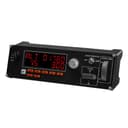
✈️ Elevate your virtual cockpit — fly like a pro, feel the control!
The Logitech G Saitek Pro Flight Multi Panel is a professional-grade flight simulator controller featuring a crisp LCD autopilot display, 14 tactile buttons and metal rotary knobs for precise control of throttle, flaps, and trim. Designed for PC flight sims like FSX, X-Plane, and Prepar3D, it offers modular stacking options to customize your cockpit setup. USB-powered and highly rated by the flight sim community, it delivers realistic, reliable performance for serious virtual pilots.


| ASIN | B01MFBNN9J |
| Best Sellers Rank | 3,269 in PC & Video Games ( See Top 100 in PC & Video Games ) 5 in PC Flight Controls |
| Brand Name | Logitech G |
| Button Quantity | 14 |
| Colour | Black |
| Compatible Devices | PC, Microsoft Windows XP/Vista, USB 1.1/2.0 |
| Connectivity Technology | USB |
| Controller Type | Joystick |
| Country Of Origin | China |
| Customer Reviews | 4.3 4.3 out of 5 stars (2,085) |
| Global Trade Identification Number | 05099206069831 |
| Hardware Platform | Desktop |
| Item Dimensions | 28.2 x 8 x 8 centimetres |
| Item Weight | 0.57 Kilograms |
| Manufacturer | Logitech |
| Model Name | pro |
| Package Quantity | 1 |
| Power Source | Corded Electric |
| Product Warranty | 2-year Limited hardware warranty |
| Special Features | Touchpad |
J**N
Very useful Flight sim add on - which works!
This brief review is in respect of the Logitech (formerly Saitek) Pro Flight Multi Panel. I only say that because the reviews in this area seemed to be bundled together in respect of products that are as different as chalk and cheese. The Multi Panel is one of a series of separate Flight Simulator add ons made by Logitech for use alongside a joystick, control column, and other flight simulator controls. To the un-initiated, perhaps considering buying as a gift, please speak to the recipient first. By itself, this item will be useless! Right, having got that over with. If you are in the market for an add-on Flight Sim controller that provides elevator trim, flap control and simple autopilot functions, then you'll be please with this. I have it working with Microsoft Flight Sim X, X Plane 11, and Aerofly FS2. By itself it's tricky to get working, but install FSUIPC software (free download, no catches and well respected in the FS Community, which will be sufficient, or payware if you want full facilities) and you'll be away in seconds. I'm no expert at the techie bits, but once I connected this, I love it!
S**5
Taking Flight Simulation To The Next Level....
I have steadily expanded my home flight sim over the years and amongst other things now have three Logitech radio panels and one Logitech multi-panel. I have found that for reliability, it's best to use powered USB hubs for each device (not supplied). I am running MSFS 2020 on a Windows 10 PC and fly PMDG 737-800 and FBWA32NX. I highly recommend SPAD.neXt to get the most out of these panels. However, unless you are already familiar with this software, expect another learning curve but, trust me, the possibilities are pretty much endless once you know how to create your own custom profiles (YouTube is your friend here). The panels themselves are very well made, mostly from plastic but rotary knobs are metal. The large LED displays are easy to read, even from a distance, and remain flicker-free even after many hours of continued use. Rotary knobs and displays operate in realtime and accurately reflect what is seen in the cockpit with no noticeable latency. Overall, a quality product which looks and feels solid. Each panel is supplied with a plastic bracket which the front panel attaches to using four screws (supplied) enabling the device to be used free-standing or vertically mounted to form a stack using additional screws (supplied).
D**T
Radio Panel - Good build; flaky setup
This is a review or the Radio Panel. First the good points. - nice solid unit; quality build - comes with a slot to bolt into - nice screws supplied - the unit screws onto a compatible yolk that keeps everything steady - the click buttons are very solid - quite stiff but a satisfying click. - the twiddle buttons work fine - very clear digital display - options to tune NAV1 & 2, Comm1 & 2, adf, show DME, etc. On top and bottom not so good things - setup! Logitech drivers (via website) waste of time. Could not get this to work with FSX. - managed to get it consistently working downloading the free SPAD tool. Only way to go (but requires FSUIPC) other thoughts not sure I like it mounted on the yoke. It pretty much sits in your face, so am trying it just under the FSX radio panel. The usage of it does allow me to run the GPS bigger. Using it to tune NDB (ADF) royal pain. If you are at 900 and need to get to 300 say, that's a lot of knob turning. Easier to use the on screen ADF. Unless I missed something.... A bit of an extravagance and in two minds whether I should have bought this!
S**D
Love this product once set up correctly.
I love flight sim and when the MSFS 2020 was released it was an amazing step forward, although I still use XPlane 11. Having flown with the military in the past I have a love for proper flying and this product was the answer. I also have the switch units from Logitech. In short this is a really effective and adds to the whole flight sim experience if you enjoy realistic flying, the down side is you must get set up correct and follow the instructions to the letter. First download the complete drivers from the website before connecting, I also found that when you have multiple units make sure you download all the drivers and updates. When I finally had the perfect set up save this on your backup settings. I had one unit and you can scroll through all the screens available using the small arrow buttons, I have decided to purchase a second unit now for navigation, I use one with the multi data screen and the other for navigation aids, also great for engine management. Overall I recommend this product, please make sure though you understand the correct set up, if it does not work correctly the easiest resolve is remove the drivers and the unit, reload and start again, it will work.
H**R
I like it
A**O
Casa Logitech non delude mai, con la sua gamma dedicata al volo simulato, Saitek pro flight radio panel è utile per rendere ancora più realistica l'esperienza di volo simulato. Si può utilizzare con simulatori di volo come flight simulator o x plane. Lo strumento è utile per gestire le comunicazioni radio durante il volo e le operazioni di terra come il rullaggio. Un vero e proprio strumento a cui nessun appassionato del genere può rinunciare.
F**L
Work a expected
A**W
I already have this but its attached to my GA setup and u wanted to add another to my commercial airline setup for my flight rig. I have the switch panel, multi panel and radio panel for GA, switch panel, radio panel and simple FCU for Airbus.
C**O
Spettacolare. Solo un po' problematico farlo riconoscere dal pc.
TrustPilot
vor 2 Wochen
vor 2 Wochen