We remain fully operational. Our teams are working around the clock to ensure your deliveries continue safely.

Laden Sie die App herunter


Kundendienst
Copyright © 2025 Desertcart Holdings Limited
Laden Sie die App herunter
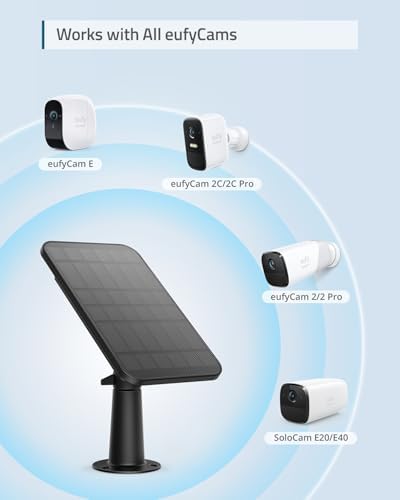



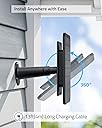

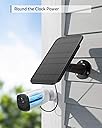

☀️ Power your peace of mind—never let your security camera run out of juice!
The eufy Security Certified eufyCam Solar Panel delivers continuous 2.6W solar charging for multiple eufyCam models, featuring a 13ft cable and 360-degree mount for optimal sunlight exposure. Its IP65 weatherproof design ensures reliable performance in all weather conditions, eliminating the need for manual battery recharges and guaranteeing uninterrupted home security.


| ASIN | B08R8B9MMX |
| Batteries Required? | No |
| Batteries included? | No |
| Best Sellers Rank | 28,907 in Business, Industry & Science ( See Top 100 in Business, Industry & Science ) 81 in Monocrystalline Solar Panels |
| Colour | Black |
| Customer Reviews | 4.4 4.4 out of 5 stars (5,399) |
| Date First Available | 24 Dec. 2020 |
| Included Components | Anchor, Mounting Bracket |
| Item Package Quantity | 1 |
| Item Weight | 313 g |
| Item model number | T8700011 |
| Manufacturer | eufy |
| Material | EVA, Ethylene tetrafluoroethylene, TPT |
| Maximum power | 2.6 Watts |
| Part Number | T8700011 |
| Power Source | Battery Powered |
| Product Dimensions | 18.6 x 11.58 x 2.55 cm; 312.98 g |
| Special Features | Continuous charging, flexible placement, 360-degree mounting bracket, weatherproofing, and eufy camera compatibility |
| Style | Battery |
S**E
Brilliant - kept charging even in winter !!!
These are very easy to install, I brought two to attach to my recently purchased Eufy 3C cameras. I decided to try them because the battery was dropping at a rate that I would of had to recharge them every 100nor so days, not bad but still a ladder and 4-5 hours charging. I brought these on the 17th December, so in the middle of winter and they are both facing south and they have kept the charge at 97-99% (currently at 98%) even with the horrible weather we've been having. In my opinion they are well worth having, if they keep the cameras charged in the winter, they won't ever need charging again! Don't forget you need to change the power source from battery to solar panel - if you forget to do this the battery will drain and you'll think the solar panel isn’t working! Lastly, I've seen reviews saying that the pass through waterproof plugs stop the USB charging lead from going fully home and causing the lead to pop off - see the photos of how to fit the waterproof plugs - put it onto the USB FIRST and then push it home into the camera - watertight and it won't come out unless you pull it out! Hope this helps you decide to buy it or not but give me a 👍 if it does
M**T
Does what it says well
Purchased at a slightly discounted price which made it better value for money. Easy to set up, instructions clear and to date operates extremely well with my cameras continually topped up to 100%, even when little light outside and continuous use. Not tried alternatives but Eufy solar panel recommended.
S**N
First impressions are good - see full review for charging analysis
When I originally purchased my eufyCam 2C Pro back in June, I didn’t expect to charge them much (as they supposedly have 6 months battery life). In reality, whilst the battery is good, I’ve had to remove both camera’s twice to charge them in the 5 months of ownership. As it’s a pain having to get my ladder out every few months to keep doing this, I thought I’d try solar panels to keep a constant charge. I was tempted to go with a cheaper alternative panel, also sold on Amazon, but I thought that I should probably stick with the ones specifically designed to complement the cameras as the difference in price isn’t that big. I read a number of reviews and wasn’t sure if these would be fantastic or a waste of money, but as Amazon have a great returns policy I thought it’s worth a shot as if they don’t work, I’ll just return them. Initially I was a little disappointed, as there was no template to use for drilling the holes for the bracket and no indication of what drill bit size should be used - of course, this isn’t a major issue, but I expected this to follow the same helpful approach that came with the cameras themselves. Given I was drilling into render, my drill had a tendency to slip and a template would have made the whole process easier. Following installation, I noticed that the battery symbol on the app was showing that one camera was being charged and the other wasn’t - this initially led me to think that I had a faulty unit as both solar panels are fixed to the same wall at the same angle and thus get the same amount of sunlight. I left both throughout the day and checked at various times, with the same results. Strangely enough, the next day the situation had changed and the app was showing my other camera was now charging and the one that previously was had now stopped. This ruled out an issue with the solar panel and led me to troubleshoot online. Ultimately, I found an article that said you need to change the setting within ‘Power Management’ on the app from battery to solar panel. By doing this, the charging symbol is replaced with an image of a solar panel, so I had to keep manually checking the battery level throughout the day. The results of my first full day are as follows: Camera 1: 71% @ 8:41 73% @ 9:58 84% @ 12:21 90% @ 14:50 91% @ 16:38 Camera 2: 52% @ 8:41 54% @ 9:58 65% @ 12:21 72% @ 14:50 72% @ 16:38 Day 2 was a really dull day (no visible sunshine and quite a bit of rain) and whilst the camera’s didn’t appear to charge, they only lost a small amount of battery. Day 3 (which was a sunny day like Day 1) has resulted in a fully charge to Camera 1 with Camera 2 at 92% Ultimately, I’m really happy with the results - of course, it’s still early days but at this moment in time, I’m pleased I made this purchase. I will update this review in a few months to update if these are still working well, or if I’ve encounted any issues.
T**M
Who knew plugging in a usb cable was so tricky...
Firstly i would like to give the positives. Does it quickly charge your camera, indeed it does, kinda wish I could split the cable and charge more but i digress. I have placed my panel on the kitchen extension and now (March) is getting about 5 hours of sun per day, this is more than enough to charge it approx 10-12% per day in sun (which we seems to have gotten a good few day of!). Its not that great in cloudy from my experience, but all you would need is a sunny 3-4 days per month to keep you ticking over across winter. For the record I have the 2C model camera (the 3 month battery one). So i doubt i will have to ever take the camera down to recharge as i need a ladder to access. speaking of ladders....when you put this panel up, leave yours out, i can pretty much guarantee you will be reusing it, at least i was. My issue is not the panel or the approx 4 metres of cable (more than enough IMHO) - its the {enter expletive here} rubber grommet for making the now exposed USB charging point on the camera water proof. Does it work, yep, it is well made with multi rubber tiny rings to really seal the port. All perfect...well not so fast there...not quite. At least for mine, this was a total pain to install, yes the rubber grommet. i lost count of how many trips up and down the ladder. Why? i hear you ask. Well the grommet would fit really snugly or the extended usb connector would fit really well BUT they would not fit together in the camera. (BTW if you are installing its not clear from the documentation- there is one side of the grommet that has a well, that where your USB fits into as the head is extended a little. My issue was a follows. i put the grommet on the cable, then install into the camera, the seal was not perfect with parts of the rubber refusing to fit. i used a wooden dowel to try and reseat it (seems to work but the seal still bulged). The charging light would go on and then maybe 1-2 days later i noticed its not charging. Up on the ladder we go. try to push the cable in and it seems the rubber seal is pushing the cable out. Reseat it, then a day or so later, back up on the ladder, same issue. After days of this, with much comedy as I got this so I would NOT have to get on a ladder. So from once per 3 months to recharge the camera Im now up twice per day. It is funny now, but certainly wasn't at the time. I got so frustrated with this I was going to do 1 of 2 things. Return the whole thing to Amazon OR send the grommet into orbit and just use silicone sealant. Finally (well its working over a week now so maybe finally), i tried again to seat the grommet into the camera and then just get the cable to seat properly (how it worked this time I have no idea). Also if you are putting it up in place (maybe I should have taken it down, I think the documentation says that BTW but i routed the cable under the roof at this point). Also be careful not to hit the SYNC button on the top of the camera when installing the cable-had to then take the camera down to resync with base station and that leaves me with the base station. I don't know if its bad luck or bad timing, my whole system has been bullet proof since i bought it over a year ago. i never had to reboot the base station (well maybe once) in all that time. Since putting up the panel, this camera looses connection with the base station and the only fix is a reboot. Now it could be updates (there has been one i know of) and just bad timing but it is also kinda weird it happens at the same time. Im hoping it is updates because a security camera that looses connection every few days isnt really a security camera you can trust. Whats worse is it looks okay on the phone app until you try to connect. Not sure if the cable is interfering with the signal(?) but Im guessing. So if you are going to use this perhaps follow the instructions more and take the camera down. Be careful forcing a usb cable, they are a lot more sensitive than people think. Would I buy it again, probably, if you have your camera in a really awkward place, then definitely. But make sure you don't have the fitment issues i had on the ground rather than tottering around on a ladder. I would be curious if anyone else who bought this also has connection problems? im hoping its not the case. Edit April 26: all issues have not re-appeared, camera recharging when needed, no dropouts in video (touch wood) . so i will put it down to 'one of those things'. final word, i would buy again.
M**O
Ottimo pannello solare. Abbinato ad una videocamera, sempre Eufy modello SoloCam C210, mi permette di dismettere quelle Arlo che negli anni mi sono costate uno sproposito in batterie. La costruzione è solida e di qualità. Il supporto è in metallo e non in plastica. Comoda, inoltre, la possibilità di raccogliere il cavo in eccesso dietro il pannello stesso rendendo più pulita l'installazione. Nella confezione sono presenti tutte le guarnizioni di tenuta all'acqua del connettore per le videocamere Eufy.
A**M
Outre la qualité du produit que je recommande, je tiens tout particulièrement à remercier et souligner le professionnalisme du livreur. Je ne peux pas indiquer son nom mais je souhaiterais le communiquer à Amazone.
R**I
as advertised, easy to install and good quality. connected to my solo solar cam. remember to change the settings or the power source in the app after installation.
J**7
You can't see it in the pictures, but a lot of thought went into this product's design. It's comes with gaskets to slip over the power connection to each of Eufy's different camera types, the ability to tilt and swivel in any direction, and even a clever plavlce behind the panel to wrap the cord round and a tiny divot to press it into so only the amouy of cable you need is showing. Installed them on our four outdoor cameras easily, and already they're charging well. I bought these when the cameras died in the winter and I had to ladder up in the snow to charge them. Not fun. Reviews I've read from other Canadians say that even with winter sun the cameras stayed about 30-40% solar charging. We'll see. Fingers crossed.
A**I
Works well and worth money
TrustPilot
vor 1 Monat
vor 1 Monat