
Laden Sie die App herunter


Kundendienst
Copyright © 2025 Desertcart Holdings Limited
Laden Sie die App herunter


🚀 Elevate your creative workflow with powerhouse storage that never quits.
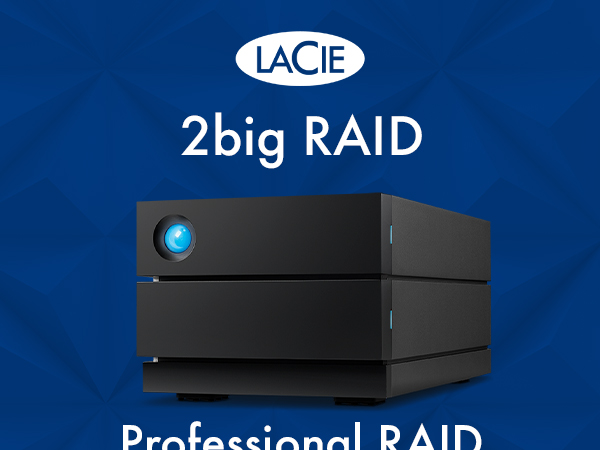
The LaCie 2big RAID 40TB is a professional-grade external desktop hard drive featuring dual 7200 RPM IronWolf Pro enterprise-class drives. It offers versatile RAID 0/1 configurations for optimized speed or data protection, connects seamlessly via USB-C and USB 3.0, and includes a 5-year limited warranty with Rescue Data Recovery Services—perfect for photographers, filmmakers, and content creators demanding reliable, high-capacity storage.



| ASIN | B09QQPDHCH |
| Additional Features | Portable |
| Best Sellers Rank | #62 in External Hard Drives |
| Brand | LaCie |
| Built-In Media | LaCie 2big RAID 40TB USB 3.1 TYPE C |
| Cache Memory Installed Size | 40 |
| Color | Black |
| Compatible Devices | PC |
| Connectivity Technology | USB |
| Customer Package Type | Standard packaging |
| Customer Reviews | 4.0 out of 5 stars 1,595 Reviews |
| Data Transfer Rate | 5000 Megabytes Per Second |
| Digital Storage Capacity | 40 TB |
| EU Spare Part Availability Duration | 5 Years |
| Enclosure Material | Information Not Available |
| Form Factor | 3.5-inch |
| Global Trade Identification Number | 08719706043250 |
| Hard Disk Description | Mechanical Hard Disk |
| Hard Disk Form Factor | 3.5 Inches |
| Hard Disk Interface | USB-C |
| Hard Disk Rotational Speed | 7200 RPM |
| Hard-Drive Size | 40 TB |
| Hardware Connectivity | USB 3.0, USB Type C |
| Installation Type | External Hard Drive |
| Item Length | 217 Millimeters |
| Item Weight | 2800 Grams |
| Item Width | 118 Millimeters |
| Manufacturer | LaCie |
| Media Speed | 2500 Megabytes Per Second |
| Model Name | 2big |
| Model Number | STHJ40000800 |
| Number of Items | 1 |
| Special Feature | Portable |
| Specific Uses For Product | Business, Multimedia, Personal |
| UPC | 763649173466 |
| Unit Count | 1.0 Count |
| Warranty Description | 3-Year manufacturer |
Y**Z
As Advertised
This is my 2nd LaCie 8TB drive. If you don't need SSD speeds, these are great drives. I would recommend. They are considerably faster than my 5400rpm drives. The difference is there! PROS: Read and Write speeds are as advertised. About 230-240MB/s on my 24" iMac. LaCie 5yr warranty is useful. I already had to call once and was surprised that an actual person answered and helped me. Just be sure to register it. Sleek design. CONS: The blue light on the front is bright enough to second as a lighthouse light. The drives are not quiet. You will hear them in the room, so beware if you record audio in the same room. Sleep mode is odd. I feel like they spin up randomly at night, which is annoying.
M**'
The Cooling Fan
The fan on my LaCie 1big Dock Thunderbolt 3 4TB HDD and Desktop Hub was not turning on and the top of the case seemed to be getting quite hot after one hour. I decided to return it for a replacement so I did a secure erase. The drive was left on for several hours during this process and after time, the fan eventually turned on. I missed it in the manual (page 22) but the fan is temperature controlled so It will not turn on when you first apply power. The unit needs to be on for a L_O_N_G_ time to generate heat before you will notice any fan activity. I cancelled my return and am quite happy with it. This is a very heavy and well built external HDD and has been working well with TimeMachine for Mac.
J**S
DON'T WASTE YOUR MONEY - SLOWEST DRIVE EVER
Hands down one of the slowest, most disappointing storage devices of any kind! I am writing a fairly long review (which I never take the time to do), and I know it may appear to some as a mad rant...my goal is to share that this is not user error or due to a specific issue with a file type or specific software application. The poor performance is consistent regardless. I am a commercial director and editor. I've worked with all kinds of storage systems, from RAID to NAS to small portable hard drives. I was looking for something easy to stay on my desktop that I could quickly dump footage to following shoots, so that I could clear my portable SSDs. I would say to call this "professional" or "fast" is comical, but after having this for 10 months, I lean more towards an outright lie. When I purchased this, I was editing on a fully loaded 2019 i9 MacBook Pro. I've now been using it with my fully spec'd out M4 MacBook Pro. Whenever I unlock my computer, the drive rumbles and takes several minutes before it shows in Finder and is accessible. It doesn't matter if I have just plugged in my computer or if my computer was on the lock screen with the Lacie already connected and powered. Every time there is a massive lag. You may think, Oh, that's inconvenient but after it connects, it probably is fine. NOPE. Even after it has been connected, every time I click to access the root folder, it lags; clicking subfolders easily takes 10-30 seconds (sometimes over a minute) for the folder to expand and display files. It doesn't matter if I am editing photos, graphic files, HD video, or 4k videos, RAW, mp4, proxies...it is consistently slow across the board, no matter what. My original workflow plan was: onsite dump cards to my SSDs, come home, and immediately back up all files to the Lacie to clear SSDs, edit off the Lacie so there is a consistent folder structure and organization (instead of editing off of SSDs then dumping once the project is complete). The read/write is so slow and inconsistent that you cannot edit using files stored on the Lacie. It doesn't matter if I am in Premiere Pro, After Effects, doing photos in Lightroom - using Affinity Designer, Adobe Illustrator, Photoshop, Logic, or doing something browser-based like uploading photos for a website edit. There is no correlation between a specific software application or file type - the inconsistency is the same across the board. Even after importing files into Premiere or Lightroom, the speed is so slow and inconsistent that files regularly buffer or take forever to display. I am not just a creative professional; my background is in custom software development, and I have extensive experience with networking hardware. I have tried everything I can to troubleshoot, isolate any potential issues, and optimize this in hopes that it would perform as described. I've owned so many Lacie drives over the years, and it just feels like the reliability and their focus on quality products continue to not be a priority for the company. I know I am being critical, but this was a $634 investment, not a cheap, no-name brand solution. I have conceded to keeping it unplugged and only using it for final backup storage once I am completely done with a project. I hope this helps some other small business professionals or creatives considering spending their hard-earned money on a product that is not "professional" nor "fast." Avoid this product and find another solution that actually does what it says it's supposed to.
T**R
High Speed and High Capacity Storage at a Reasonable Price
I purchased this Lacie D2 to provide external backup to a QNAP NAS. The read/write speeds are excellent for a single external HD no doubt large due to the fact that this unit has a 20 TB Seagate Ironwolf Pro HD. The Lacie d2 works perfectly, is quiet, and was an excellent choice for high capacity and high speed backup protection.
E**H
Great machine!
I purchased to 8TB of these. I haven'y had to call tech support so far. Pros: Slick design Quiet Good speed Imperceptible vibration Very low heat Straight forward plug and play After weeks of research and much testing of several brands and models (Purchases & Returns) Best alternative value to SSD's which are stratospherically expensive. Cons: The cyclopean blue light is aggressive! Especially when it blinks! I just cannot have the drive facing me on my workspace, so I turned them around to face the wall, having the view of the back of the casing, with the power and USB connections facing me, thus defeating the beautiful design of these devices sitting on my desktop! The stands are attached to the casings, making their shape awkward for portability (packing and transport).
K**O
Good Drive - But Not Easy To Setup
------- ------- ------- Feb 20, 2022 Update ------- ------- ------- The 2 drives that I installed on Sep 13, 2020 will not power on. I swapped the power supplies with the power supply from the 3rd drive - but the drives will not power on. Both drives spun up and can be read after removing from the chassis and plugging them into a docking station. I 'm fairly certain that the power switch/module failed, because swapping the power supply didn't work. The switch is wired to a small board that is in the top of the chassis. The wiring leads to the bottom of the chassis, where the power supply plugs in. I was lucky with this one - both drives are part of a windows storage set and the data is still readable. The drives are non-shingled, 7200 RPM Barracuda Pro drives - which is what I wanted. I'm disappointed that the power switch/module failed on 2 drives and I'm waiting for the 3rd drive to fail. Will see what Seagate (LaCie's parent company) does - the drives are 17 months into a 60 month warranty. I used about 1.5 TB of the 4 TB capacity. Will order a 2 TB SSD and use these as backup drives. ------- ------- ------- Sep 13, 2020 -- Original Review ------- ------- ------- My important files are backed up to multiple SSD drives. I decided that it might be easier to consolidate the backups to a larger mechanical drive, so I looked for an external mechanical drive that was durable and had decent performance. I read the reviews for LaCie and Glyph - it was obvious that Mac Users were having problems, but there were also some problems for Windows users. The problems seemed worse for the 8 & 10 TB drives. I ordered two 4 TB LaCie d2 Professional drives. The drives are very quiet and don't run hot. 1. After registering one drive, the LaCie website kept looping back to a popup window about Seagate. It was impossible to add the 2nd drive until the next day. Maybe a new user account can only register one device when the account is created? 2. I decided that using Windows utilities was easier vs. trying to use either product download. The User Guides are weak and website articles are old. --- Lacie_Desktop_Manager_for_Windows installed correctly, but it couldn't identify any drives, including the LaCie drives. --- LaCieToolkit installed correctly - but didn't do much other than identify both drives. You can mirror a system's boot drive to a LaCie drive, but can't mirror a LaCie drive to another LaCie drive. Same thing applies for Backup & Restore. 2. Both LaCie drives worked out of the box for Windows 10 Pro as standalone drives, but not as Disk Management mirrored volumes. --- The drives were already partitioned into an EFI volume and a larger unallocated volume. --- After reformatting from FAT32 to NTFS, the EFI volumes remained. Used diskpart from the CMD window to delete the EFI volumes. --- Both drives are identical capacities, but I could not add mirrors from Disk Management. The drives would not convert from Basic disk to Dynamic Disk. 2. I ended up using Windows Storage Spaces with 2 way mirrors. The 2 drives are seen as a single, 4 TB drives. ------- ------- ------- Sep 15, 2020 ------- ------- ------- After a couple of days, I noticed other problems - I had upgraded Windows 10 Pro with the May 2020 update. It required a BIOS update, which I applied on Sep 23. There were other driver updates (network & graphics) but none for firmware, storage or USB. A. Sep 15 problem: The laptop reboots after sleeping for about 2 hours. Sep 23 update: The laptop reboots stopped after a BIOS upgrade. ---- The reboots were not related to the LaCie drives which were connected to a docking station. ---- The reboots were related to external SSD drives that were connected to the USB 3.0 and USB-C ports. B. Sep 15 problem: There's a Windows event about a USB device that's draining power from the system. ---- It could be the drives or the USB docking station, but it's a strange message because the devices have their own power supplies. But it's possible that's how the Windows interpreted the problem. Sep 23 update: The May 2020 update removed all the power plans. ---- Added a new Windows power plan to handle sleep & hibernate better. ---- I allowed the laptop to hibernate after about 15 minutes of sleep time. ---- Then went into properties for the Network adapters and set them so they would not sleep. This helps when I want the laptop to come out of hibernate. C. Sep 15 problem: Windows Event messages about the drives having the same disk identifiers. There's a reference KB 2983588 about MPIO, which is not something that I would enable on a laptop. --- Windows Storage Space displays the same serial number for the drives in the storage pool. It may be a virtual S/N because it's not the physical drive's serial number. Sep 23 update: The Disk Identifier message goes back about 4 or 5 years for Windows. ---- It's related to USB 3.0 and a newer protocol. The older USB standards used a Bulk-Only Transport (BOT) protocol to transfer data between devices. ---- When USB 3.0 was introduced, the BOT protocol was retained but a newer USB Attached SCSI protocol (UASP) was defined in the spec which uses the SCSI command set and allows for faster, multi-threaded parallel transfers with command queuing.] ---- The Windows Storage Space serial number is related to the UASP issue.. ------- ------- ------- Sep 16, 2020 -- Added a 3rd drive for Acronis Backup ------- ------- ------- I did not install any of the LaCie/Seagate utilities. Used DiskPart to delete the EFI partition, then reformatted the entire drive to NTFS. Attached to USB-C. No problems like what was observed originally. ------ September 23, 2020 Update -------- All 3 LaCie drives are working well, without any problems.
L**N
Transfer speeds above 250 MB/s. Very quiet operation. I bought 5!
I purchased 5 of these hard drives - three 8TB size and two 10TB size. These hard drives are considerably faster than my other external hard drives that run usb 3.0. I am very happy with my purchase and recommend these LaCie drives. Upon testing each drive works perfectly as expected. My upload and download speeds are within 5 MB/s of each other which is awesome. I ran my tests using usb-c to usb-c on my MacBook Pro M1. See my screen capture showing the upload/download speeds. All five of my hard drives were sold with as "Style: d2 Professional USB-C 3.1" . Every one I received includes a usb-c to usb-c cable and usb-c to usb 3.1 cable. The rear of the hard drive has a usb-c input. Some reviews mentioned the loud sound from the hard drives. I noticed that all 5 are quieter than my WD and Seagate drives. This is likely because the LaCie enclosure is a very heavy metal versus the vented plastic in my older hard drives. The thicker metal blocks some sound. I can say that my two 10TB LaCie drives are slightly quieter than my 8TB LaCie drives - but both sizes I consider quiet for platter hard drives. SSD drives will be silent because they have no moving parts - so comparing these platter drives to SSD drives is unfair. I bought these on Amazon Prime Day 2022 for a considerable discount. If I can get the discount again, I would purchase these. At full price, I would purchase these if I needed the fast transfer speeds. But if the transfer speed wasn't important I would just buy the cheapest price-per-TB hard drive at the time from WD, Seagate or LaCie. LaCie drives do have a premium price tag and have a higher quality enclosure but use a Seagate hard drive inside.
B**S
Another crappy Seagate product- LaCie is just a name now....
I used to buy Lacie drives all the time, and had no problems with them until Seagate's crappy quality and crappy customer service completely began to change the company. I had a pair of Lacie drives die on me and because Seagate claimed I had damaged the drive while traveling they refused to honor the warranty. That was a few years back. Fast forward to this year when I thought hmmm, I'll try them again. I bought one of these little guys for a project and since July it's been ok, while not nearly as fast as it claimed it would be. Meh. I wasn't too worried. Then 6 months later in December the stupid thing takes a nosedive and refused to mount. I took it into the Apple Store and they recommended I replace it immediately as the drive was corrupted and would probably not mount again. I called SEAGATE, and was told that I have to send the old drive in or they will not replace it. Because the blue light is still flashing on it they claim they have to assess it and if they determine it's defective, THEY keep the drive and send you a new one which may or may not be a REFURBISHED PRODUCT. The person I talked to could not describe any kind of standard for data security or privacy measures. This person told me that what they do is test the drives, if it works, they determine you lied and sent in a product that was fine, and you may or may not get it back. The BUYER has to pay for shipping. And again, through the whole process, there is no guarantee of privacy or protected data. They actually told me two different versions of how the product is tested for defects. Here's the thing. This isn't a pair of shoes. I have a lot of very sensitive client data on this hard drive and am loathe to just mail it off to a service center where who knows what will happen to it. The SEAGATE person was rude because 1) I would not provide all of my personal data to them, and 2) I asked if a replacement was possible without mailing in the drive that died. They got downright snippy with me when I asked how my privacy would be protected while they tested the drive. Avoid this company like the plague. LaCie is no longer the standard for nice external hard drives that worked well and looked good on your desk. I remember good customer service, a solid warranty and a good product. If the bad track record, poor customer service, and refusal to take responsibility for a failed product wasn't enough to avoid this company, here are some other problems I have: This drive has a GIANT BRIGHT blue light that constantly pulses and I had to put a little strip of electrical tape over the light because it was so distracting while in use. The old Lacie drives had a bright blue light that was kinda cool--- but not this giant garish flashing blue dot that would do better on a Las Vegas light marquee or in a truck stop bathroom. You know in some public spaces they put out those bright blue lights to deter drug users? Yeah it's THAT BRIGHT AND OBNOXIOUS. The drive is NOISY. Even when it's not in active use it's noisy. Don't make the same mistake I did. Avoid them.
TrustPilot
vor 2 Wochen
vor 3 Tagen