We remain fully operational. Our teams are working around the clock to ensure your deliveries continue safely.

Laden Sie die App herunter


Kundendienst
Copyright © 2025 Desertcart Holdings Limited
Laden Sie die App herunter
Buy anything from 5,000+ international stores. One checkout price. No surprise fees. Join 2M+ shoppers on Desertcart.
Desertcart purchases this item on your behalf and handles shipping, customs, and support to GERMANY.
💼 Elevate your brand with labels that work as hard as you do.
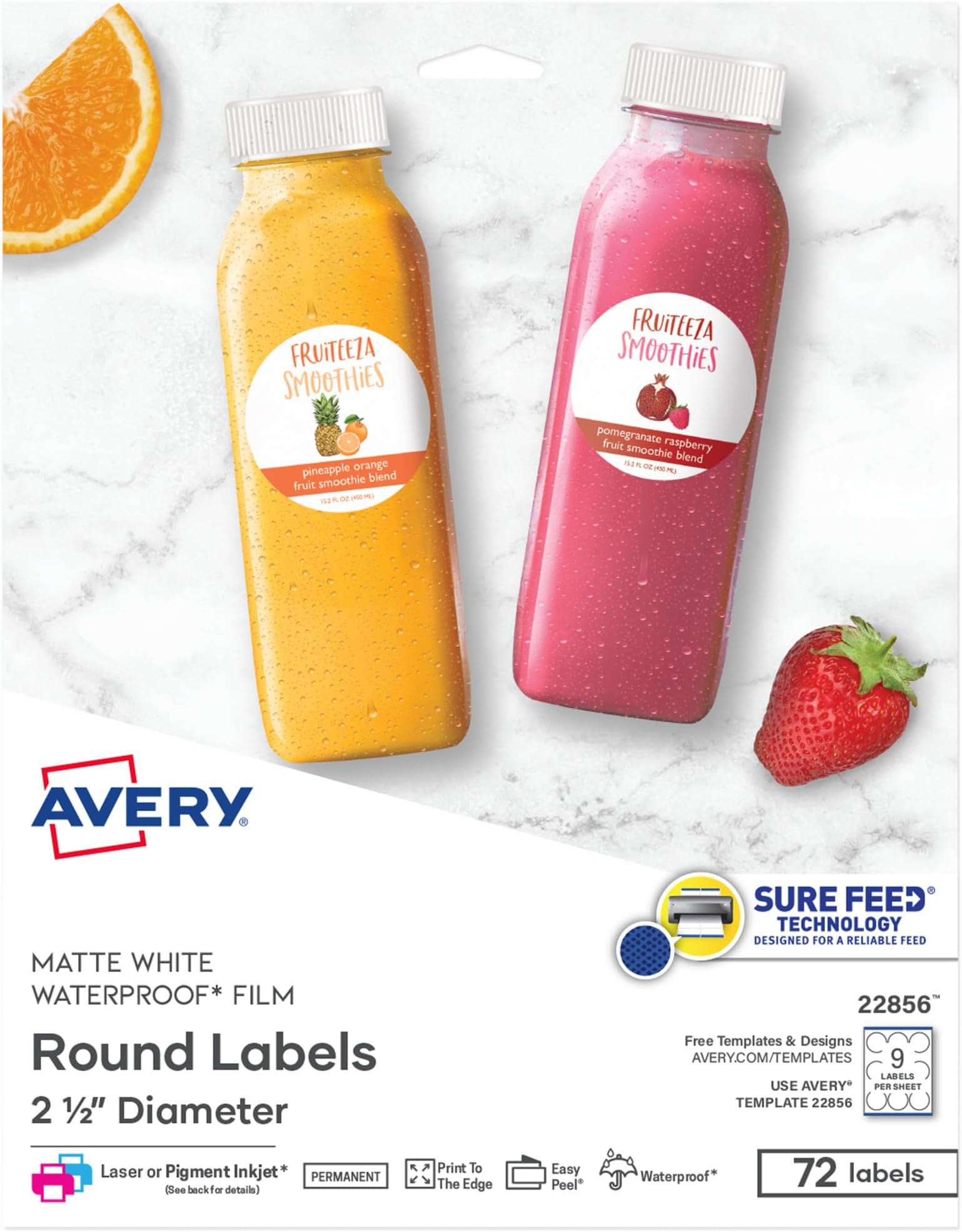
Avery Durable Waterproof Round Labels (2.5", 72 count) feature premium polyester film that withstands water, oils, and wear. Designed for laser and pigment-inkjet printers with Sure Feed technology, these matte white labels deliver crisp, full-bleed prints with easy peel application—perfect for professional branding, packaging, and versatile labeling needs.

| ASIN | B01MCZRE1P |
| Best Sellers Rank | #497 in Office Products ( See Top 100 in Office Products ) #4 in Laser & Inkjet Printer Labels |
| Brand Name | Avery |
| Color | Matte White |
| Customer Reviews | 4.8 4.8 out of 5 stars (12,453) |
| Finish Type | Matte |
| Global Trade Identification Number | 00072782228569 |
| Included Components | White Print-to-the-Edge Easy Peel Round Durable Labels |
| Item Shape | Round |
| Item Type Name | Label |
| Item Weight | 9.07 g |
| Manufacturer | Avery |
| Material Type | Polypropylene |
| Number of Labels | 72 |
| Size | 2.5" |
| UPC | 072782228569 |
| Unit Count | 2 Count |
| Warranty Description | No |
J**T
Good sticker stock
These are the OG sticker stock. ONe of the best things is that the AVery website includes design tools for you to create your own stickers. I make up a few hundred and take to No Kings rallies, family events, and to use for geochaches. Its a lot of fun to create the stickers. These are high quality, glossy stickers, and peel off the backing easily. A bit pricey, but these are the perfect size for a quick button or sticker.
A**Y
Great product. Easy to customize. Sticks well
I love these labels. The avery website makes it really easy to make custom ready to print designs. I got the waterproof ones this time and him glad I did. I have used these to label jars and to make stickers. Print quality looked great and the stickers stick well. I love that I don't have to worry about water with these. They were perfect for what I needed. I'll definitely be purchasing again. These are a matte finish, not shiny. Good for photos. No glare on stickers.
A**R
sticker labels
this are some good labels ...good quality
M**S
Templates Are Reasonably Easy To Use. Labels Look Professional.
I bought Avery Print-to-the-Edge Round Labels (22830) to use on widemouth canning jars. These 2.5" labels fit Kerr and Ball widemouth lids. They are a glossy white label. When printed, colors are vibrant, and the ink dries fast. I've been very pleased with them. You can find pre-designed templates for Microsoft Word on Avery's web site. There are about 75 designs available for the 2.5" round labels. None seem to be designed with canning in mind, however, so I created my own. There are some generic designs that could be used for canning. If you type the label number (22830) into Avery's search, you will get incomplete results. You will get better results if you click the Templates tab at the top of the web page and navigate to Templates > Labels > Round Labels > 2 ½" diameter. There are still designs missing from that list, some of which I found using Google. To design and print the labels, you can use Avery Design & Print Online with an Avery account, or you can download templates to use on your computer. The pre-designed downloadable templates are all for Microsoft Word. Avery offers plain templates that you can use with your own designs for Microsoft Word, Apple Pages, Adobe Illustrator, Adobe InDesign, and Adobe Photoshop. I used the plain template for Apple Pages, as it is easy to work with images in Pages, and I designed my labels in Photoshop. The instructions that Avery offers for templates are to download and make any edits you want on that document, save the document, do a test print, then print your labels. But you can save the downloaded document as a template before you add or change anything, so you will have it for future use in the editing application of your choice. Once your labels look the way you want them, do a test print on paper. You can check the colors, centering, etc. and get an idea of whether the print will align correctly with the sheet of labels. I had one small problem with alignment, but it wasn't the fault of the template. The bottom row of labels was slightly off-center on one sheet, because the sheet did not feed into the printer precisely straight. I'm not sure if I can avoid this consistently, but try to make sure your sheet is completely straight in the printer tray. I could not print these with more than one sheet in the printer tray. My printer would always grab a stack. I ended up putting the sheets in one at a time, which worked fine. I wish I could figure out how to use some of the MS Word templates in Photoshop and Pages, but the frustrations with using my own designs with the Pages template were very few.
M**Z
Loved them!
I love these! I've bought them before at walmart but I think I got a better deal with amazon. They're so easy to use. You go on the Avery website and pick the ones you got, design your sticker on the right template and print!
A**E
Great product. Free online software is a bit clunky.
Pros: These stickers are awesome for low-cost custom branding! The glossy finish and print-to-the-edge factor give them a professionally printed quality. They worked great with the Konica Minolta laser printer at my workplace, and they are easy to peel and stick. They look gorgeous. Cons: I ended up using the Avery Design and Print Online software, and while there were a bunch of different designs to chose from, I had difficulty getting my own uploaded images to print correctly. I ended up scrapping that option due to time constraints and using an Avery design, but it wasn't ideal for my purposes. Given enough time, I may have been able to get it to work, but it was clunky for sure. All in all, the labels themselves are great and I highly recommend, just be aware if you're planning to use your own design that it may take some time to get it to print just so.
J**Z
perfect for bussiness
Why did you pick this product vs others?: These Avery 2-inch round labels are fantastic! The glossy finish looks great, and the permanent adhesive sticks well. They feed smoothly through printers with Sure Feed Technology, preventing jams. Perfect for customizing labels with a professional look—easy to use with both laser and inkjet printers. Great quality and quantity for the price!
T**T
On time
Work good
E**Z
Estas cosas antes tenia que esperar a tener un viaje a USApara poder tenerlas
A**A
Open and missing a sheet not happy
P**I
Not matching with the Avwry layout after printing, tried many times, totally waste my papers time and money. Quality and all are good.
M**A
Legaron en el tiempo indicado, y perfectas para imprimir según el formato de la etiqueta. Es exactamente lo que necesita, son muy buenas como todas las de esta marca. Excelentes.
A**N
Great labels Love you can use these at home on the avery website and design and print your own
TrustPilot
vor 3 Wochen
vor 2 Monaten