Some deliveries may take a little longer than usual due to regional shipping conditions.

Laden Sie die App herunter


Kundendienst
Copyright © 2025 Desertcart Holdings Limited
Laden Sie die App herunter


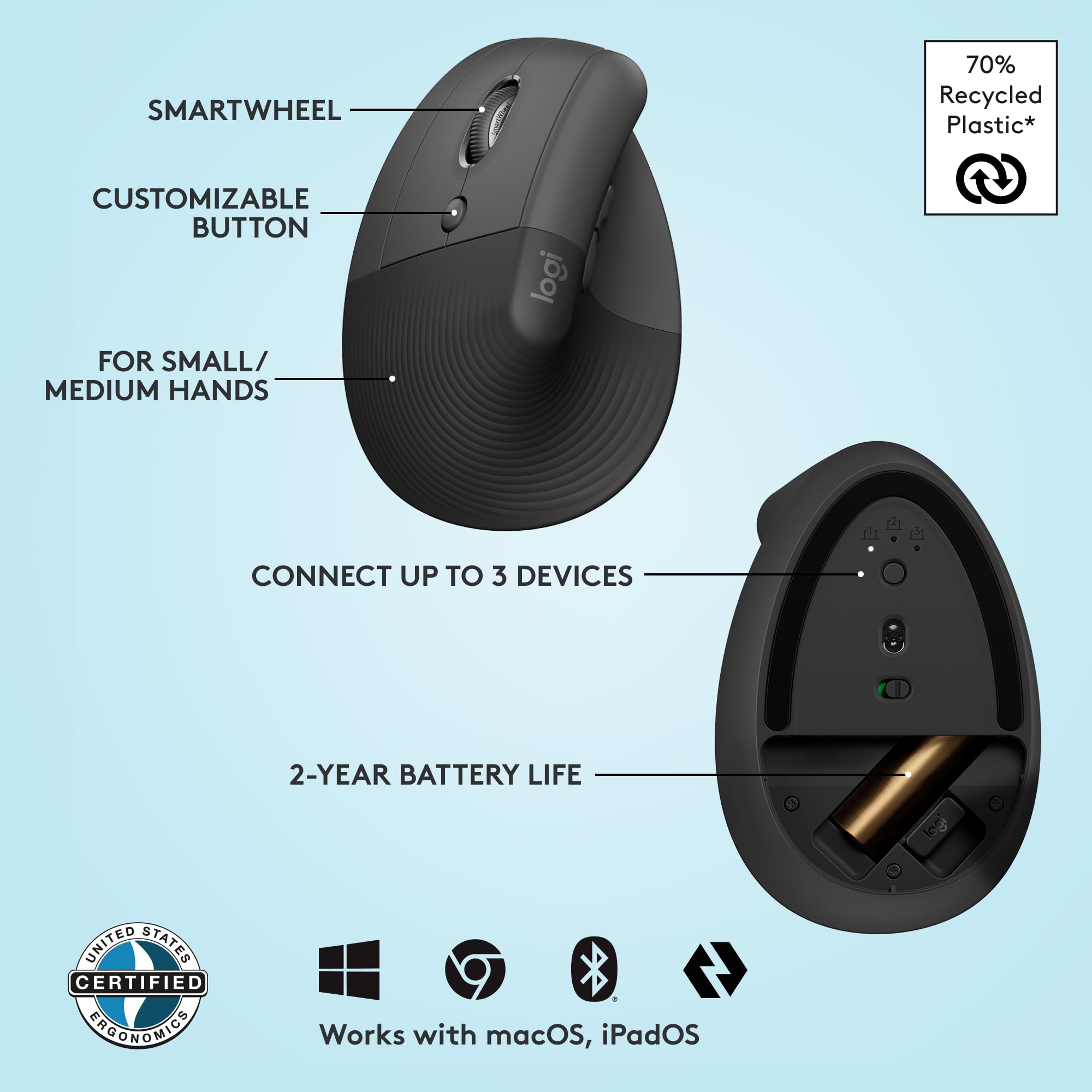


🖐️ Elevate your workday with ergonomic precision and effortless control
The Logitech Lift Left Vertical Ergonomic Mouse is a wireless, left-handed mouse designed for small to medium hands, featuring a 57-degree vertical tilt to promote natural wrist posture and reduce strain. It offers multi-device connectivity via Bluetooth or Logi Bolt USB, whisper-quiet clicks, a precision SmartWheel, and 4 customizable buttons. Compatible with major operating systems, it boasts an impressive 24-month battery life on a single AA battery, making it a durable and versatile choice for professionals seeking comfort and productivity.


| ASIN | B09J1SYX5B |
| Average Battery Life (in hours) | 24 months |
| Batteries | 2 Lithium Polymer batteries required. (included) |
| Best Sellers Rank | #10 in Computer Mice |
| Brand | Logitech |
| Color | Graphite |
| Customer Reviews | 4.5 4.5 out of 5 stars (13,754) |
| Date First Available | April 19, 2022 |
| Hardware Platform | Mac, PC |
| Item Dimensions LxWxH | 5.9 x 3.5 x 3 inches |
| Item Weight | 4.4 ounces |
| Item model number | 910-006467 |
| Manufacturer | Logitech |
| Operating System | Chrome OS, Mac OS X 10.15 Catalina, Windows 10, Windows 11, iPadOS 14 |
| Power Source | Battery Powered |
| Product Dimensions | 5.9 x 3.5 x 3 inches |
| Series | Lift Ergo |
R**B
This Mouse is Great!
Just received this mouse an hour ago and already my arm feels better. Other reviews mentioned a learning curve, but this mouse is simple to use and I feel more productive right away. If you are considering purchasing this mouse and are hesitating, don't....you will not be disappointed. I'll try to update this review as I get more experience, but so far it is great. Update after 1 month: still a great mouse, I have three other computers and I find myself avoiding the others so I can use this mouse...have to consider buying more of them. So far I have not discovered any downside to using this mouse and it is still significantly more comfortable than a standard mouse.
J**J
Good scroll wheel, coming from g305, 18cm hand
For reference my hand 18 cm measured from the first crease after your palm to the end of my middle finger. I flexed my wrist and the first crease I used as my end point for my palm. My arms are at a 90 degree angle, and my wrist is neutral (not flexed up or down) due to my wrist rest keeping my wrist straight. Most of my arm weight is on my memory foam wrist rest. My review is based on my personal hand size Update: After a month I have not noticed any staining on my white lift. But I am also a pretty hygienic person and I never touch my mouse if I touched food. Wrist pain: This might be because I don't have arm rests so the weight of my arm is resting on the wrist wrest, but I had some minor wrist pains within an hour or so. It didn't really feel like a muscle or bone kind of pain, but a nerve/soft tissue pain. When I didn't use a wrist rest, the weight was mostly the side of my hand, in particular the bony part near the wrist. That part rubbed when moving the mouse around if you don't lift your arm. Edit: After some adjustment I no longer get any wrist pain, even when gaming. Palm grip: I think palm grip would be unusable for this mouse. My fingers extend 0.5-1 cm after the end of the mouse (where the left and right buttons start curving). When clicking the mouse it almost feels like im clicking with my finger joint instead of my fingertip. With a relaxed thumb (thumb slightly curved and only fingertip touching mouse) it is pretty easy to click the side buttons. Side of thumb can press upper button, thumb joint can press lower button. With the entire thumb fully in contact with the mouse, the upper button is a bit awkward to press but possible, and the lower button is the same as relaxed thumb position. Awkward to use the scroll wheel since you have to curve your fingers quite a bit to get your finger tip on the scroll wheel but still usable. Also because of the hand angle, I found it much more comfortable using my middle finger to use the scroll wheel instead of my pointer finger that I use normally. Fingertip grip: Personally I found it feeling different, but perfect. My finger length is perfect so my fingers land around or slightly below where the left and right mouse button start to curve. When I click, the direction of the force from my finger is more diagonally down and to the left. If my fingers were a bit shorter, it the force would be to the left. I found this diagonally force feels more natural, kind of like squeezing a trigger (kinda) instead of just squeezing a mouse. It is hard to describe. In this grip, the only part of my fingers (including my thumb) that are touching the mouse are my fingertips. My palm is resting on the mouse. Thumb characteristics is same as palm grip. Scroll wheel characteristics same as palm grim. Claw grip: Works fine, only problem is pushing lower thumb button is a bit awkward since you kind have to shift your entire thumb back but it is still possible. Easy to use scroll wheel since your fingertips end right next to it Compared to g305: The Lift is much more comfortable and natural. I got used to the Lift very quickly. In comparison, the g305 felt like a petite mouse. The g305 felt hollow, like there was nothing supporting my palm. I didn't have any issues with the mouse shifting when clicking it on my mouse pad. Even on a smooth surface with no mouse pad it would happen rarely. Scroll wheel: Excellent combination of a normal scroll wheel and a free one. I can scroll down all the way to the end of reddit threads and spotify playlists in one scroll. Going back up takes a few scrolls however since I apply less force. Smooth scroll supplied by Logitech Options+ is also nice. Makes it feel like scrolling has inertia. There a lot of very nice features in Logitech Options+ like Logitech Flow
T**H
Easy peasy connection
First time using an ergonomic mouse of this kind and it'll take a little bit of getting used to. Color matches the theme of my home office and it has a pleasant feel to it. No lights or RGB on this one. Very easy to move maneuver around with. The mouse is very accurate when you move it around your computer screen. I even connected it to my tablet and the accuracy and speed is great. Fast but not excessively fast. I do feel like that there is less strain on my wrist while using this mouse. It makes resting my hand in the wrist pad easier and more comfortable. The size is okay but I have big hands for a female so there will always be a size factor for me when it comes to various mice. The quality and build of this mouse is very good. I've had quite a few products in the past and now from Logitech so it's a brand that I trust. I'm not even opposed to buying another one of these for the office. Initially I thought I would have a problem adjusting to the scroll wheel and clicker being on the side of the mouse, but it's actually more comfortable and convenient than my current Windows mouse. Scrolling is much easier but still adjusting to clicking on things. I'm sure it'll become second nature soon. Instructions on the cardboard are super easy to follow to set up which devices you want to connect the mouse to. It took less than a minute to connect each of my devices. Being able to scroll back and forth on a website or folder without having to use the browser/folder's back and forth buttons is wonderful. I just have to not hit the left click button when I touch them. I decided to install the Logi Option+ software to see what all I could do with this mouse. I was a bit annoyed the software took longer to install than download. The actual mouse is lightening fast compared to the software. Since I'm just getting the product today and starting to use it today, I'm not able to speak on the battery life just yet. Comes work a typical AA alkaline battery which I'm grateful for, but at some point I'll change it to a lithium battery since those last a bit longer. Yet before I do that I'll check to set if the batteries last at least a year. So back to the software, once it finally installed, it took forever to load so guess that portion will be an update. Any hoo, great mouse with a movie of comfort, convenience, speed, and accuracy. 10/10 recommend!
S**A
I recently purchased the white Logitech Lift Vertical Ergonomic Mouse, and it’s exactly as described. It fits my small hands perfectly, and the ergonomic design sits comfortably in my palm, making long hours of use a breeze. The off-white color looks even better in real life—sleek and modern. The clicks are truly silent and smooth, adding to the overall premium feel. It connects easily via Bluetooth or Logi Bolt, and setup was quick. I'm really glad I chose this model—convenient, comfortable, and stylish. Highly recommend!
M**F
Comfortable mouse, very customizable, I have tested it on different surfaces, and still works very well & smoothly on all surfaces including "plastic & glossy surfaces" :D.
Y**A
I really love it! Works great but for me it hurts my hand more than the horizontal one.
F**O
Esse mouse vale o quanto custa! Há anos que venho tendo problemas com a mão direita por trabalhar com edição de foto e vídeo, ao ponto de os dedos ficarem endurecidos e não conseguir manipular coisas pequenas ou mesmo dar um nó num cadarço mais curto. Alguns colegas de profissão falaram pra eu usar mouse vertical ergonômico, admito que nunca havia me tocado de sua existência. Pesquisei alguns modelos com a metade do preço e todos tinham algum defeito que me desagradava ao ler suas avaliações, ao passo que este da Logitech parecia ser uma unanimidade. Adaptação: IMEDIATA! Tenho mãos de tamanho médio, a mão direita encaixou perfeitamente, as dores sumiram, e os comandos são silenciosos em sensíveis, sem delay algum. É um produto premium. Conexão: pluguei o conector usb e o mouse foi reconhecido de imediato no meu Mac. Nem testei via bluetooth porque uso um HUB com mais portas USB e tinha algumas sobrando. Conclusão: mouse ergonômico premium que vale o que custa, resolve os problemas musculares comuns para quem usa muito o computador, com altíssima sensibilidade e comandos silenciosos e suaves. PERFEITO
S**G
The only and best left handed mouse made by logitech. Quality quality quality product. I would buy this again and again forever if I need to. It surely has made my wrist pain disappear.
TrustPilot
vor 3 Tagen
vor 1 Woche