Some deliveries may take a little longer than usual due to regional shipping conditions.

Laden Sie die App herunter


Kundendienst
Copyright © 2025 Desertcart Holdings Limited
Laden Sie die App herunter

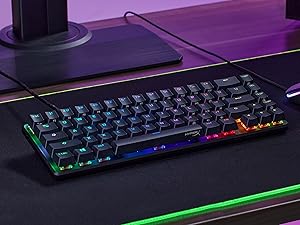
⌨️ Elevate your desk game with compact power and radiant style!
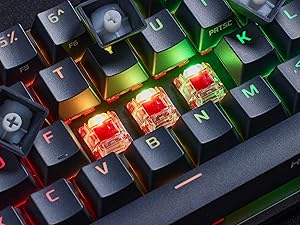
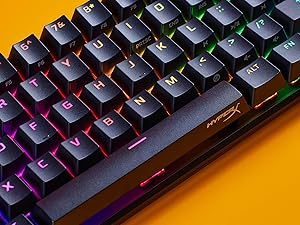
The HyperX Alloy Origins 65 is a premium mechanical gaming keyboard featuring a space-efficient 65% form factor, durable aircraft-grade aluminum construction, and smooth Linear Red switches designed for both gamers and professionals. Its vibrant RGB backlighting is fully customizable via HyperX NGENUITY software, while USB-C connectivity ensures easy, versatile plug-and-play compatibility with PCs and PlayStation 4. Engineered for longevity and performance, this keyboard balances sleek aesthetics with functional excellence to keep you ahead in every session.








| ASIN | B09RB7XB8Q |
| Additional Features | Backlit |
| Antenna Location | Gaming |
| Best Sellers Rank | #1,122 in Video Games ( See Top 100 in Video Games ) #111 in PC Gaming Keyboards |
| Brand | HyperX |
| Built-In Media | Alternative Esc and Spacebar keycaps, Keycap Puller, USB Cable |
| Button Quantity | 65 |
| Color | Black |
| Compatible Devices | PlayStation 4, PlayStation 5, Xbox One, Xbox Series S, Xbox Series X |
| Connectivity Technology | USB-C |
| Customer Reviews | 4.6 out of 5 stars 14,877 Reviews |
| Enclosure Material | Aluminum |
| External Testing Certification | Não aplicável |
| Global Trade Identification Number | 00196188046074 |
| Hand Orientation | Ambidextrous |
| Item Dimensions L x W x H | 13.8"L x 5.8"W x 1.7"H |
| Item Type Name | Gaming Keyboard |
| Item Weight | 2.25 Pounds |
| Keyboard Backlighting Color Support | RGB |
| Keyboard Description | Gaming |
| Keyboard Layout | QWERTY |
| Language | English |
| Manufacturer | HP Inc. |
| Model Name | Alloy Origins 65 |
| Model Number | 4P5D6AA |
| Number of Keys | 65 |
| Number of Sections | 8 |
| Power Source | USB |
| Recommended Uses For Product | Gaming |
| Series Number | 4 |
| Special Feature | Backlit |
| Style Name | HyperX Red |
| Switch Type | Linear |
| Theme | Gaming |
| UPC | 196188046074 |
| Warranty Description | Information Not Available |
A**N
Really impressed
After trying several competing products, this is likely the one I am keeping. Thoughts: 1. The LEDs are really bright. The only other company on par with this are the logitechs. The LEDs just look phenomenal and are true to color, unlike many competitors. 2. The alloy frame is solid and just screams quality. The only thing I don't like is that the keyboard is really thin overall. I prefer to use a wrist rest and I think it will be difficult to find one thin enough to truly match this keyboard's height. 3. The switches are really nice. I got the red linear and they are buttery smooth. They don't really thock but are relatively quiet. NZXT might be quieter but are higher pitched. steelseries was lower ptiched but very thocky, if you like that. 4. The pbt keycaps feel great but the legends on the the symbol keys look a little gamery and not really crisp (eg. ;: looks pretty trash). 5. The stabilizers are really the big problem. There is more lateral play than I would really like (my right shift is pretty wobbly) and they are really rattly. Such a stupid oversight for what is otherwise a really well thought out product, particularly since they chose to make it not hotswappable. 6. It's not hotswappable... I don't really want to swap the keys out, but it would be nice to have the freedom to do a little light modding like replacing the stabilizers with something that isn't trash. All in all, after trying several competitors-NZXT, steelseries, logitech, royalkludge-this is likely what I will keep. The tecware phantom+ is on backorder, so I haven't been able to do a comparison of that yet. Update: I followed a youtube tutorial on how to basically do a variant on the bandaid mod for this keyboard that significantly helped the stabilizer issue. While the stabilizers could use some lube, the main problem is that they are just way too loose on the top plate. I partially pulled up the stabilitzers by unclipping them from the top plate. Then, I cut some really thin strips of electrical tape and used some tweezers to feed them through the part where the clip is and then clamped the stabilizer down on top of the very end of the tape. This made the stabilizers more snug with the top plate and I think the rest of the tape is sort of under the stablizer and the padding it from the PCB. This has made it so the longer keys have a lot less play in them and they are also quieter. I am still trying to decide if I will use a syringe to inject some krytox on the stabilizer bar and maybe the housing. For now, this was a good enough fix and I recommend others give it a try.
T**.
The RGB keyboard for everyone
I picked this up to use across two systems as I recently started using a docked laptop as my daily driver. The usb-c connection makes swapping between systems as simple as swapping a single cable, meanwhile I can tuck the other cable away when not in use. This is replacing the alloy elite and this is my experience so far ... Been using this board since late Feb 2021 and I love it. It has a much smaller footprint than the alloy elite while boasting pretty much all of the same features. At first the removal of the dedicated media keys, volume roller, and dedicated RGB keys was bothering me, but all of these functions are mapped to the function keys on this board. Not having those keys is actually the big thing I love about this board. It offers the same hyper x clicky switches that I love in a much more compact form factor. The build quality is great. The deck is all metal and super slim compared to the alloy elite as well as every other board I've used in the past. It's close to logitech's offerings as far as thinness goes, but without the extreme flex and terrible keycaps. The hyper x keycaps use standard mx stems so using pretty much any keycap set should fit these, though check the questions if you're looking for specific compatibility. I removed the pudding keycaps from my alloy elite and swapped them over to these which ... is a mixed bag. Overall I love the floating keycap design and the backlighting on this thing is both very bright and software accurate. I do miss the the legends printed on the FN keys that tell me which keys do what since I no longer have the dedicated media keys, but it took approximately a day to remember everything. Compared to the alloy elite this board seems much brighter overall. The lowest setting on these switches seems to be brighter than the highest setting on the elite, which could be a placebo effect but I don't know. I can't turn these up to max without it being painful to keep in my periphery. So RGB?? Fantastic on this board, especially with the pudding keycaps. I also really like the adjustable feet that offers you 3 different height adjustments. It's pretty standard these days but I still love to see it. Another thing I love is the numlock/caps lock display. It's positioned perfectly so that you can easily see at a glance which functions you have activated. This was not the case on the alloy elite. The display was placed too closely to the numpad meaning that unless you were sitting up very straight, are super tall, or leaned forward to look at it you could NOT tell what was on/off. This is a big improvement. It seems minor but it really bugged me on the elite. Not much else to say. Keycaps feel great, very stable and it has that satisfying bump I'm looking for in an mx-blue style switch. i love it. So everything about this keyboard is amazing, but it right now!! ... oh wait ... the software Well the software is pretty barebones, isn't very streamlined, and still appears to be in beta from the MS store? I'm not sure as I didn't install this on the computer I'm using right now. I used my old pc (desktop) to set this up since it already had the hyperx software (ngenuity i believe) installed, and it works well enough. While the colors of the keycaps are very accurate in terms of how close they are to what you see in the software you would not notice this with the stock keycaps. The black seems to shift the colors just a little bit so that they appear darker. With the pudding keycaps though they're amazing. Can't complain here. So yeah use the software once to customize your board, then uninstall it. There are plenty of effects to choose from whether you prefer static colors or moving effects ... it all looks great. And with that yeah I think we're done. This is a fantastic keyboard for anyone looking for a better overall typing experience. Do some research about switches, maybe order a sample pack of switches or something, to find the one that's right from you, then go nuts. Great product, will definitely be buying hyper x again if they can maintain this level of quality and value. Good stuff
D**I
Smooth, comfortable, and great value TKL keyboard
I’ve had the HyperX Alloy Origins Core Mechanical Gaming Keyboard for over a year now and haven’t had any problems. The Blue switches are smooth, clicky, and very satisfying to type and game on. The software works great and is easy to use for customizing lighting and macros. I really love that it’s TKL, not too small, not too big, just the perfect size for my setup. It connects easily via the included USB C to USB A cable, and the keyboard feels very comfortable for long sessions. Overall, it’s high-quality, reliable, and excellent value for money.
M**R
Fantastic mechanical TKL
I bought this with the HyperX blue switches to replace a Das Keyboard Pro 4 with Cherry MX Blue switches for work (I am a programmer). I loved the Das, it's a solid workhorse and the clicky cherry blue switches are so satisfying, but it's huge and I wanted something smaller so that I could position my keyboard directly in front of me without pushing my mouse way off to the right. Feel - When I got this keyboard, I put it next to the Das to compare the HyperX blue switches to the Cherry MX blues. There is a slight, noticeable difference. I would say that the cherry blues are _slightly_ crisper, but the difference is negligible. The HyperX blues are still plenty clicky and satisfying. I got used to this keyboard very quickly. I probably wouldn't have noticed any difference if I didn't have them side-by-side. No complaints here, it's a joy to type on this keyboard. Noise - Yes it's loud, that comes with the territory. The volume is comparable to the Das... however... I read other reviews that complained about "pinging" and didn't know what they were talking about. This wasn't a problem with the Das even after years of use. However, in the past few days (after a month of using this keyboard) I noticed that some keys, particularly the Tab and Ctrl keys, make a "pinging" noise after being pressed. It's not as loud as the normal clicking noise of the keys and it depends how snappy and hard you tap the keys, but it's there. It doesn't really bother me but I could see how it might grate on some people's nerves. You could always just turn on some music. :) Design - I love the compact form. There is no wasted space around the keys to needlessly take desk space. The key layout is the same as what I'm used to minus the number pad, no funky layout to make it more compact or cram in extra keys. The spacing feels slightly different compared to the Das; I guess the keys are slightly closer together? Not a big deal, I got used to it in maybe a week or two. It lacks USB ports to plug in other devices, but this wasn't a big issue for me. Like any other mechanical keyboard it is a bit tall and I highly recommend getting a wrist rest like the Glorious Gaming wrist rest (don't forget to get a TKL size). Lighting and software - This was low on my priorities, but I have to say the RGB lighting is cool. This keyboard is VERY BRIGHT. It has 4 brightness levels other than off (25%, 50%, 75%, 100%) but even on the lowest setting at 25% it is quite bright. However you can dim the brightness to whatever level you want with the software. The software, despite all the complaints in other reviews, seems fine to me. It gives you a lot of flexibility for layered colors and effects that are very cool. I have no problems with it other than I wish it allowed you to load the settings from your keyboard to tweak them after you save them to the keyboard, but it does look like it has profiles that you can save and load in the software. Summary - This is a fantastic TKL layout mechanical keyboard that I would recommend for work or games. The blue switches are comparable to Cherry MX blues. However, if you can't stand the "pinging" noise on some keys then you may want something higher quality.
D**.
Solid Keyboard, Lousy Software
This review is for the HyperX Alloy Origins keyboard with HyperX Aqua keys. The quality of the keyboard itself deserves a 5+ rating but, as many others have pointed out, the software is terrible. I have been using Logitech keyboards for the past 20 years and their software is excellent. My longest lasting Logitech was a G15, which was still working great after 9 years, but I decided it was time for an upgrade. My most recent was the G810, which lasted 4 years before the left CTRL key broke. Since their proprietary 'Romer-G' keys are very difficult to replace, I decided to go with another brand this time. PROS: I really like that this keyboard is well-built with a solid metal frame (unlike the plastic Logitech frames). The Alloy Origins keyboard is the same length as the G810, but smaller in width. Once I figured out how to use the horrible software, I like the control I have over the color and effects on each individual key. I also like that I had a choice between the type of keys (Aqua, Blue, or Red) and that they are the widely available Cherry-MX keys. The Aqua keys only make a significant sound when you press hard enough to 'bottom out' the key. There appears to be a very good system for recording macros/key-presses, and for linking presets to individual games, but I don't use that very often. NOTE: On the G810 only the letters/numbers on the keys were lit, on this keyboard the lights 'bleed' out from under the keys resulting in a lot more light. I haven't decided yet whether I like this better or not. CONS: - The software! I searched and watched You-tube videos for TWO HOURS before I found one that showed me how to change the color of individual keys (tip: you have to add multiple layers of effects). There are virtually NO INSTRUCTIONS provided with the keyboard other than to show you which end of the USB cord goes into the keyboard. Almost all of videos I found were just showing off all the different effects (wave, explosion, sunburst, etc...) which I find to be totally useless. I'm 67 years old, I have been playing video games since Pong (1975) and I just want to be able to see the keyboard in low light and find certain keys. - I also had to research what the differences are in the Aqua/Blue/Red key types. Is it so hard to add that to the product description? - Another CON is that the software is only available through Windows Store, which happens to be broken on my account on the PC. I had to create another account so I could install the software, but I can only run it as that user. Why not just have a download link on the company website and install the software like a normal program? - I also don't like that I have to use two keys (FN + another) to turn the lights off/on and to control the sound and media controls. The reason this keyboard is not as wide as the Logitech G810 is because that keyboard has a row of individual keys for all those things (including a 'rolling' control for sound, which I used very often). SUMMARY: I've had the keyboard for about a week now, and I think I'm going to really like it. Now that my key colors are set, I probably won't have to use the software again. I will get used to using the FN key to control things that I used to control with one key, but the real test will be how long this keyboard lasts, and how easy will it be to fix a broken key. (I did buy a 4 year warranty this time...)
E**O
Feelings amazing for typing and gaming.
Recently on my previous key board my W and C key just started only registering had the times making typing feel very annoying, and it had clicky switches so it was load af. Until I got this keyboard, the linear switches feels, amazing, satisfying and more quiet to type on, and since the switches are also much lighter too, it makes gaming feel so much more responsive, I highly recommend this if you’re mixed between gaming and productivity.
P**G
High quality keyboard. Unexpectedly great.
I've had this keyboard for three years and I use it for everything. It is my daily driver for both work and recreation. I've had many keyboards from old IBM heavy clackers, to dome-switch Dells, to gamer-y RGB mechanicals (from another brand), to hand-lubed custom swappable keyswitch types, and this HyperX Alloy Origins Core is my overall favorite to date. It's very solid, reliable, has a consistent smooth and lightly tactile key action (I got the aqua switches) and pictures don't do it justice. It may look like just another black RGB keyboard but the feel, weight, minimalistic design, and lighting quality in-person all feel premium. There is a little rattle from the space bar stabilizers but that's nit-picking and can probably be solved with lube. The well-placed rubber feet and heavy weight keep it from sliding around. The braided USB cable is removable. The TKL is my favorite version of this keyboard not only because it strikes the right balance between size and the keys I most use, but also it's understated appearance with the TKL's black on black HyperX logo. With the bright, programmable RGB lighting it can do wild gamer style but can also pull off looking clean and professional. The keycaps that come with it are not PBT but they are high quality. They have a smooth texture and show fingerprints to some degree but they do not wear down. The font is clear and not obnoxiously gamer-y. Again it hits a balance between understated clean and gamer glitz. After years of constant use, the WASD and spacebar keys still look and feel as good as the rest of the keys without the uneven wear and glossiness that commonly develops with other keyboards. One of my favorite features is the look of the backlighting. Many premium mechanical keyboards do not have backlighting and ones that do often have unevenly lit keys or fonts that have hotspots that just look cheap to me. Not this keyboard; it has the most evenly lit key fonts I've seen. And this keyboard can go bright when you turn it up. The included RGB software is ok. I had no problems with it but understand others have. Good news is you can download up to three different custom lighting profiles into the keyboard itself, so you DO NOT have to have the software running to enjoy custom lighting, animations, or macros, if you are into that.
F**A
Quality Keyboard, Amazing switches, Not the greatest software
The first thing I noticed when I pulled the Hyperx Alloy Core Origins out of the box was the weight. The thing was HEFTY. This just screams quality to me. Usually keyboard around this price range are not made out of metal and if they are it's only on top while the bottom of the board is plastic. This is not the case with this one. The whole keyboard is metal. The frame is very sturdy and the hyperx aqua switches are pretty good. Coming from cherry mx reds, using these aqua switches was a great improvement from my older corsair board. The keycaps that come applied on the board are okay in quality, but there are some better one's out there as far as durability is concerned, but at this price point I am not going to complain. Just buy yourself a good set of pbt keycaps for around 15 dollars. Hyperx sells those as well which is what I replaced the old caps with. The lighting and RGB is extremely bright and has 5 brightness options: Off and 4 levels increasing in intensity. This board outshines by a huge margin my older Corsair k70 lux. I would have given this hyperx and this keyboard a 4.9 out of 5 stars because although I am in love with the board the software is close to being complete trash. I read other reviews prior to purchasing that the software (Ngenuity) was bad, but reviewers tend to exaggerate some things. Not with this though. The software always crashes whenever I attempt to customize the colors and profiles of my board. It occurs randomly every few minutes or so and if it does it erases and undo's all of the customization that you have input into the app. Not only that but you would have to keep the program running to have it save the profiles. Like I said this would have been given a 4.9, but since that's not an option I think giving it a 4 would be lying to the customer who wants to buy this next. Excellent product!
TrustPilot
vor 3 Wochen
vor 2 Tagen