
⌨️ Tap into the future of hands-free productivity—your keyboard, mouse, and air controller, all in one!
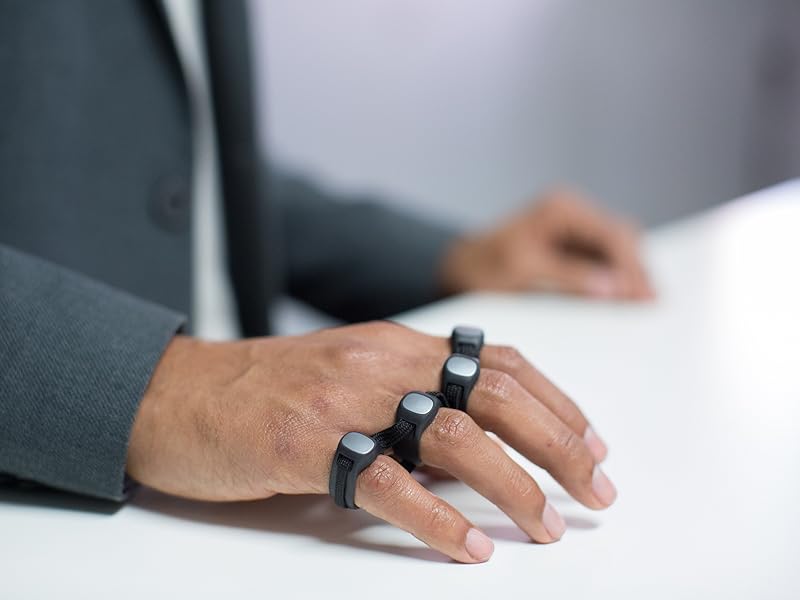
The TAPWITHUS Tap Strap 2 is a cutting-edge wearable device that transforms your hand taps into keyboard, mouse, and air gesture commands. Compatible with VR/AR/XR, smartphones, tablets, PCs, and smart TVs, it supports any language through customizable TapMaps. Ambidextrous and fully customizable, it offers a plug-and-play experience designed for professionals seeking seamless multitasking and mobility.


| ASIN | B09C2K7L73 |
| Additional Features | Wireless |
| Antenna Location | Gaming |
| Best Sellers Rank | #685 in Computer Keyboard & Mouse Combos #1,081 in Tablet Keyboard Cases |
| Brand | TAPWITHUS |
| Built-In Media | 1 x Hand Strap |
| Button Quantity | 2 |
| Color | Black |
| Compatible Devices | Gaming Console, Laptop, Projector, Tablet, Television |
| Customer Reviews | 3.6 out of 5 stars 1,067 Reviews |
| Enclosure Material | Thermoplastic Polyurethane (TPU) |
| Hand Orientation | Ambidextrous |
| Keyboard Description | Micro USB |
| Keyboard Layout | QWERTY |
| Manufacturer | Tap Systems, Inc. |
| Model Number | 1 |
| Number of Keys | 3 |
| Power Source | Battery Powered |
| Recommended Uses For Product | Gaming |
| Special Feature | Wireless |
| UPC | 852325008052 |
| Unit Count | 1.0 Count |
| Warranty Description | 1 Year |
J**Y
Learning faster than I anticipated.
I got my TAP Strap 2 in today and started with the tutorials. I was surprised how fast I started to pick up the 'taps'. I worked through the first couple sets quickly, the tutorial/practice allows you to repeat the practice sessions as often as you like. It rates you by 1,2 or 3 stars, based on your aptitude. I repeated the ones I had only 2 stars on and others that I didn't feel comfortable with. Each practice set incorporates some of the letters from the previous one and you 'earn' special characters when you show more proficiency on a set, so you get period, space, comma, and start learning those regularly used characters very quickly. For anyone concerned about the size, I did find in one of the Q&A a tip to fold a dollar bill in half and if your hand width was smaller than the bill to get the small version. I had measured the width and thought I was right at the 3" mark, so I couldn't make up my mind. When I tried the dollar trick, I decided to go with the small size and it's just right. There is room for me to loosen the strap if I need to. I think the large would have been too big. I was having a little trouble with certain letters at first. I think I was holding my fingers too close together. I found that by spreading them out a bit more, for letters like C, I was able to get a clear tap. I am definitely using the shortcuts for v, and j. Can't make up my mind about z LOL. I'm looking forward to continuing the tutorial and at least getting the rest of the alphabet so I can start working on speed. Oh, I started practicing on my computer, then paired my iPad and did the air tutorial. The left click is giving me some trouble, I don't think I'm keeping my hand in the right position. Not sure I'll use the swiping feature much, as I was more interested in the typing without a keyboard for the iPad. So far, 5 stars. I'll try to update my progress.
T**K
What a let down
I was very excited to get my hands on the tap strap 2, but every step of the process is riddled with unreliable apps, annoying settings, and ergonomics that are out performed by an Adzerd Smart Ring for 20 bucks. Starting with the app, the app is by far the worst part of this experience as it disconnects frequently, and once disconnected you must either completely clear the app data from your device or you uninstall and reinstall it to reestablish connection. And you NEED the app to change your settings, which are also compromised. The settings allow you to configure multiple presets and switch between them witch is nice as it is just a wearable keyboard and mouse on your hands. But the device is soo sensitive that inputs will execute accidentally frequently. This can be mitigated by setting all commands to 2 - 3 taps, but not only can the switch commands not be switched as they are locked by the manufacturer, but they are also 1 tap. Meaning you might accidentally switch your settings and have to constantly try to set them back to your custom configuration. Ultimately i expected this device to allow me to multitask and execute commands while my hands are occupied, but if you don't have a stable surface to tap or something in your hand, the tap accuracy significantly drops, and you won't be able to instinctively operate this device without having to troubleshoot every time you use it. Again the Adzerd ring is what i wanted this device to replace. Its accurate, doesn't need an app or presets, doesn't need a specific surface to operate and can be used even while typing. I'm turning my music on and scrolling through tiktok as i type this, yea good luck doing that with the tap strap 2. Also the mouse feature is clunky and annoying to use too, but of course it is lol.
C**J
Definitely Shouldn't be sold as a Keyboard.
I'm a lifelong wearable computing enthusiast, and I'm old enough that most of my life the outlook has been bleak. This device is amazing...ly close to being usable. I'm a moron, and I was able to memorize the alphabet using their great tutorials and mnemonics in just a few days of 15-minute sessions. And then I ran into the wall, because this device cannot be used as a keyboard. If you double tap e, it inputs e, backspace, exclamation mark. If I am using a program that's not a word processor, which treats e, backspace, and exclamation as different commands, this will severely mess things up and be fundamentally unusable. I'm not smart enough, nor interested in trying to memorize a new set of taps for every single program, and even so, that doesn't solve the issue. And without double-tap and triple-tap working as they should, you don't have enough chords for the entire keyboard. The developers have been repeatedly told of this problem for literally years, and they just ignore it, claim it must work this way. If you don't like it, they say, disable double-taps and then you have a device that also isnt' a keyboard, because it hasn't even got most of the characters available. Can you imagine if your mouse had to perform the single-click action on every double-click? It wouldn't be useable except in EXTREMELY limited circumstances. This device is exactly that. If you imagine yourself using this to type in a word processor or messaging app AND NOTHING ELSE you'll love it. It's super cool and it's actually fun to type on. It makes me so sad that I can't make it my daily use keyboard because it's just ... not one, and the devs could fix it with one very tiny optional setting they steadfastly refuse to add, for *years.* Honestly. I'm only writing this because I'm super sad at what a useless device it is, and how much potential is just squandered.
J**Y
Hard to learn, needs surface like youd have a keyboard on anyways.
I'll start with a quick positive, this is the most portable keyboard and mouse you can find. This is not an air keyboard by any means which I still somehow thought after watching a few videos, that's on me. This dramatically ruins the AR experience. You need a hard flat surface like a desk to use this on. If you're going to have a surface you might as well have a keyboard and mouse in most cases. If you had only one usable hand (or needed to free up one) this might be neat. That's the only circumstance I can see. However, you'd still likely be better off with a keyboard and mouse operated with one hand, even switching between the two...unless you're mobile! (You'll still need to find a surface to tap on) I don't often use my phone with still fixed ergononical surfaces, so it's useless there; and I always use my computers with still surfaces, where there are far more positives to a keyboard and mouse. The air mouse is impossible to use, as to click you move your wrist which is also how you move the pointer. The surface mouse is pretty cool, but requires more cooridination than a regular mouse, as your thumb indepentdantly is the x,y input. Your cursor/thumb is prone to move (not unlike in air mouse mode) when you move any of your other fingers to click, as your hand is all well connected together, unless you keep consistent pressure down on your thumb. This get tiring quickly, unlike a mouse meant to let your hand rest precisely a-top, not moving when you lift your hand or click a button. If you could disengage the mouse movement from your hand before clicking with an extra gesture it might work, but then you've gotta do multiple gesture to click once... Still works alright as a one handed keyboard once you learn it, with surprising accuracy (still less convenient then typing with one hand with fixed position hard keys if you can have space for a keyboard.) Other than for fun, there's just no real point in learning a less accurate, slower, less convenient device. It's a step in the right direction, but there's a few miles to go. Inputs devices can only be made better with consistency/accuracy#1, memorability/speed#2, ergonmics#3, features#4(extra function(fn) or macro buttons),Style#5 This device hits misses #1 Might actually win number #2 if I spent enough time (as I already know how to type, comparitively) Is uncomfortable after short term use so likely missing #3 for most people (experience may vary) #4 Has a world of possiblities if they provision the right type of macro software with a slick interace, not fully applicable yet #5 Looks Awesome, you could wear this around anywhere in this day and age and it would inspire only curiosity, it's very exciting product. (too bad it doesnt work just anywhere you want i.e. walking, at least just yet)
A**I
Phenominal mouse, promising keyboard
The mouse is amazing. 1- I can hold it anyway I like, only constrained by the mouse rest. I found the pictured position to be the most comfortable. 2- It switches seamlessly and quickly between mouse and keyboard mode, so I am not resting my arm in a static strain state. These two factors have led to the most ergonomic mousing I've ever experienced. My hand actually feels better after an hour of use. It's similar to the feeling one gets right after weight training. I've only had the device for a few days, so I cannot fairly assess the keyboard. It's promising so far: I have reached 15 WPM within 2 days, which is way faster than Mavis Beacon could imprint QWERTY on my plastic 8 yo brain. It doesn't seem to interfere with my regular typing muscle memory either, since the contexts are so different. I typically type at 80 WPM, and I saw people on youtube pushing 70 WPM on this device, so I am optimistic about this device eventually replacing my mouse and keyboard. It's already replaced my trusty Logitech MMO mouse as I could get all my hotkeys and shortcuts mapped on the tap strap. Some feedback/requests for the next-gen: - A hard reboot function (e.g. long-press the thumb button). I froze the device once (my fault; I messed with the tap mapping) and had to wait for the battery to die down to perform a power cycle. - A windows version of the TapManager tool. I use the device for my computer, and I have to pair it with my iPhone every time I want to change the settings. - An all-black version. The silver centerpieces on the rings look a bit tacky to me - A sleeve accessory for the charger/case - Decouple ring tightening from adjusting the slack between rings. Currently, I have to do 10-15 seconds of adjustment to find the sweet spot. Not the end of the world, but it would be nice if I can wear it and jump right into using it. In summary, great idea, well-designed hardware and UX, and excellent support from the team. I'm looking forward to relying on this completely once I hit 40+ WPM.
V**R
Awesome idea ... but not quite baked yet - Tap strap 2
I so wanted to love this product - I bought it to help alleviate repetitive stress in my wrist and reduce shoulder strain. The product is well-made, well-presented, and has thoughtful craftsmanship. However, the air mouse function which is the primary function I bought it for, just isn’t there yet - it is inaccurate and quirky. The hepatic is terribly sensitive, and activates/deactivates functions at inappropriate times - often in the middle of a normal mousing task like scrolling - this happens consistently using the air mouse function. Using the mouse-on-hard-surface is rather awkward as it requires a significant flat space to mouse accurately - definitely not useful trying to use one’s leg, sofa arm, or other small flat space. On the positive side, I loved the tapping concept for typing- it was easy to master - though that had some accuracy complications as well - it didn’t always recognize the difference between common finger combinations like ‘space’ vs. ‘delete’, which was problematic. Sadly, because of these issues I had to return the Tap strap 2 - but I eagerly await the next generation of the product!
V**I
Buy it, try it, enjoy it.
Loving it. Learning new "keyboard" is fun. Airmouse and normal mouse are quite easy to use. Had some difficulty with linux mint setup as linux wasn't loading uhid module for some reason. Going to pair it with rayneo's xr goggle to be coding on the move :)
M**R
Excellent
This is a really quality product for the money it costs. It fits very nicely and is honestly pretty comfortable. The app is helpful and it was pretty easy to learn how to type with it. It takes some getting used to, but so long as you know sign language letters, it's easy to pick up on since most of the letters are based on that. It's discreet, which is helpful when you need to take notes or send a text while still paying attention to what's going on around you. Some of the letters can be easily turned into others though if you're not careful, but there are sensitivity settings which help regulate that a bit. After a while, muscle memory pretty much takes care of everything so you can type surprisingly quick. It charges quickly, and the case itself holds several rounds of charge, which is convenient for trips or other times chargers aren't readily available. It's definitely a conversation starter as well. Plus they're much easier to carry around than a full on keyboard for your device or even a laptop. They even have mouse and scrolling features, both of which are very handy. All in all, a very good product and a very cool piece of technology.
TrustPilot
vor 5 Tagen
vor 3 Wochen



