![LINKUP - Ultra PCIe 4.0 X16 Riser Cable (Open Box) [RTX4090 RX6950XT x570 B550 Z690 Tested] Shielded High-Speed Vertical Mount Gaming PCI Express Gen4┃Left Angle Socket {5cm} 3.0 Gen3 Compatible┃White](https://m.media-amazon.com/images/I/61IhmCfLgVL.jpg)

🚀 Elevate your GPU game with LINKUP’s ultra-speed riser—because your rig deserves the future, today!
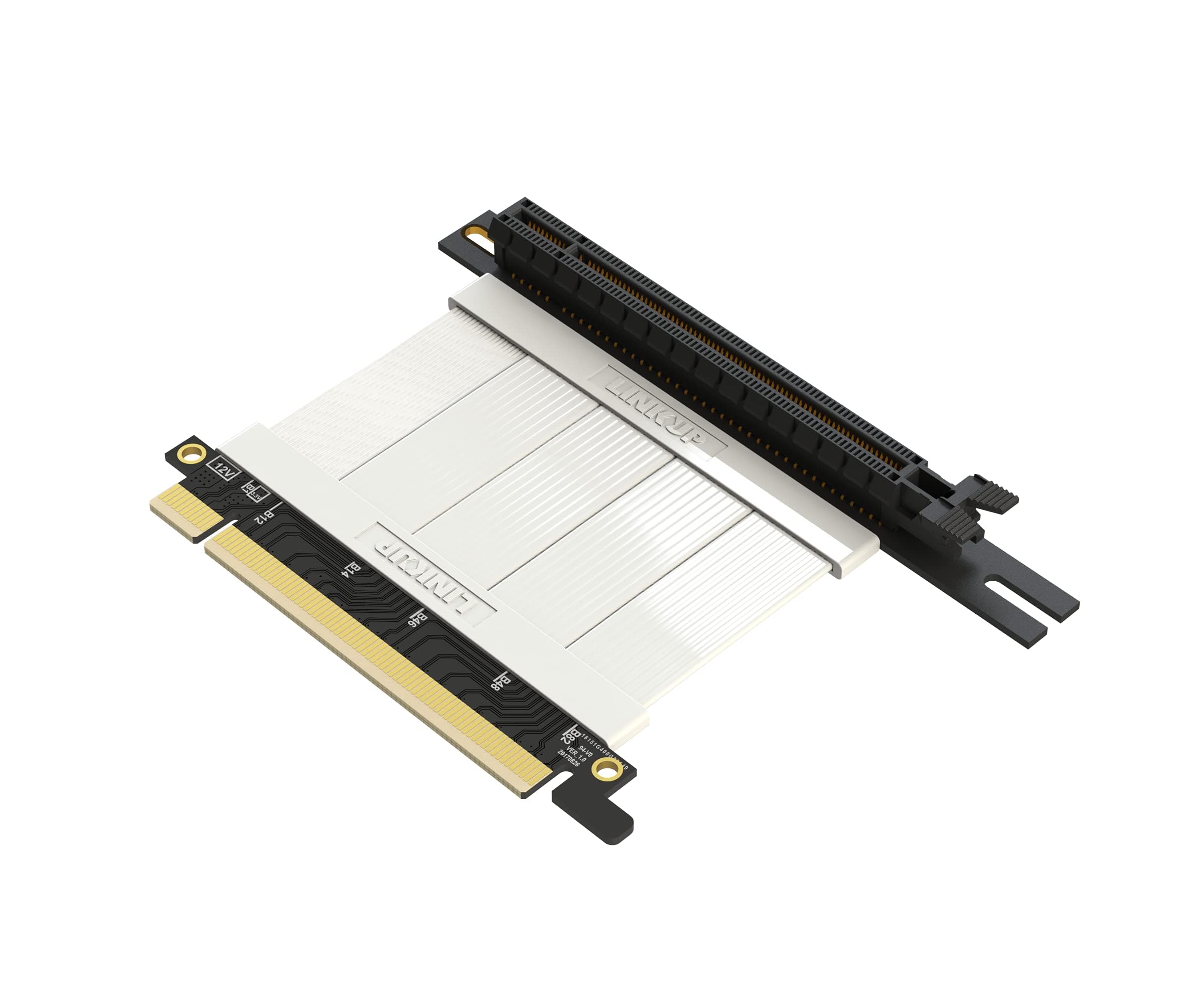
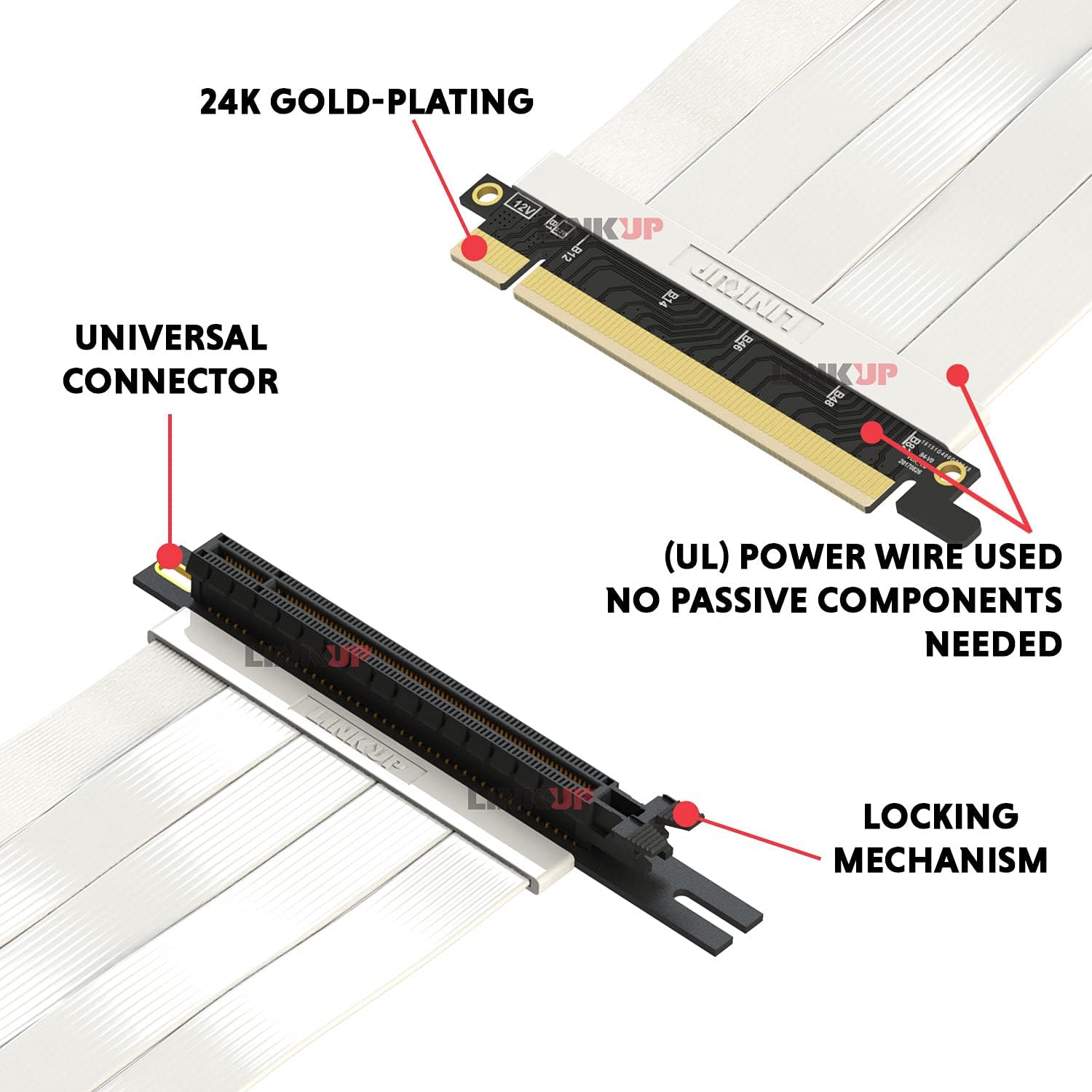
The LINKUP Ultra PCIe 4.0 X16 Riser Cable delivers true PCIe 4.0 speeds up to 64GB/s with advanced shielding and impedance-matched design to eliminate errors and interference. Compatible with top-tier GPUs like RTX4090 and RX6950XT, it supports flexible vertical mounting with superior airflow and durability. Tested across multiple chipsets and backed by a 1-year warranty, this cable future-proofs your build for upcoming PCIe 5.0 GPUs while ensuring stable, high-performance connectivity.
| ASIN | B0DGRM6MML |
| Best Sellers Rank | #158 in Computer Graphics Cards |
| Brand | LINKUP |
| Brand Name | LINKUP |
| Cable Type | Component |
| Color | White |
| Compatible Devices | SSD |
| Connector Type | DisplayPort |
| Customer Reviews | 4.5 out of 5 stars 3,115 Reviews |
| Manufacturer | LINKUP Technology Inc. |
| Other Special Features of the Product | High Speed |
| Special Feature | High Speed |
| UPC | 882991009893 |
W**H
Works As Advertised
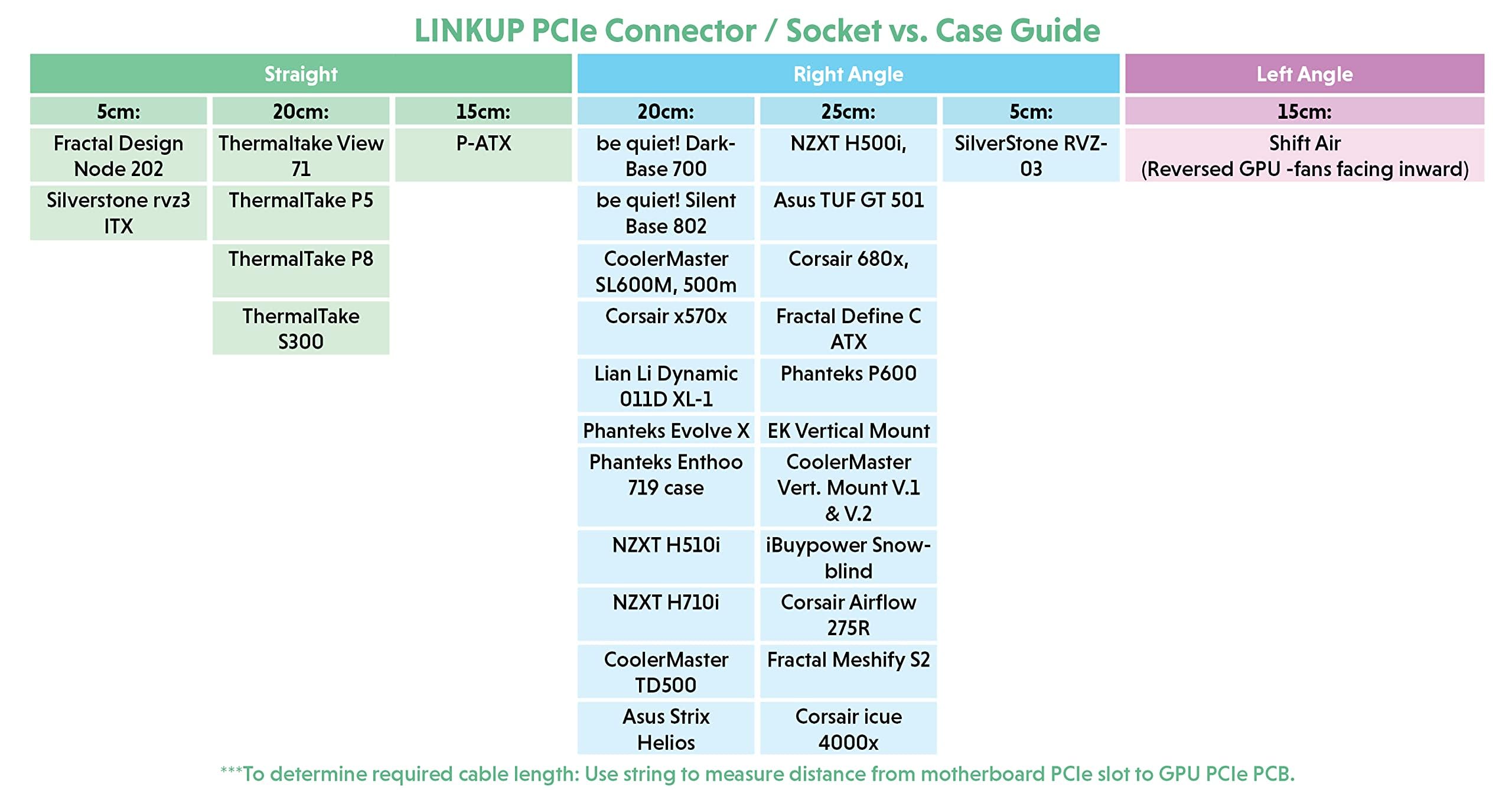
I bought a new Thermaltake View 71 case to accommodate my new RTX 3090 graphics card. My old case fit my GTX 970's snuggly, but that case was a non-starter for the extra inch in length the RTX 3090 has. The View 71 has a built-in bracket for mounting the graphics card off of and parallel to the mobo. I decided to take advantage of this design option, thus requiring the purchase of a riser cable like this one. After doing quite a bit of research, I settled on this LINKUP cable. Particularly appealing with this cable is that it is well shielded against interference and has the bandwidth to support PCIe 5.0. While I'm only using it in a PCIe 4.0 configuration at the moment, the extra bandwidth this cable has guarantees I will get full performance out of my PCIe 4.0 setup. Using GPUz, I have confirmed that this cable is perfectly capable of supporting PCIe 4.0 on all 16 lanes. It is a high quality piece and easy to install. Be sure to use LINKUP's chart to order the right length and connector angle for your setup. For the View 71 case, LINKUP's chart recommends the 20cm straight version, so I ordered that one and it fits perfectly. If you have a setup that allows for mounting your graphics card off of the mobo, I highly recommend you go with a LINKUP riser cable. EDIT: After reading several negative reviews on this product, I thought it important to share my perspective: 1) Cost vs. Value--several comments focus on the cost of this product being "too high", "pricey", "not worth it", etc. My perspective--You get what you pay for. This is a high quality product that is supporting the latest and greatest high end graphics cards. Spending $70 to support a $2000 graphics card is well worth the investment, in my opinion. 2) PCIe 4.0 Capability--several comments suggest this cable doesn't support PCIe 4.0 and causes OS and game crashes when the bios is set to PCIe 4.0 rather than 3.0. My perspective--care must be taken with the install to ensure you have the cable properly seated at both ends. If the cable is not fully seated in the mobo or fully seated on the card, your speed will drop to 3.0 or you will get only 8 lanes instead of 16. Just as importantly, you need to make sure you are inserting the cable into the full size PCIe slot closest to the processor on you mobo. Not all PCIe slots support PCIe 4.0 x 16. Check your mobo info to confirm you are plugging the cable into the right slot. Finally, it is vitally important you order the right cable length and connector angle. Again, LINKUP has a chart that will help guide your choice here for your specific setup. A cable that is too short and thus straining the connections on each end, for example, will not yield good results. Likewise, a cable that is too long and thus resting against other components in your build could be picking up noise that will interfere with the signal quality between your graphics card and the mobo. I've been programming, building, and modifying computers since the 1960's. I've built, customized, and tweaked hundreds of PCs since their advent in the 1980's. I know how to lay a solid foundation and tweak the setup to get the most out of the build. I've verified with extensive testing that this product works exactly as advertised and is a high quality piece. If you're price sensitive, find a cheaper product and you'll get what you pay for. If you are having problems with this product working correctly, troubleshoot your setup before you blame the product. In my experience, that's where most computer problems lie. Enjoy.
K**T
Quality made pcie riser cable
I used this one for my cooler master vertical gpu bracket as I needed something shorter for my micro atx case to which this riser cable did the job pretty well. I was able to bend it well to conform it to my case. My pc was able to detect it right away without issues.
M**R
Speeds good
Works perfect. Speeds are almost identical to pcie 4.0x16
O**M
Works for Corsair 7000D rotated GPU bracket!!
I've tried SEVERAL GPU extension cables, including Corsair's own, and the 15cm version of this extension cable is the only one that properly fits the Corsair 7000D's rotated PCIE bracket for mounting the GPU in the middle of the case. Tested with the Corsair 7000D and RTX 5080 FE and works perfectly! The cable is almost not short enough but just makes the length perfectly without strain once you flex the ends of the cable for that clean look we're all going for. Zero concerns for cable length, and thankfully, not too long like most every other cable (or too short like a few). The only issue was the riser screws from the case was just barely a bit short, so I had to apply pressure from underneath where it screws in, to ensure it seated fully. However I've also had the same issue with even the standard cable, so I suspect it's moreso an issue with the case. Definitely the cable you want for that case. Thrilled to complete my upgrades finally!
R**.
Does what it's supposed to, but lacks some refinement
First of all mounting this thing is kind of a pain. The slots for the adjustment on the 90º bottom portion aren't preset for anything in particular so you kind of have to guess and check as you mount it and hope the card fits, if it doesn't then you have to remove the card and adjust (no way to screw it in when a large card is on it). The instructions say you're also free to drill if you want to because the board on the bottom is just a dummy, which is nice but there is no pre done measurements / specific branding tie in to make it easy. Good for options, bad for quick use. The standard motherboard standoffs and screws used to mount this in the Corsair 5000X also are slightly larger than the slots, so once the screw is in it's kind of stuck until you pop it out. Mine also arrived with the rear secure tab for the PCIe click in portion broken off and missing. It still works, and luckily this is a very large and heavy desktop so I'm not overly concerned, but it is always a little concerning getting something broken already (even if it's just a plastic security piece). That all aside, it went in fairly well, the cord is manageable, and the card seated and booted up. No major reduction in power for the 3080 RTX I've seen, benchmarks seemed normal. Do note that if you have a chonker of a card (mine is a 3080 RTX FTW3 Ultra from EVGA) you may see a slight bit of sag to the rear even after everything is fully secure. Not nearly as bad as horizontal mounting, but just be aware. Also if mounting a fat card in the Corsair 5000D/5000X (and likely moreso in the 4000 series) it will be VERY close to the glass. If you have good airflow this shouldn't be an issue, and GPU temps themselves are pretty solid for me, but if you have your tower pressed up against something or stuffed under a desk you may see more residual heat. That all being said, I specifically moved this because my RAM (4 DIMM of 16GB Corsair RGB 3200MHz RAM) was running too warm right over the GPU. This dropped my RAM temps at idle about 10 degrees Celsius (no joke) and about 8 while doing RAM intensive items. It also helped lower my PCH temp issue on the ASUS ROG Strix Z690-A motherboard because there was a heat zone trapped behind the card near the M.2 drives, lowering that 4-5º as well. No increase to CPU temp by moving it (1-2º drop at idle) with a top mount H150i AIO in 6 fan Push/Pull setup. Basically everything I wanted to help cool I got (and more than expected) at little to no gain in GPU temps. As for the look compared to horizontal mount... I'm getting used to it. It's not bad but it does look weird. All the space you would "gain" isn't really a gain because of the cable, and working on plugging things in on the bottom half of the board is going to be tighter now. With that said it does help hide out cables you have coming out from your PSU shroud or around the bottom of the motherboard. TLDR: Serves it's purpose, works decently, kind of a pain to mount and get a large card mounted but doable, questionable QA out of the factory with a broken plastic part that doesn't impact functionality.
R**5
The part I needed Works flawlessly
Exactly what I needed. Works perfectly, no issues.
J**E
Great for sandwich layout
21cm fits perfectly in a sandwich layout. Cable seems to be good quality amd pcie 4 enabled in bios and runs fast.
C**S
Inconsistent stability at 4.0 speeds
Bought this to use with my vertical mounted 4090, unfortunately this riser wouldn't consistently boot or run at 4.0 speeds in either my main gaming rig or test bench. 4/5 times it wouldn't post, stopping on code 94 (pcie enumeration); if it did manage to boot, running the 3D mark pcie bandwidth test would show inconsistent speeds bouncing between 20GBps and 26GBps. With the card directly installed in the slot, both systems would boot every time, and that same test would show a rock solid 26GBps. I tried everything to get this riser to work: cleaning everything with a toothbrush and rubbing alcohol, attaching extra ground wires to the mounting points of the PCBs, wrapping the wires in tinfoil and manually grounding that, manually flexing the pins in the connector to give a better connection, and couldn't get it to consistently work at 4.0 speeds. I even bought (and returned) a second riser of the same style (and model date/number) that was lian LI branded in case I received a dud unit, but it exhibited the same behaviors in both of the systems I tried it with. At this point I was so frustrated I decided to remove the outer plastic/rubber covering the wires/contacts, and found that while the wires are shielded, the shield isn't electrically connected to ground. Afaik, this would significantly reduce the effectiveness of said shielding, but I'm not an RF engineer. I'm not convinced this was the actual problem with the riser, as it seemed like holding it in a specific position relative to the GPU/slot helped it's reliability. Makes me think maybe the slot/pcie finger are slightly over/under sized, trading reliability for compatibility with as many devices as possible. One way or another, I ended up destroying this riser out of frustration, and returned to the 3.0 riser that's been working consistently for the last 6 years. Buy at your own risk.
TrustPilot
vor 4 Tagen
vor 1 Woche



