We remain fully operational. Our teams are working around the clock to ensure your deliveries continue safely.

Laden Sie die App herunter


Kundendienst
Copyright © 2025 Desertcart Holdings Limited
Laden Sie die App herunter


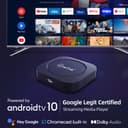
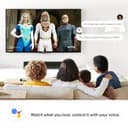


🔥 Unlock your living room’s full potential with Dynalink’s 4K Smart TV Box!
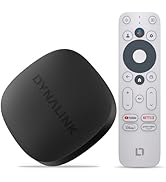
The Dynalink Android TV Box runs on the latest Android 10 OS, delivering stunning 4K HDR streaming with access to over 3000 channels and apps. Featuring built-in Google Assistant for voice control and Chromecast for effortless casting, it offers a sleek, easy-to-setup solution for professional millennials seeking premium home entertainment and smart connectivity in a compact device.




| ASIN | B08YYTVKGZ |
| Brand | Dynalink |
| Color | Black |
| Compatible Devices | Television |
| Connectivity Technology | Bluetooth, Ethernet, HDMI, Wi-Fi |
| Connector Type | HDMI |
| Controller Type | Remote Control, Voice Control |
| Customer Reviews | 4.4 4.4 out of 5 stars (1,117) |
| Form Factor | TV Box |
| Item Dimensions L x W x H | 7.32"L x 4.02"W x 1.97"H |
| Manufacturer | Dynalink |
| Mfr Part Number | Dynalink Android TV Box |
| Model Name | chromecast |
| Model Number | Dynalink Android TV Box |
| Other Special Features of the Product | 4K Streaming, Dolby Audio, Chromecast, Google Assistant, Large Content Library, Netflix, YouTube |
| RAM Memory Installed | 2 GB |
| Resolution | 4k |
| Supported Internet Services | Netflix, YouTube, Google Play |
| Video Codec | MPEG-2, AVC/H.264, HEVC/H.265 |
| Video Output Resolution | 1280x720 Pixels |
J**.
Best little box for the money
Nice little box. Does have limitations, but for the price is amazing. WiFi is excellent, true Android TV BOX, Google certified. Set up is very important, many apps can be uninstalled, the ones that can't most can be disabled increasing storage area. I have put 10 Pro Apps on this device and still have 3.5 gigs of free space. Again knowing how to set up these devices is critical, not going to give a tutorial on this subject. Been streaming live TV channels in full HD quality for 3 days , working perfectly. Remote control is very responsive, Google Assistant works great in all my Apps. Only downfall is no Ethernet connection, you can hook up an OTG cable with Ethernet adapter and USB. Was able to side-load apps form USB Thumb drive using OTG Cable and USB 3Port adapter with Gigabyte Ethernet port. I have been using many of these for my clients, no issues!
I**C
Better then Firestick Good little box. Missing external ports
Nice box. I would be nice to have more then 2Gb ram but still good. Nice to have true Google TV and not mobile android running like most cheap boxes. Comes with a very short HDMI cable so I just bought a cheap longer one. Runs Netflix, Disney+, Amazon, and all the other streaming Apps. You could add Kodi if you still use it. I find much better alternatives without the hassle of Kodi. But unlike Amazon you can simply grab Kodi from the google play store. Played 4K video smoothly in Plex. Even high framerate 4K played fairy smooth. But I dont see anyone using it for that as none of your normal streaming apps free or paid typically do that. Def a powerhouse in a tiny package. someone here said trouble with 5Ghz but I had no issues running 5ghz band at a trade show wifi or at my house.
H**L
Nice replacement for GGCC
Got this to have a little more horsepower when streaming higher quality video since the Google CC kind of fails at anything above FHD / 5.1 audio. I've managed a few different 4K/5.1 / atmos streams without the sever not needing to transcode them which was the goal. There are some quirks though w/ audio through ARC where the volume is at a static setting and not adjustable from the Dynalink. The other thing I like is this doesn't require me to restart my soundbar as often because you can get to the main menu / settings w/o it disconnecting from the SB like the CC. One thing I don't really like is the RF situation with the remote as it's kind of more of an IR remote where you do have to aim it a bit to get it to function w/ the box. Otherwise it's a great little powerful alternative to roku / google / amazon.
D**R
Tiny devices with lots of potential
Almost five stars. It struggled stablishing a connection with my mesh, I realized it doesn't work on 5Ghz, so I had to use my legacy hidden network that I use for the cameras. Once connected to Internet it downloaded an update to Android 10. Booted it up and it was great. I was able to install apps from the Google Play store and even APKs from internet including NordVPN and some streaming apps. I bought it for my home-office old LED tv, but I first tested it on my recent LG OLED with Magic Remote, and it connected to the remote and was able to use a single remote for both devices, the. I realized that both remotes are bluetooth, so that's why. Veredict, I'm surprised about the capabilities and speed of this very tiny device (about 3x3 in and 1/2" tall). It is expensive compared to others, but if you look at their reviews people always complain. This is is almost perfect (except for the WiFi issue I mentioned above). EDIT: After latest updates, it's much more capable and fast. Connects to 5Ghz Wifi. Changing my review to 5 stars.
F**A
A new life for my old TV
I love this TVBox! I have a 42" Samsung SmartTV that is already years old and whose system is already obsolete, it is no longer able to use the applications of the current streaming platforms, so I have been using it as another monitor on my PC to play video games and watch anime in my studio, but thanks to this TVBox I have been able to give new life to my old TV. To my surprise, this device is very small and discreet, so it goes unnoticed, it hardly takes up any space, which makes it perfect for those who want to keep their space clean. Beyond my expectations, it has many interesting functions and works very well with the main HTPC type applications, such as KODI (which is quite cumbersome to configure), it also works very well with the applications of streaming platforms, such as Netflix, Amazon, HBO, among others. It was very easy to configure it and connect it to the network, and it even allows me to perform certain remote actions through Google Home. It also works quite well with the built-in voice assistant that is activated from the remote. Since I have quite a bit of video on my NAS, I used VLC as my video player, and it was really easy to connect it to the shared folders. So far, I have not had any major problems with the TvBox, and given my work model and requirements, I have not felt that it is missing anything else, although other users may miss a USB port or a wired network connection.
TrustPilot
vor 2 Wochen
vor 3 Wochen