We remain fully operational. Our teams are working around the clock to ensure your deliveries continue safely.

Laden Sie die App herunter


Kundendienst
Copyright © 2025 Desertcart Holdings Limited
Laden Sie die App herunter

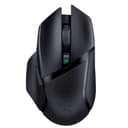







🎮 Own the game with lightning-fast precision and unstoppable endurance!
The Razer Basilisk X HyperSpeed is a high-performance wireless gaming mouse featuring Razer's HyperSpeed technology for 25% faster wireless connectivity, a 16,000 DPI optical sensor for pinpoint accuracy, and an impressive 450-hour battery life. It supports dual-mode connectivity via Bluetooth and HyperSpeed Wireless, includes 6 programmable buttons for personalized control, and durable mechanical switches rated for 50 million clicks, making it a reliable choice for serious gamers and professionals alike.





| ASIN | B07YPBQSCK |
| Additional Features | Ergonomic Design, Portable, Programmable Buttons, Wireless |
| Antenna Location | Gaming |
| Are Batteries Included | Yes |
| Are Batteries Required | Yes |
| Battery Average Life | 450 Hours |
| Best Sellers Rank | #46,588 in Computers ( See Top 100 in Computers ) #1,363 in Computer Mice |
| Brand | Razer |
| Built-In Media | Razer Basilisk X Hyperspeed Wireless Gaming Mouse, Ultra-Long Battery Life |
| Button Quantity | 6 |
| Color | Black/White |
| Compatible Devices | Personal Computer |
| Connectivity Technology | Wireless |
| Customer Reviews | 4.5 4.5 out of 5 stars (25,282) |
| Embellishment Feature | Logo |
| Enclosure Material | Plastic |
| Finish | Matte |
| Hand Orientation | Right |
| Hardware Platform | PC |
| Item Dimensions L x W | 13L x 7.5W centimeters |
| Item Type Name | Mouse |
| Item Weight | 0.2 Kilograms |
| Manufacturer | Razer Inc. |
| Model Name | RZ01-03150100-R3U1 |
| Model Number | RZ01-03150100-R3U1 |
| Mouse Maximum Sensitivity | 16000 Dots per Inch |
| Movement Detection | Optical |
| Number of Batteries | 1 AA batteries required. (included) |
| Operating System | Windows |
| Pattern | solid |
| Power Source | Battery Powered |
| Range | 10.0 meters |
| Style Name | Modern |
| Theme | Gaming/Wireless Technology |
| UPC | 811659035806 |
| Unit Count | 1 Count |
Y**V
Never brakes up)
I've bought this mouse not because my previous was gone/damaged/vaporated, but because the previous Razer Basilisk Ultimate is 5 years old and I've used it a lot :DDD No cons at all, just maybe the battery capacity becomes less after 5 years :D In general - perfect mouse.
A**L
Razer mouse
One of the best i ever had
M**Y
Very good mouse
It's awesome nice, love it
R**R
Decent for the price, but by no means perfect
Since work from home started, I have been using a Logitech Mx master 2S for work. It has been a revelation in terms of what comfort means. My mice now absolutely must have thumb grip and must be wireless. I decided to have a look around to see what is on offer for gaming in a similar design aesthetic with wireless options. Considering the competition is close to 100-150 usd for wireless gaming mice, this one is bargain by comparison. By no means is it without faults, but it sounds a lot more nitpicky once you take price into consideration. It is a nice extremely lightweight mouse (the Mx master feels like a brick for comparison) with good plastic bits. There is a rubberized grip on both sides with hard plastic on top. The thumb grip, while decent could have been slightly wider. In general, it is a very slim mouse, could have used a bit of bulk on the mid section for greater palm comfort (do note I have pretty big hands and always have a "palm grip", a normal sized hand would probably be much more comfortable). The wireless is a breeze, with the mouse running in 2.4Ghz(dongle) mode. Have not felt any lag or issues compared to a wired mouse to be honest. And I am sure the Bluetooth work fine as well (do note that the Bt/2.4ghz switch is at the bottom in case you use it on 2 PC's with dongle and Bluetooth mode, so switching is not going to be easy). While I haven't personally used it, there is Razer Synapse to re-map the buttons as you feel like. You can change the DPI using the switch below the scroll wheel all the way up to 16,000. It is battery operated, so you will need a supply of rechargeable AA batteries. Good news is that it uses just one. There is no wired mode option on this mouse. There is no RGB as well if that matters to you (not even a little bit). Its a pretty good mouse for the money. It points and clicks perfectly, no need to spend more on flashy stuff that isn't really needed.
J**R
Doesn't sit flat on a surface. Rocks when clicked.
I love Razer, but this mouse was a disappointment. It doesn't sit flat on the surface and always rocks when I right clicked, making it completely unusable. No mouse feet missing. I thought I could replace my 2 year old G502 lightspeed with this. I see now I was utterly mistaken.
V**M
scrolling problems
scrolling problems in 2months of use. do not worth the money it costs. real price ~$30 charging station do not work after 1month of use money down the drain
L**A
Cheap Mouse = Cheap Build
PROs: Wireless Lightweight comes with energizer battery One touch DPI Switch CONs: Build quality is plastiky Doesnt look Premium No RGB CONCLUSION: In comparison, my Logitech g602 feels more premium than this.
A**Z
Amazing mouse!
Compared to my previous Razer Basilisk Essential, the Razer Basilisk gaming mouse is unquestionably an improvement. Impressive responsiveness and speed make it a fantastic option for fast-paced gaming. The ability to quickly rebind the mouse's buttons using Razer Synapse is one of the features I value the most. It's a useful feature that enables customization based on personal preferences. Additionally, the mouse's versatility is increased by the capability to create and save various profiles for various games or applications using Razer Synapse. The Razer Basilisk's ability to store mouse profiles directly on the device itself makes it simple to switch between profiles without using any additional software. The mouse's design is also noteworthy because it is cosy. Thus can comfortably be used for long periods of time. Overall, for gamers looking for a high-quality, adaptable mouse that can meet their needs, the Razer Basilisk is a great option.
Z**.
This is single handedly the best mouse on the market currently. Having 6+ months with this device really showed me the following: ++Responsive side buttons ++Great precision when using mouse ++Incredible mouse battery ++Rubber pad grips +Bluetooth and 2.4 USB connectivity +Razer software (good software for mouses) -Heavy mouse (does not matter to me) -Sharp edges (only near the bottom) --Mediocre magnet for the shell (does not during gaming or work) even though this mouse is relatively heavy this is still a mouse I'd recomend for work and gaming, though if you are looking for a cheaper alternative with a lighter mouse go and check for the razer deathadder essential mouses, those are ones I recomend if you are already into razer. Else go for the Redragon M656, its a decent wireless mouse. 5/5
A**L
Mi Logitech G502 le comenzaron a fallar los botones así que elegí este modelo como sucesor. El G502 tiene piezas metálicas para agregar al gusto y personalizar el peso y distribución del mismo, en teoría es genial pero en la practica sin tener conocimiento sobre como hacer el ajuste es algo molesto, el Razer ya viene con un peso predeterminado el cual es el ideal. Mientras que el Razer tiene un ajuste manual sobre la resistencia de la rueda al girar, el punto mas ligero no es lo suficientemente ligero para mi gusto, en cambio el G502 tiene un botón que ajusta una resistencia "normal" cercana a la mas ligera del Razer y hace el cambio a ninguna resistencia lo cual permite que la rueda gire por inercia lo cual es genial al navegar en paginas por internet, es un punto en el cual en mi opinión le gana al Razer y esperaba que también lo tuviera. El cable USB que incluye es muy suave , muy cómodo si no vas a usar el dock y vas a conectarlo directo al mouse. El dock es genial y muy útil cuando te acostumbras a colocarlo para cargar a la primera. La iluminación es genial, el software tiene muchas opciones, es tedioso si no te gusta meterte demasiado a los ajustes, pero genial si prefieres personalizar lo mas posible tus periféricos. Si tuviera que mencionar algún "contra" del dispositivo solo mencionaría dos. -El ajuste de la resistencia de la rueda debería tener la opción de cero resistencia. -La batería no dura mucho, si usas el ajuste de la iluminación a la mitad (intensidad), en ese nivel podría durar un turno de trabajo, la carga es relativamente rápida pero seria genial mas capacidad de parte de la batería. Si vienen de algún mouse mas económico es una buena opción, pero sugiero esperar a la temporada de promociones para conseguirlo a precio atractivo y vendido por Amazon, también sugiero invertir en una garantía extendida por si las dudas. Actualización: Debido a que es mi primer mouse de esta gama inalámbrico y con un dock hay un detalle que me atrapo desprevenido y puede que les sirva. A dos meses de estarlo usando continuamente empecé a notar que tardaba en habilitarse después de haberse apagado para ahorrar energía y al montarlo en el dock a veces no lo ponía en carga y solo se quedaba con el patrón de luces. Al parecer la memoria del mouse se satura y comienza a ciclarse o congelarse al hacer cambio de acciones (pasar de hibernación a activo o de estar en uso a cargando, incluso note que la batería le duraba menos) lo cual se soluciona apagando y volviendo a encender el mouse desde el switch en la parte de abajo , después de esto reacciona igual que el primer día de uso, ahora lo apago cada que me voy a dormir y lo dejo en su dock cargando.
A**L
Was soll man dazu noch sagen? Eine wirklich tolle Maus! Sie kann sowohl über Bluetooth als auch mit einem Empfänger verwendet werden und ermöglicht die nahtlose Arbeit mit zwei Systemen, ohne dass man umstecken muss. Diese Maus lässt keine Wünsche offen,
C**R
I'm not an Apple fan-boy, but I do love my MacBook Pro 14 M1 Pro...just love it. With that in mind, I wanted to flex the mini-LED screen of my beloved with games like CoD, so of course I needed a decent gaming mouse that would be up to the FPS tasks the game would throw at me. Trouble was I didn't want a USB-A dongle sticking way out of my otherwise puma sleek beauty of a laptop (even more so because in order to use the dongle, I would have to use a USB-A to USB-C adaptor, which would just look ridiculous - COME ON Razer, Logitech, and a host of other manufacturers, why haven't you yet embraced USB-C 2.4 GHz dongles), which really limits me to two just gaming mouse offerings from the two big boys: Razer and Logitech, that have Bluetooth connectivity onboard. I grabbed this mouse on super sale, and so far I'm pretty happy. It's not a flagship Razer mouse; it lacks a rechargeable battery, wireless recharging, and even lacks the snappy looking LED lights found on so many gaming mice, which I personally really like...within reason. But this mouse is a bonafide gaming mouse with a DPI and polling rate to match, and equally importantly, this mouse has excellent ergonomics for right-handed people (left click button is higher and at a different angle than the right click, making it incredibly comfortable to use). Sorry left-handed people...though you are in the minority by quite a bit here. Anyway, if you're looking for an inexpensive, no frills, but effective, dual-connectivity mouse with great ergonomics, I recommend giving this one a go.
K**S
First review I wrote in November 2022 couple of months after purchase Energy drains off the battery in couple of hours. Forget months. Even Duracell batteries wouldn't last after using it for couple of months. Not sure if this is specific to this piece or in general. Editing the review based on Dec 2023 The mouse stopped working and there no way to revive it. After spending so much of money and energy, the product turned out to be extremely dissatisfactory. Not sure if Amazon is sending substandard products or Razer is bad. I see 19000 odd reviews with majority advising its good, but the experience is pathetic. Next mouse I'll probably buy at store who are at least ready to answer and certify the authenticity. Happy shopping!
TrustPilot
vor 2 Wochen
vor 3 Tagen