
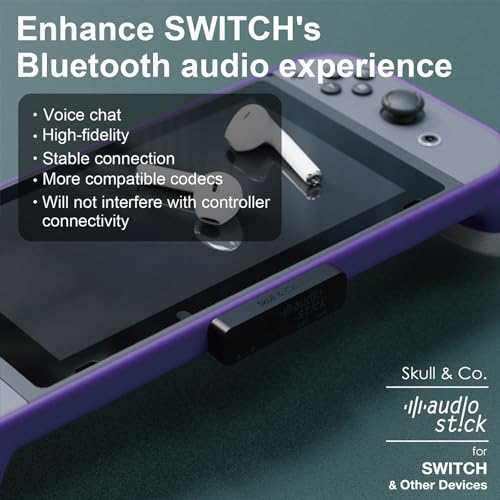

🎮 Elevate your game audio—wireless, flawless, and built to fit your lifestyle.
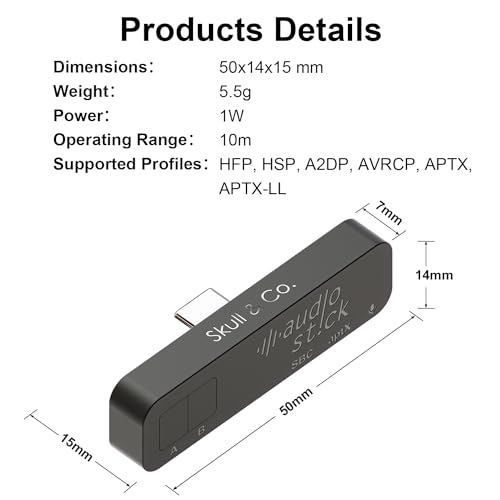
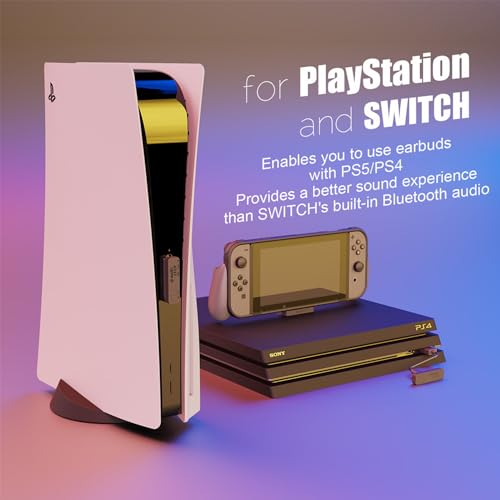
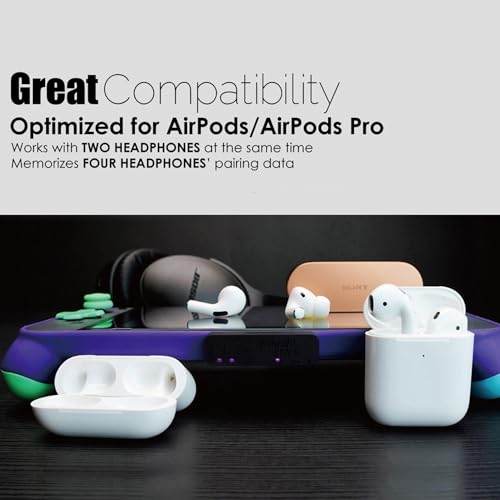
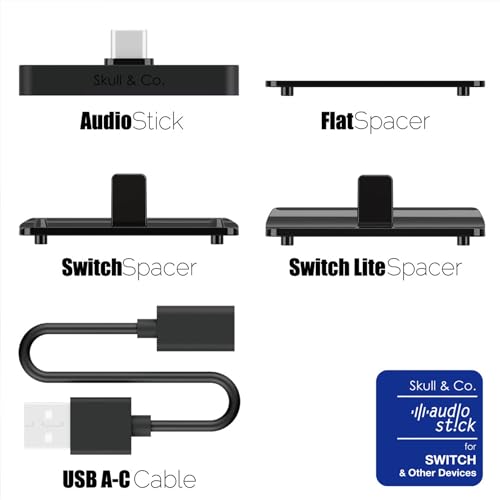
The Skull & Co. AudioStick is a sleek, ultra-thin Bluetooth 5.0 transmitter designed for Nintendo Switch, PS4, PS5, and other devices. It supports dual headphone connections, low latency codecs like aptX-LL, AAC, and LDAC for near-zero lag, and comes with custom spacers for a perfect fit with or without protective cases. Optimized for AirPods and most Bluetooth headphones, it ensures stable, high-fidelity wireless audio, enhancing your gaming experience with seamless plug-and-play versatility.
| ASIN | B08DZRJD2N |
| Color | Black |
| Connectivity technologies | Bluetooth, USB |
| Customer Reviews | 4.5 4.5 out of 5 stars (1,507) |
| Date First Available | July 30, 2020 |
| Human Interface Input | Buttons |
| Item Weight | 2.4 ounces |
| Item model number | AS01-BK |
| Manufacturer | Skull & Co. |
| Other display features | Wireless |
| Product Dimensions | 6.69 x 4.13 x 0.79 inches |
| Special features | Low Latency |
C**U
Best Bluetooth Audio Transmitter for the Switch and Switch Lite!
I’ve liked the products Skull & Co. puts out since their first comfort grip case for the Switch. Since then they have improved the design even further and it’s obvious they put a lot of thought and care into their products. I had been planning on getting a Bluetooth transmitter from one of the other companies once I purchased a wireless headset. By this time Skull and Co. had launched their Audio Stick and again it was clear they took their time wisely figuring out the best way to incorporate their product to function well with the many options of cases and grips different people choose to use with their Switch/Switch Lite. It’s obviously designed to fit perfectly with their brand name grip cases for both Switch and Switch Lite by designing the transmitter to have a slightly extended male USB-C so the unit is flush against the case and the extended USB-C still fits all the way into the female port on the bottom of the Switch. They also thought ahead about the limitations this would cause for those who don’t use a case at all or use others grips that aren’t full cases, leaving the bottom of the Switch open, like the Satisfye grip, which would result in about a 1mm gap between the Switch and the Audio Stick due to the extended USB-C design. To mitigate this they came up with the “plate design” where you are provided with a selection of plastic spacers individually designed for the Switch, Switch Lite, and a universal flat spacer plate to be used with other non-Switch products and they perfectly fill the gap. It may sound like a hassle if you’re like me and don’t use a full grip case, because the other Bluetooth transmitter brands are designed to just fit as is and wouldn’t need an added spacer to worry about possibly losing. But because I respect the effort Skull & Co. puts into creating quality products I decided to deal with needing to use their device with the “Switch plate” installed. It turned out to be just perfect. The plate, once installed onto the Audio Stick is nice and snug and will not slide off accidentally, which was my main concern. The Skull & Co. Audio Stick fits on the Switch much more securely than any other brand would because the plate design has perfectly molded curves and includes the small bumps to fit into the two little holes on each side of the USB port as well as the rectangular notch on the back of the Switch. Unlike the other transmitters, any pressure placed on the Skull & Co. Audio Stick will not be putting stress on the metal USB piece and causing it to potentially break off inside your Switch. The plate’s added features for fitting the mold provides all the resistance you’d need if pressure was placed onto the device, so you’ll never have to worry about that either. You’re also provided with a USB-C to USB-A adaptor with about a 4 inch cord so you can connect it to the dock without blocking the other USB port. They were also smart about their packaging... Knowing most consumers are not likely to be putting every spacer plate to use and Switch Lite owners won’t really have a need for the dock adaptor, they designed a little box that opens like a book and inside is a nice hard foam material with precise cut-outs for everything, the Audio Stick, the different spacers, and the dock adaptor, so everything can be kept organized in a nice durable package. And in regards to the quality of the Audio-Stick itself, it works great! It has the ability to read and perform with the proper codecs for low latency devices that use features like aptX and has LED indicators to show which codec is being used. They state that this product was optimized for Apple Air Pods, which I don’t think are aptX, but only SBC. Regardless of the dreaded latency it seems everybody is mentioning when it comes to using Bluetooth audio while gaming, my inexpensive wireless earbuds cost a small fraction of the price of actual Air Pods, the codec LED indicator is showing SBC, and I have not been able to notice any latency at all. Everything works perfectly. My only concern is regarding a full size wireless Bluetooth gaming headset I purchased from Turtle Beach. It is designed primarily for PS4 and PS5, but said that it works great with the Switch as well. It comes with it’s own proprietary USB-A dongle, and it does work great docked, and also portably, since I already had another adaptor that is the opposite of the Skull & Co. one, where it is male USB-C to female USB-A. I was really hoping the Skull & Co. Audio Stick would be able to recognize this headset but so far I’ve only been able to make it work with the dongle it came with. However, it’s not a big deal since I have everything I need to make both my wireless earbuds, and my Turtle Beach headset work well with the Switch, portably and docked. It would’ve just made it more convenient. I have not yet tried connecting 2 sets of Bluetooth earbuds, or headsets to the Skull & Co. at once, but just like the other transmitters, the option is there. It has a built in microphone which I have also not tried using. Overall, I think the Skull & Co. Audio Stick is the best of its kind out there. It’s basically the same price as the others, but provides a lot more in terms of features and functionality. It’s also nice and sleek, not bulky at all, and fits perfectly. Being all black with its small LED indicators and 2 buttons flush on the bottom makes it so you won’t get distracted while playing handheld. If you have a decent set of earbuds or a headset that is not super low latency or aptX, and doesn’t require a proprietary dongle to work, I wouldn’t worry. As long as it’s Bluetooth 5.0 and basic SBC or better I’m sure you will be very happy with the results. I definitely am!
H**A
The best audio bt dongle for Switch period
First a bit of background, I’m around 4 months looking for a wireless headset solution for Switch, I ended getting so many gizmos to achieve my goal but no one worked the way I wanted. My first attempt was the Gulikit Air Pro+ tested it with Sennheiser 350BT, the results were horrible, the dongle fails to keep stable connection, it drops randomly, add to that annoying audio hiccups and the experience is awful. My second attempt was using Artics 1 from SteelSeries, they are specifically advertised to work with Switch, and while it works with no lag and comes in all-in-one package the audio quality of the speaker itself was pretty poor, maybe I’m spoiled by Sennheiser audio :p Finally came across the AudioStick from Skull’n Co, I said finally because truly it’s the only dongle that works, it was a long journey, but now I can enjoy the amazing audio quality from my PXC II with no lag, no connection drops, no hiccups, it detects the headset as aptX LL and pairs within minutes. If you are an audiophile you own yourself the AudioStick, it just works perfect, has great build quality, flawless aptX LL compatibility.
R**Z
!Compatibility and Stability!
I would like to start off saying that I've used the following Bluetooth adapters -Gulikit Route Pro -Gulikit Air -Genki Audio Bluetooth Adapter -Vive Fox BT Adapter -Mpow BT Adapter -Tao Tronics BT Adapter -Homespot and that I only have a few gripes with AudioStick as it simply trumps all of the others. As using the others always had caveats that actually bothered me and hampered my experience. If this was available released at the beginning of the Switch's launch I would souly recommend only this adapter. The only stuff I could say the others are better at are -The Gulikit Route Pro is longer and that it's more compatible with more heavy duty cases -The Genki (all though limited and pricier) offers more color options -Due to it being flush certain device stands would have all the weight resting on the adapter itself which is not safe -There is no bypass charging (never used it even with the other adapters but options are options (Also the led lights on the AudioStick are Purple which can either be good/bad as it's only visible at the back and bottom) During the years of owning the Switch through Schooling and Traveling I always found that the speakers were always to quiet. Plus with phone companies removing the headphone jack to sell their own Bluetooth Earbuds, carrying wired audio is getting more and more inconvenient as time goes on. So I sought out some Bluetooth options. My gripes with adapters like the Gulikit Air, Genki, Homespot, and Vive Fox was that they're only useable on Switch's with no case. Mpow and Tao Tronic Adapters generally have to be charged and can't be running while being charged. There are some exceptions but it's annoying over all. The GulitKit Route, Genki, and Vive Fox just hangs at the bottom. The Gulikit Route Pro fits alot of case and even comes with an adapter to be placed on the back so it doesn't have to hang from the bottom. My problem was that with a case on it has to dangle at the bottom no matter what, the adapter is to tight against the Switch and blocks some of the vents. The way it's designed actually works better with the Genki and Vive Fox. The fit also seemed to wiggle which isn't always the best feel. Most of these adapters don't tell you which Audio Codec is being used but both the Homespot and Gulikit Air tells you just like the Audio Stick. My problem with the others is that resetting them can be hard and it won't even connect using the right codec. Some of them refuse to connect to some of my devices at all. My Sony Headphones and Soundpeats True Engine 2s both support Aptx. The Gulikit Route, Genki, and the Tao will only Aptx with the Sony but not the True Engines. All of them except the Tao Tronics and Gulikit Air will not Aptx with my True Engines. However even they will only connect for 30 seconds before constantly pairing and unpairing. All of these adapters don't support Voice Chat by themselves except the Audio Stick. The Audio Stick doesn't need an extra mic like both Gulikits and Genki. As it'll use the microphone straight from the Bluetooth device you're using if it has one. I used two. Yes TWO sets of True Engine 2s and I was surprised that not only did they connect and work but they didn't disconnect in the first minute too. They also had voice chat and Aptx enabled. The pairing buttons are nice and firm. Not the weird squishy ones like on the Gulitkit Route and Air where you press hard and hope it actually counts as a press. They include Adapters for when using a Switch, a Switch Lite, and for other Usb C devices. No Adapter is needed for when both the regular Switch and Switch Lite have a case on. The Audio Stick fits nicely even when in a carry case I've tested 10+ devices with the AudioStick and not only did they pair without a problem. They connected using the correct audio codec and remain connected throughout the duration of use. When a Bluetooth device is turned off and you leave the Audio Stick plugged in it auto turns off within a minute but only requires you just to press a button to turn back on. All the other Bluetooth adapters would leave me a feeling of wanting a better product that actually works. The Audio Stick on the other hand makes me feel content and satisfied with my purchase. Just buy it already. (Edit as of August 2021 - I noticed some people having to manually turn on voice chat mode. For the guy having trouble on Ps5 I can't offer any help. Mostly cause getting a Ps5 for normal price still isn't possible for me or most of us. For me when playing games with Voice Chat the Audio Stick automatically turns on the mic. After then you could press it as a form of self mute button incase your audio device doesn't have one. A great way to test your mic on Switch is install the game Warface and go into their settings. There's a settings tab in there to see if your Mic will turn on and it even let's you hear what you sound like through it.)
S**G
Works great with PS5 - AirPod Pro 1’s
I am currently using it with a PlayStation 5 and 1st Gen AirPod Pro’s and works great with no noticeable latency (noise cancellation & transparency mode works like normal as if you were on a iPhone). Also works with the PlayStation 5’s “3D for Headphones” option. One problem, however, is the sound quality, as it isn’t too great, it still sounds good and better than if you used Apple’s wired headphones but it isn’t as great if you used it with an iPhone. Overall, I think the value for money is pretty good, I’d rate 4.5 stars.
H**E
Buenas calidad pero no sé si son los headsets o esto pero no se escucha bien pero su conección es optima
Y**M
رائع جدا وعلبة المنتج منظمة مرتبة بشكل رائع
H**S
Works fantastic. Was able to connect my ps5 to my alexia as my monitor doesn’t have speakers effortlessly. 5 stars easy.
E**L
Using it to pair Airpods pro gen 2 and Bose QC 35 II to a PS5 - works perfectly!
D**Y
Flawless function with ps5 phat and slim and coupled to sennhauser BT headphones No lag not connection problems
TrustPilot
vor 4 Tagen
vor 3 Wochen



