We remain fully operational. Our teams are working around the clock to ensure your deliveries continue safely.

Laden Sie die App herunter


Kundendienst
Copyright © 2025 Desertcart Holdings Limited
Laden Sie die App herunter


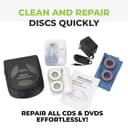
💿 Restore. Refresh. Replay. Never miss a moment.
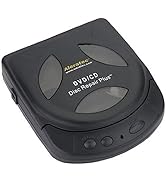
The Aleratec Motorized DVD CD Disc Repair System combines a precision motorized cleaning mechanism with a specialized repair solution to improve disc readability and playback performance. Designed for portability and ease of use, it effectively reduces skipping, freezing, and read errors caused by minor surface wear, extending the usable life of your CDs and DVDs.



| ASIN | B0002A9SJ2 |
| Best Sellers Rank | #7 in Audio & Video Disc Repair Kits |
| Customer Reviews | 3.9 3.9 out of 5 stars (2,535) |
| Date First Available | June 1, 2005 |
| Is Discontinued By Manufacturer | No |
| Item Weight | 9.9 ounces |
| Item model number | 240121 |
| Language | English |
| Manufacturer | Alera Technologies |
| Product Dimensions | 6 x 5 x 2 inches |
S**K
Fixed dvd read issue
This worked great to fix a problem where the dvd wasn’t being read on the computer. Needed to use the “cleaning” procedure twice outlined in the manual to fix the issue.
J**N
Solid product
Very easy to operate and does a great job of cleaning. It will not repair corrupted discs, but if you have dirty discs or light scratches it will do the trick
B**C
Very good value, buyer beware no tech support
The original importer and seller of this product, Aleratec, closed their business a couple of years ago when the CD/DVD duplication business dried up, so there is no product support or warranty from that company. That being said, if you receive a defective or damaged product, you can probably return it to the current seller for an exchange or refund. This particular item is probably closeout inventory which explains the low price, but I had purchased other products from Aleratec in past years, and everything they sold with their name on it is quality, including this item. I received product yesterday, and like so much else that comes through Amazon these days, in was in a shipping bag, but the cleaning device is in its original retail sales carton. It operates similar to other disk cleaning devices, and I had a chance to try it out on a couple of DVD's that stopped playing. Most of my DVD collection is "hard to find" items. The first disk, after cleaning only, played flawlessly after just one pass. The second DVD, after cleaning, still had a few skips where it was scratched and pitted in a few places from improper storage container, so I ran it through the full 3-stage process: clean, buff, and "repair" (polish), IN THAT ORDER. The DVD plays, fine, but a couple of minor skips, with most of the damage removed. I believe after a second pass to cut a little deeper, it will play at 100%. The instructions are adequate but as others have pointed out, if one has never used a disk cleaner before, they are a little hard to follow, so read and re-read a couple of times. Here are a couple of tips: Run the cleaner cycle first, in some cases it is all you will need. My kit came with 3 wheel bases, and a cleaning fluid reservoir, which is the wet base for when you running a cleaning cycle. All of the other pads will fit on a wheel base. A little plastic tool with a prying tip is used to lift one of the spring-loaded pads off of the reservoir base. Be sure to sue that prying tool so you don't accidentally pull the retaining ring off of the cleaning pad. You only need to remove one pad to fill the container. The instructions say to fill 80%, but about half way is adequate for several cleanings before refilling. Be sure to remove the cleaning reservoir from the machine when you are done so it doesn't leak into the machine during storage. For deep scratches, you will need to run the second stage to buff off the surface of the disk using the buffing pads. There is no liquid product involved, just the coarse buffing pads. After the buffing process, you will have to run the polish stage ("repair") which fills in the swirls left by the buffing pads, living a film on the surface of the disk which makes the swirls almost invisible to the optical ready. At this point you are finished. If you decide to repeat the process for deeper scratches, be sure to run all three steps starting with cleaning, because the disk will not buff properly with the polish material still in place. Then run the repair cycle again after buffing. All of this is mentioned in the instructions, but it is not explained very will. I rated this product 4 stars because there is no product support however the price is a bargain for the product quality and it works if used properly.
K**Y
Junk
Started out with high hopes. Reading through the instructions got a little murky. “the box labeled wet” - there was no label on the box. Opened the one with cleaning solution to find “wet” in tiny letters. Popped the heads in to run the cleaning process. Ran fine. Here’s the fun part. No way to get the cleaning heads out to install the next set. Dry head came out easily, cleaning heads disintegrated. Head still stuck. No lever, no assist, no room to pry. Cleaning solution now everywhere in machine. Machine not working. It is now in pieces in my garbage. I have now guaranteed that these pieces are so mangled that they will never be a disappointment to any human being ever again. At first I thought I wanted my money back, now I’m just thinking of taking it as a life lesson on what garbage products to avoid in the future. Don’t waste your time or money.
R**N
Excellent performance so far
We've only had it for a few days, but performance has been excellent so far. We used the cleaning cycle on a music cd (Mendelssohn's violin concerto) that was skipping toward the end and it plays perfectly now.
A**R
Avoid using the red buff pads! Repair and Cleaning do OK but won't remove deep scratches
I've rewritten this review to reflect my latest experience. Just know up front that you may not be able to save your CD, but it's worth a try. As the Three Stooges once said when they were "doctors": "We kill or cure!" Same with this machine! First, about CDs, DVDs: The "playing" side is the thickest part of the CD, with clear polycarbonate meant to be scanned through to read the "pits and lands" at the data layer. The label side of the disc is the thinnest and closest to the data bits. If the label side is scratched, the disc is probably a goner because it's probably reached the data bits. If you hold a disc to the light and can see holes through it, you're probably out of luck unless they're very tiny holes your player can correct for. If the scratches are only on the playing (silvery) side, then you can probably fix it if you can polish or buff your way through the scratch (if it's not too deep). If you're looking for a simple, one step solution to all your unplayable optical media, this is NOT it! If you just want to keep it simple, try washing the disc in the sink, or buying another one. Or take your disc to some place that sells used CDs and see if they have a professional machine to take the scratches out. If you're patient and willing to work with a machine that's not perfect and work within its limitations, keep reading to see what I've discovered. There are much more expensive and bigger machines here that get the same complaints, so you might as well take your chance with this little thing and pay less for it if you're patient and willing to take a risk. First, this machine seems to do OK with very light scratches (the kind your player can probably read through) with the "repair" and "clean" pads (yellow and blue). Three very small drops of the repair "sauce", and one run makes it nice and shiny. As for the "clean" (blue) pads, they just use isopropyl alcohol to clean the surface of the disc. If you're only cleaning one disc, don't waste the solution by filling the reservoirs, just put a few drops on the small blue pads and go. If all you have is finger smudges on the disc, you can wash it in the sink with hand soap or dish soap, and you're good to go. What about deep scratches? For those, you'll want to pull out the red "buff" pads, and they will likely make your disc unreadable. So, if your disc plays but it's just ugly, don't use the red pads. Other reviews here say one pass with the red pads is OK, but my CD needed much more than that. Start looking for a new disc, and be prepared to give your disc up for dead before you pull out the red pads! I have two disks I've run through this machine. One was severely damaged with lots of tiny pits, and I had at first tried using sandpaper followed by Novus polish. (You can find this method on line: Start with 1000 grit wet sanding, and work your way up to 7000 grit, then polish to make it shiny again.) This manual method still did not take off enough polycarbonate to get all the damage, but did not introduce any new errors, at least. This was an audio CD, and the tracks that were good before I took the CD to hell and back were still good, and the ones that were bad before were still bad, though the disc was uglier after the process. So, I did several rounds with the red pads, and then took it through the yellow and blue, but I knew it was bad when I saw severe clouding in the inner (where the TOC and important data is) and outer edges of the data area. So, now the CD is completely unreadable. My advice: Never use the red pads unless you've already given the disc up for dead, because it'll take a miracle or a lot of manual intervention to bring it back. If one pass with the red pads doesn't fix it, be prepared to go the manual wet sand route. Anyway, the good news is, I had another CD with a deep scratch that I also wanted to fix. It was the worst kind of scratch: An arc right in the direction the disc spins, which affects too many bits for the reader to correct. I learned my lesson about the red pads, so I went with the manual sandpaper method above, which I had to do several times to get the scratch out. Finally I was done, but the disc was hazy after all that "torture", even though it now read the problem track. So, I ran it through this machine using only the yellow pads and washed the residue off under the sink. Now the disc looks almost new, and reads every track. (Your mileage may vary, of course!) Use this device with caution, and realize you may have to manually intervene to save discs with deep scratches. Also, if you're ripping or testing audio CDs, all that sanding and polishing may introduce other, hopefully correctable errors. For the most part, if you can avoid using this machine, do so. Try washing the disc under soap and water first. Most players can read through light scratches or correct minor errors, especially if they go from the inside out. If they follow the curve of the disk (like the pickup scratched it), you may be out of luck. Deep scratches may need the yellow "repair" pads and solution (sparingly, three tiny drops). You may need to be a skilled craftsperson with fine sandpaper to fix the really bad ones. If I do manage to save the ruined disc, it won't be thanks to this machine. The only reason to try to save a CD with this machine is to save another piece of polycarbonate from the landfill, and avoid having to buy another one if possible. Collectible and Out Of Print CDs will be worth less after taking them through this process, but if you succeed and make them playable again, that saves you from hunting for another one and paying through the nose for it, doesn't it? If you're handy with tools and like to invent hacks, I could see how this machine could be a platform for improvements, such as making it take fine sandpaper and polish pads.
W**G
Excellent product enchanting
It's pretty good it's more than half decent it's got things that would never work before to work it won't get all the scratches off especially all those deep ones but for some reason it's got some magical enchantment about it that makes it to where it will work it's a great product for the price
O**M
Funciona bien.
J**H
First thing to know is the instructions are amazingly weak at properly describing how to use this (This works for me and I offer this as advice without any guarantee it will work for you without ruining your discs or equipment) I purchased this item because my 400 disc dvd changer died and I had no intention of buying a second one to replace it and some of my discs are 20 plus years old and needed to have scratches removed through a more professional buffing The first thing to know is the red buffing pads are a worst scenario use only, do NOT start with them. I had a couple double sided discs that needed it because the one side that was not facing inwards in the cd wallet took a beating. If yous use it try it once with the "repair" button and look at the problem area after, if it is still visible give it a second run The yellow pads are the main user here with the repair button, for the discs that have become cloudy this will fix that or even some light scratches, my warning on this is use a very very small amount from the repair tube, if you use too much it will gum up the pad and cause excess friction which will stall out the machine, you will be able to see the disk slowing down or even stopping the machine when this happens (and it will until you get good with it) you can fix the pad by using some dish soap and water and gently rubbing it on the palm of your hand then rinse it off and let it dry fully (give it an hour), once it takes the buffing marks from the red pads out (might take 2 turns, only need to apply the paste the first time if you do it in quick succession the blue cleaning pads are good if you mom would look at the disc condition and pull a kleenex out of her purse and lick it. Warning on using there, while they come with a tank for holding the provided solution, only use it if you are going to be cleaning many discs in a short period, to buy this is expensive on its own and with the bottle you get just apply a little bit to the top of the wet pad and use it that way Hopefully this helps especially all the people that gave it negative reviews, there have been a couple that I tried this on that looking at them (and guessing they lost a fight with Wolverine) I knew I should have just thrown them out but I was curious to see just how much damage this could restore and common sense was correct on each one.
R**Y
Not UK compatible not the right ac dc adaptor so definitely not worth the money
M**Y
I'm converting my CD/DVDs to my hard drive (then cloud). For most, I just use Novus scratch remover and K&F microfiber clothes. Add in Exact Audio Copy (music) and Recovery Toolbox (data) freeware and I could transfer about 98% of my discs without errors. This product was for the other 1-2%. I strictly use it for it's repair feature which involves grinding the surface of the disc with a very fine abrasive (sandpaper). I also bought. I know someone said throw the red discs out and ignore the instructions in another review but I specifically needed to use the red discs so I did follow the instructions. And it worked! I was able to recover a couple of dozen heavily scratched CDs that are long out of print and not available on streaming sites (or even torrents), so this product was worth it. For most discs, you can get away with the products and software I listed but if you need to try something when all else has failed, this is worth a shot.
D**H
As advertised pro : works great on discs that have few scratches con: deep scratched discs require more pressure Happy with purchase
TrustPilot
vor 3 Wochen
vor 1 Monat