We remain fully operational. Our teams are working around the clock to ensure your deliveries continue safely.

Laden Sie die App herunter


Kundendienst
Copyright © 2025 Desertcart Holdings Limited
Laden Sie die App herunter
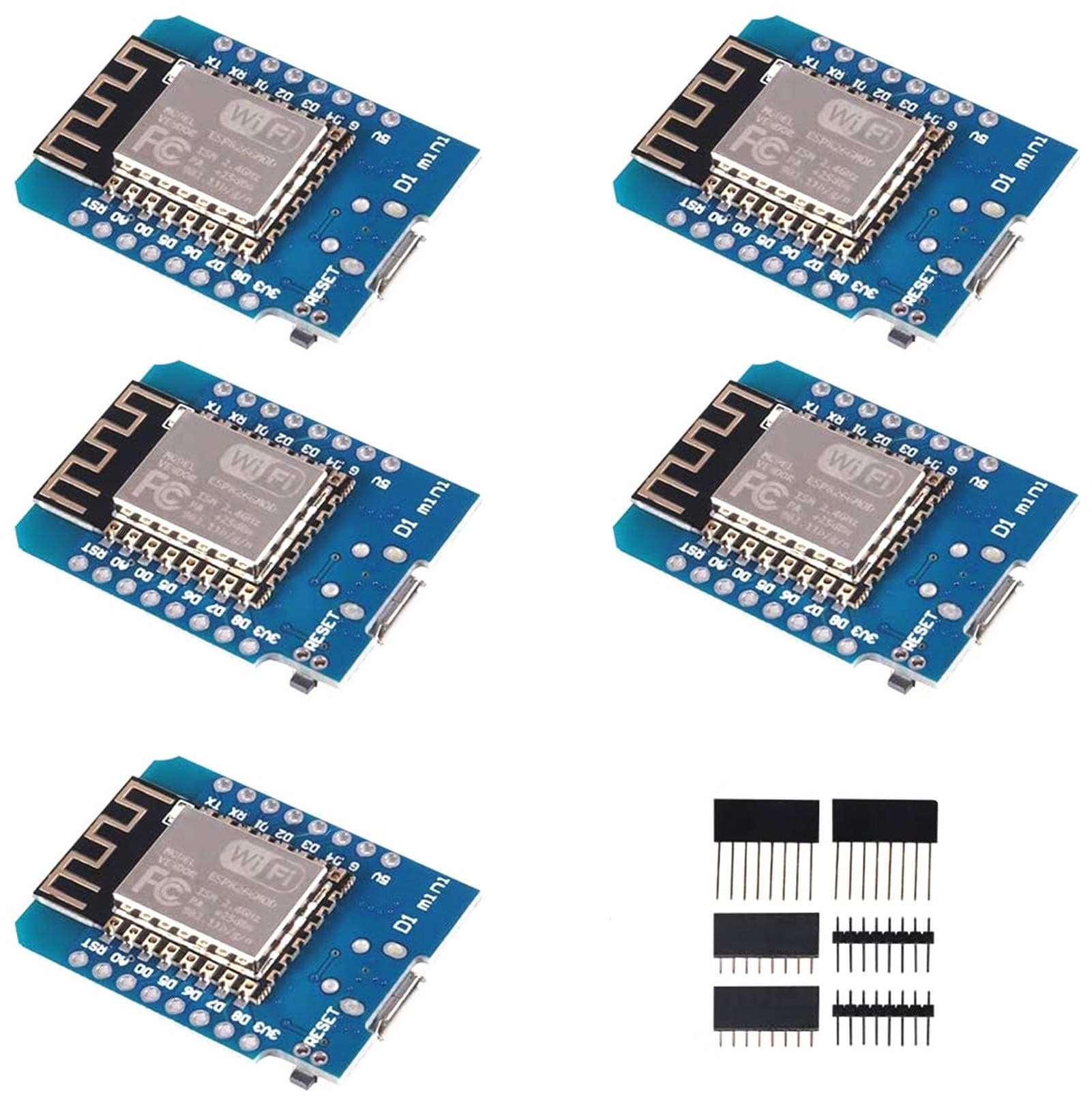
🚀 Tiny Board, Massive Possibilities — Power Your Next IoT Breakthrough!
The ACEIRMC 5pcs ESP8266 ESP-12F NodeMcu Mini D1 Modules are compact, WiFi-enabled development boards featuring 4MB flash memory and 11 digital I/O pins. Designed for seamless Arduino IDE compatibility, these boards support multiple protocols including PWM and I2C, powered via micro USB with onboard 5V 1A switching supply and resettable fuse. Ideal for professional-grade IoT projects and rapid prototyping.



| ASIN | B081PX9YFV |
| Best Sellers Rank | #240 in Single Board Computers (Computers & Accessories) |
| Brand | ACEIRMC |
| Built-In Media | esp8266 d1mini |
| Compatible Devices | Arduino, WeMos |
| Connectivity Technology | I2C, USB, WLAN, Wi-Fi |
| Customer Reviews | 4.5 4.5 out of 5 stars (774) |
| Manufacturer | ACEIRMC |
| Memory Storage Capacity | 4 MB |
| Mfr Part Number | 10550 |
| Model Name | D1 Mini |
| Operating System | Linux |
| Processor Count | 1 |
| RAM Memory Installed | 4 MB |
| RAM Memory Technology | LPDDR3 |
| Total Usb Ports | 1 |
| UPC | 701715431645 |
| Warranty Description | 1 |
| Wireless Compability | 802.11a/b/g/n/ac |
D**I
Might be an older chip but they work well for a lot of use cases!
I love these chips. They are very useful and I have used them for a few things now and though they don't have a ton of memory and their processing speed is lower than things like the ESP32, I still prefer them for certain applications. Built a few WiFi enabled thermometers with these. They sit in various rooms of my house and sense the temperature and I can hit a little webpage I coded into the device to see what the temperature is where they are located. So basically, they are acting as remotely readable temp/humidity sensors. Also, I used these to build a controllable outlet where I can log into a webpage on it over the network and control the on/off state of an outlet. Then I modified the code so it would reach out to the remote thermometers I mentioned to get the temp and turn on/off the outlet based on the temp. This way they control a heater in my shed to keep the temperature stable through the winter. It has been working great!
S**O
They work
Some arduino products (based on NINA wifi) simply don't work reliably. This seems to work perfectly. Note: this isn't the board's fault, but the Arduino IDE takes some setup to talk to these, and the latest version (3.1.0) of the board manager package does not work. You get an incomprehensible error message about time_ns and things fail to compile. Drop back to 3.0.2 and all is well. This sort of thing isn't atypical with Arduino projects, which seems to be very much the wild west in terms of software,
T**Y
Great deal on a sweet product.
Received the product in a few days with each chip packaged in anti static bags. A nice added bonus is the extra I/O pins that can be soldered based on your application. For a little over $3 ea, I think this is the most versatile of the 8266 chips. I’m just getting started back into electronics (I’m 70) and these are so easy to apply into IOT projects with a huge support community. I was able to put together a temp humid web server in a matter of a couple hours. Highly recommend this seller as he also reached out to me after the sale to insure all was ok, and an email address if I should have questions. I’ve received no free products or incentive to write this review.
B**E
Awesome value for tinkering with wireless projects
Using these for various LED projects, and man what a good bang for the buck. All 5 modules I received tested and work fine with my WiFi. I am taking off one star for not providing adequate instructions for installation to get this thing up and running. For those having issues with not detecting the device when plugged in.. **MAKE SURE YOUR USB CABLE IS FOR DATA, NOT ONLY CHARGING!** I wasted several hours messing with Windows and trying to install drivers for CH340G, didn't even dawn on me that the cable could be the problem. After trying about 6 different cables in the house I finally found one that worked, and everything worked fine after that. I'll post instructions for anyone having trouble -- these really should be part of the description (not just "install drivers" and "install board to Arduino IDE"). Installation for drivers only: 0. Ensure you have a DATA micro USB cable (typically one that came with a phone should work -- mine came with vapes and so only supported charging). 1. Try plugging in the board without installing drivers -- if you hear the connection sound for an external device you are good to go (skip to 3). 2. If you need drivers, SparkFun has them hosted (official wemos site seems to be down) -- I can't link to them but search google for "sparkfun CH340 drivers," and the first result should be "How to Install CH340 Drivers" 3. Verify you can see the device: open Device Manager --> Ports (COM & LPT) --> USB Serial CH340 (COMXYZ) Getting setup in Arduino IDE: 0. You will need a link to copy and paste, but I can't link it here. Search Google for "arduino ide esp8266 board manager" -- the first result should be for a "readthedocs" website, and that should have all the instructions you need. However, for clarity I will list them here as well. 1. Ensure you have Python installed (this might be optional -- I haven't installed Python directly, but I installed the Arduino IDE and had no issues). 2. Open the Arduino IDE and go to File --> Preferences 3. Under "Additional Board Manager URLs" at the bottom, paste the link (it's to a JSON file) you copied from the other page into that box and hit "OK" 4. Go to Tools --> Board --> and select Board Manager (near the top) 5. Search for "ESP8266" and install the result (should be from "ESP8266 Community") Selecting the board for your sketch: 1. Go to Tools --> Board and select either “LOLIN(WEMOS) D1 R2 & mini” or "NodeMCU 1.0 (12-E Module)" — either of these worked for me 2. Be sure to select which COM port the board from Tools -> Port 3. Check that the upload rate is 115200 (it should already be) Test the board with "Blink": 1. Go to File --> Examples --> ESP8266 and select "Blink" at the top 2. You shouldn't need to change anything, so click Upload 3. Once it's finished, check that your blue led light is blinking Test the board's WiFi with "ArduinoOTA": 0. This isn't necessary, but to be sure your WiFi module actually works you need to try connecting 1. Go to File --> Examples --> ArduinoOTA and select "BasicOTA" 2. Only changes you have to make are on lines 7 and 8 for your WiFi SSID and password 3. (Optional) Save the sketch 4. Go to Tools --> Port: If all was successful, you should be able to see the ESP8266 board here (COM whatever) -- select it 5. Hit upload and open the serial monitor 6. Once the program is finished uploading, make sure to change the baud rate to 115200 on the serial monitor 7. Check to make sure you get the "Ready" message, followed by an IP address Hope this helps everyone, this really is a bargain product but without installation instructions it's infuriating.
C**H
Works, and cheap. Cant ask for more
Arrived fast, flashed with ESP8266 Micropython in Thonny and I was up with webrepl in about 5 minutes
D**D
8266 is a great chip, but the CH340G USB is hit or miss
Editing and adding two stars. The last batch I got performed flawlessly with MicroPython 1.19 firmware. These are wonderful and cheap little 8266 boards, but the CH340G USB to UART bridge really drags them down. Can't get the thing to flash? Try a different USB cable. Got garbage characters on your serial output? Try a different USB cable. Yeah, really. The USB cable can make a difference. I don't know if it's the CH340G or the CH340G driver for Windows, but something is not quite right. My experience using the same USB cables with NodeMCU and Adafruit Huzzah32 (and their CP2102 USB to UART bridges) is stable and working consistently. These were a great price, but not worth the headaches. Stick with a CP2102 equipped device.
TrustPilot
vor 1 Tag
vor 1 Monat