We remain fully operational. Our teams are working around the clock to ensure your deliveries continue safely.

Laden Sie die App herunter


Kundendienst
Copyright © 2025 Desertcart Holdings Limited
Laden Sie die App herunter



Buy anything from 5,000+ international stores. One checkout price. No surprise fees. Join 2M+ shoppers on Desertcart.
Desertcart purchases this item on your behalf and handles shipping, customs, and support to GERMANY.
🚀 Upgrade your rig, outrun the pack!
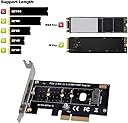
The NVMe PCIe Adapter by JESOT transforms any PCIe x4/x8/x16 slot into a high-speed M.2 NVMe SSD interface, supporting multiple SSD sizes (2230-2280) and delivering up to 3200+ MB/s read speeds. Its vented immersion gold PCB ensures efficient heat dissipation, while plug-and-play compatibility with Windows 7/8/10 makes installation effortless. Perfect for professionals seeking to turbocharge older desktops without native M.2 slots, this low-profile expansion card offers a budget-friendly, high-performance storage upgrade.


| ASIN | B07VYWR91T |
| Customer Reviews | 4.5 4.5 out of 5 stars (586) |
| Date First Available | August 1, 2019 |
| Item Weight | 3.2 ounces |
| Manufacturer | JESOT |
| Product Dimensions | 3.9 x 3.9 x 2.2 inches |
S**C
Speed Boost for 8 year old Desktop
Bought to speed up an old home built desktop (AMD A10 CPU - Gigabyte AM3 MB) to use for photo editing (Lightroom 3 and Photoshop CS4). It has a SATA SSD but the performance was okay. I ran a Benchmark on the SATA SSD and bested 350 MB/S Read and 300 MB/S Write. I also have a spinning disk that would max at 120 MB/S (Read & write). I purchased this card and a 250 GB Kingston NVME M.2 SSD. It’s an old PC. I wanted to keep the cost down. The total for both was less than $50. My OS is Win 10 64bit. The card and SSD were easy to assemble and I placed it in the 16x slot which is PCIe 3.0. It took about 10 minutes to install. No drivers needs as WIN10 loaded them automatically. I had to do minor configuration in Windows Disk Manager and I was up and running. My benchmark for the drive was 1.6 GB/S Read and 1.17 GB/S Write so that’s a major improvement. Since it’s an old BIOS; it’s not worth the hassle of modifying it to boot from the NVME SSD. The SATA SSD is where the Boot OS resides. I reinstalled Lightroom and the CACHE location to the new drive and now I can edit my photos with decent performance. I read a review where someone was complaining about the system hanging when it went to sleep mode. No issues at all for me. This was a cheap upgrade and allowed me to squeeze about 2 more years from my desktop.
M**E
works as expected, getting over 3000 MB/s
I think this is a great value for the money. I already had a 1 TB drive installed in my only motherboard m.2 slot, so I decided to give this a try. I was skeptical of the speed, but it tested fine. The only issue that I had was that my CPU integrated video (i5 6600K) stopped working after installing this for some reason (my setup is atypical). My system is a little dated now, so I have no idea what caused it. I don't require the integrated video, so it wasn't a major issue. I'm using this with a Silicon Power 2TB NVMe. The drive is working at the advertised speeds, so I'm satisfied. My OS is installed on the 1TB drive that's in my onboard m.2, so I didn't want to move it. I built the system in 2016, so it's a little dated. I'm using MSI Z170A Gaming Pro Carbon with i5 6600k and 4x8GB ram sticks. I have an ASUS GTX 1650 Super GPU, so the onboard video isn't necessary. I had previously enabled the ability to use both the Intel integrated video and the GTX 1650 together because I needed a 2nd HDMI port. The video card only has 1 HDMI, 1 DP, and 1 DVI. For some reason, using the integrated video with the GTX 1650 along with this m.2 adapter board caused my system to BSOD. I bought this back in early Feb. 2020, and after I turned off the video option in the BIOS the system has been fine. I've been running this configuration for 6 months, and I've had no issues since.
M**0
Simple and works great
This is a simple pass-thru adapter for PCIe based NMVE drives and it works fine out of the box assuming appropriate drivers are installed on your OS for your particular drive. It does require minor assembly by the way of picking the appropriate length mounting bracket but it isn't too difficult and all the tools, screws, brackets (low profile and normal profile) are included. Only thing I had a slightly hard time with was installing the brass drive retaining lock since it's a bit awkward when using a full length NVME drive (Hint: Install the drive and retaining lock first before putting the bracket on). Other than that, it all works great. I just dropped it into a spare PCIe x16 slot since I don't have an x4 slot on my motherboard. Benchmark was ran on it and the speeds are great. Have been using it for a little over a month now. Edit 8-9-22: It's been about 3 years since I bought this and it's still working fantastic. Absolutely happy with this product!
D**A
Perfect performance, poor directions
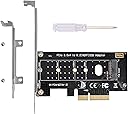
What can I say? This does exactly what it is supposed to do. Provide storage through a pci interface. Like many others on here, I bought this because I had a spare m2 after replacing the drive in my desktop with faster and higher capacity storage. Kit comes with 2 different back plates for LP and regular sized cases, a screwdriver, and the board. As some others have said, the m2 screw is kind of confusing to put in because it’s backwards from where you would normally think it goes. Same goes for attaching the back plate to the board. Performance wise this board works just fine and maxes out the capability of the card I have, for higher speeds I am unsure as I don’t have a high speed spare sitting around. Could have been 5 stars but the lack of instructions can make for a frustrating time for others. Luckily I read through the right and relevant comments before purchasing!
R**R
Good adapter, though if you have a newer motherboard won't help
Used in an old motherboard (cpu 2500k) and did a good job with a 500 meg NVME (believe 3rd generation which is the most my mb could do anyways). Noticed a decrease in loading times on the old hardware for gaming). Happy with purchase. Used it only for newer games in an older system but it made a significant difference in performance...less loading times and smoother gameplay.
B**N
I love it!
No pic as its installed in my PC. But wow I didn't know these things existed or were so easy to install. I bought this adapter card and a new NVMe SSD drive on the cheap and simply plugged them together and put them in my computer. Easy Back up and running instantly. Very handy. I wish it had room for another drive on the other side but it clearly stated it was for only one when I bought it so I knew what I was getting.
TrustPilot
vor 2 Wochen
vor 1 Woche