Some deliveries may take a little longer than usual due to regional shipping conditions.

Laden Sie die App herunter


Kundendienst
Copyright © 2025 Desertcart Holdings Limited
Laden Sie die App herunter

🎧 Elevate your desk soundscape—without the clutter!
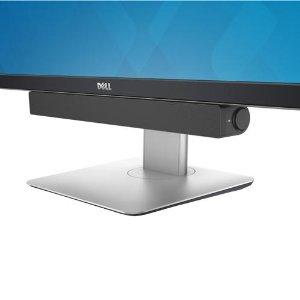
The Dell AC511 USB Wired SoundBar delivers crisp stereo audio powered solely via USB, eliminating the need for extra cables or batteries. Designed to mount seamlessly on a wide range of Dell monitors, its compact 16.5-inch profile saves desk space while providing rich sound for music, gaming, and video calls. With built-in volume control and a headphone jack, it’s a plug-and-play upgrade that replaces your computer’s sound card effortlessly.


| ASIN | B00DEJXRAE |
| Audio Driver Type | Dynamic Driver |
| Best Sellers Rank | #168 in Computer Speakers |
| Color | Black |
| Compatible Devices | Desktop, Laptop, Tablet, Television |
| Control Method | Touch |
| Customer Reviews | 4.2 4.2 out of 5 stars (2,588) |
| Date First Available | June 14, 2013 |
| Global Trade Identification Number | 00782386274779, 05397063566587 |
| Included Components | Sound bar, USB cord, User guide |
| Input Voltage | 5 Volts (DC) |
| Is Discontinued By Manufacturer | No |
| Is Waterproof | FALSE |
| Item Dimensions LxWxH | 16.5 x 1.9 x 1.5 inches |
| Item Weight | 1 pounds |
| Item model number | AC511 |
| Manufacturer | Dell Computer |
| Material | Metal, Plastic |
| Maximum Range | 20 Meters |
| Model Name | AC511 |
| Mounting Type | Bar Mount,Plug Mount |
| Number of Items | 1 |
| Power Source | Corded Electric |
| Product Dimensions | 1.9"D x 16.5"W x 1.5"H |
| Recommended Uses For Product | Volume Control |
| Set Name | Soundbar and USB cable |
| Shape | Rectangular Bar |
| Speaker Size | 41.91 Centimeters |
| Speaker Type | Monitor |
| Special Feature | Volume |
| Specific Uses For Product | personal |
| Standing screen display size | 27 Inches |
| Style | Computer Soundbar |
| Surround Sound Channel Configuration | 2.0 |
| UPC | 755034401940 884116132097 012301416732 734911099272 088411613200 714497982809 742128727246 791398634600 782386274779 734911500549 |
| Unit Count | 1.0 Count |
| Warranty Type | Limited |
R**N
Dell AC511 USB Wired SoundBar ... it is a fast solution when you need sound from the computer.
Dell AC511 USB Wired SoundBar ... by Dell IN THE BOX ... was the Dell AC511 USB wired SoundBAR, and a USB (male to Femaile) extender. The Dell AC511 is packaged in a heavy corregated box by the manufacturer and shipped inside a shipping box. CONDITION AND OPERATION... is very good. The Dell AC511 is brand new and was designed to work with designated DELL monitors. Overlooking the design intent, I have used the DELL AC511 on my Dell 755 SFE and my Lenovo laptop. There is no power supply, the power is supplied through the USB cord. There is NO AUX JACK. Only the USB connection. ... The AC511 bypasses your sound card and you don't need any additonal software. ... If you dont have sound, look at your sound source in your computer. Should list the AC511 as a selection. True with Linux systems as well. ... If the sound is noisey, or scratchy, which may happen if plugged into the monitor, try a different USB port, try a port on the computer. ... The AC511 has head phone jacks on the side. If the jacks are noisy, try cleaning the jack and plug. ... The AC511 DOES NOT HAVE AN AUX JACK to plug in a MiniDisc player or MP3 player. Does not have that capability. Only USB input. ... The AC511 was designed to work on designated DELL monitors because DELL installed a USB port for the soundbar on the monitor. However, the AC511 does work on most computers with a USB port. THE LAST WORD ... The Dell AC511 has a pretty good sound for a small-ish sound bar. It is a quality product and may be an answer for a computer with a bad sound card as the AC511 replaces that sound card. Sound control is from the volume control on the AC511 on the side and/or from the computer volume controls. The sound is rich and good quality. the only way you will get better sound is with separate speakers and then unless you add a sub woofer, you may not experience that big of a difference. ... For a laptop with those built in speakers or a computer that needs a set of speakers, this should work fine. All you need is a USB port. I would recommend the DELL AC511 speaker sound bar. EDIT 071518 There are on going reports of uncontrollable static after using these speakers for awhile and I did have this happen to mine. I actually shelved these speakers for awhile because I couldn't figure out how to stop the static noise that would randomly pop up. BUT one day I was working on a computer and just plugged one of these in for the sound. It worked with no static, and it continued to work. The only difference was the USB cable was no where near a monitor or computer except for where it plugged in. --- one suggested fix was to put tin foil over the speaker unit, I have tried this and had some good results. But I have now found that the USB cable is acting like an antenna and will recieve signals that can trigger the stattic noise. --- I want to make one thing clear, these are rather good sounding speakers. They sound better than my replacements when the static noise made them useless. It would be a plus to be able to get these working again. --- I have experiemented recently by shielding the speaker box with tin foil, or you can place them under a metal container, and keeping the cord away from the monitor and the computer, and especially away from any of the other cords from the monitor and computer. I have had good results, no static. There have been many complaints to DELL and they haven't found a fix other than discontinuing the speakers. But the sound is good enough that it is worth the extra trouble to shield them to keep any outside signals from triggering that static noise which obliterates any usable sound from the speakers. Of course, pulling and replacing the USB corrects this for the moment but it will come back. --- If you still have yours, try some shielding, These were a good idea but some spurrious signals are mucking up the output. I don't work for Dell or the seller and did not receive any monies or product for my random review R 160613 1255 E 180728 1144
S**T
Excellente!
I Just received 4 Dell AC511 USB Wired SoundBars and am in love! I didn't expect anything spectacular like booming bass and all that but I had a feeling Dell would deliver on these and I was right - they sound excellent! Better than some side-by-sides I have had for sure. The installation process was pretty simple - Just unpack, line up the tabs on the underside of a supported monitor and slide to the right to lock in place. They are removed as easily as well but I won't be unless I hook up my tower to an Audio Receiver with insane sound or something like that. These beauties save space on any desk and look great as well. They are simple to hook too. After locking in the soundbar, a single USB cable is hooked up to one of my computer's USB 2.0 ports and everything else was a piece of cake. One of the first things I did was play a Barry White song titled Love Serenade. Barry has a deep voice and the song itself has been a pretty good song to play to test the acoustics on speakers and as mentioned, they sound great! I'm well pleased - so pleased I have 4 of these on 4 identical Dell E2414H monitors which are pretty nice too by the way. I'm not one of those people that spends a ton of money on the latest and greatest stuff - although I'd jump on a new audio release by the Rolling Stones in a heartbeat. Anyway, the speakers at 50% volume on the Windows main audio control paired with VLC Player watching an old Columbo DVD sounded great as well. No vibrations are caused at all by the sound bar at all either. I have one thing to say off the bat as a negative - If you call it that. I have a couple Side-By-Side monitors as shown in the photo above where I was able to place a wired Logitech USB mouse on the plastic pedestal from the monitor. With the addition of the sound bar, I can no longer do that - but not a biggie. I have nothing bad to say at all about these speakers. They are great looking, connect easily to the monitor itself and the cable connection is straight forward with a simple USB connection. No 3.5mm audio plug required at all. I can picture myself Skyping someone and these would be great! Dell has another couple models of soundbars that have more features and may sound a bit better - I say them while shopping amazon. One of their newer ones (the Dell Pro Stereo Soundbar AE515M) had video conferencing buttons and a good mic as well but I just picked up 4 of these bad boys because I already chose a webcam with a mic on it. But, one of these days if I upgrade to a 4K monitor of larger than 24", I'm going to throw down a few bills and get the Dell Pro Stereo Soundbar AE515M for sure! For now, I'm happy with the sound quality, the looks, and the simplicity of them. Dell has some nice monitors and their newer soundbars are supposed to be able to mount on the underside of the monitor or the pedestal arm so that's nice. Pick some of these up if your looking for good quality sound.
そ**3
Dellのディスプレイならはめ込み式でディスプレイの下に取り付けられる USB入出力・電源ソースのサウンドバーです 取り付けると右にPC操作用の音量つまみと電源ランプが、左にはピンタイプのマイク入力と ヘッドホン出力が付いており、PC起動に合わせ電源が自動的に入るので面倒な操作もほぼ不要 ディスプレイにアップ及びダウンストリームのUSB端子が内蔵されているタイプだと 接続コード含めてディスプレイ裏側に全て押し込めるので、動画やゲームのサウンド程度なら すっきりした机とディスプレイで正面からサウンドを聴く環境が整えられると思います 音質は至って普通ですが、低音がやや籠もり気味か とはいえこのサウンドバーにそこまで音質を求めてるわけではなく、 また一般的なディスプレイの内蔵サウンドよりは十分音量が確保できてるので 音楽をPCでは余り重視していない、ということなら買っても損はないかも なおカスケードするとディレイが出てくるので、このサウンドバーを接続した ディスプレイから必ずアップストリームとダウンストリームで直接USBとPCを 接続するは必要があると思います。
B**C
Very Happy With Dell Sound Bar, And Delivery as Very Prompt Especially From 'America',,
R**N
I just received this today and set up took literally 30 seconds, just plug in the USB to the back of the PC and DONE. Cleaning up my desk to find a space for it took more time than the setup. The volume knob on the side is deceptive as it doesn't do much. The volume is controls via the PC on your monitor. The sound is loud and clear. I do agree with other reviewers that the bass is not deep and do not expect surround sound quality when playing songs or movies. Having say that, it produces more than adequate sound quality and loudness for games, netflix and movies in general. I don't use my PC to watch movies as that's what my TV is for. Happy with the purchase so far.
A**L
superb product -compact-sound and power on single usb cable
C**N
Recently my 15 year old PC monitor with inbuilt speakers died on me. Had to get a replacement, but found that the ones with speakers were either way too big, or too expensive. I decided to get a reasonably priced one minus speakers and use a soundbar instead. Found this Dell AC511 , read the reviews and did the usual bit of research before purchasing. I have to say, its performance for the price is very, very good. However, I have to admit that I have had it unboxed, just sitting there for about a week because although I am fairly computer savvy, the instructions for setting it up were not the best, and reading through all the Amazon Q & A's, I found so many varying suggestions on connecting it - I honestly was not sure whether it connected to my monitor, or the PC, or both!! Today I decided to connect it how I thought best, because after all, this is a plug & play device. For anyone contemplating buying this soundbar, and like me, are not sure how it will connect and work, here is how I did it - absolutely simple. It comes with a reasonably long USB lead. Put the USB into a vacant port on the back of your computer whilst it (and the monitor) is on - I have an HP desktop running Windows 7 Pro, but I am sure it will work the same with any usual operating system Windows recognised it immediately and installed the driver. Next, go into Start/Control panel/Hardware & Sound. At the bottom of the list you will see the Soundbar called "SRS Audio Control" To adjust sound to where you want it to be (bass/mixer etc), click on the "SRS Audio Control" and all the settings are there relating to the device. Just adjust with the slider buttons. You can adjust the sound via the knob on the right hand side of the bar, or via your speakers icon on your PC taskbar. How simple is that? No configurations required, no A to B cable, no additional USB cables - just the attached USB cable the soundbar comes with. I tested the sound with a Youtube video recording of music to get the sound I wanted, and it was excellent. Good bass - no tinniness, or distortion even when I had the speakers up louder than I would use. I found even at about 38% it was quite comfortably loud enough. Looks unobtrusive and sleek - and most of all - absolutely does the job. You could, if you wish, pay a few hundred pounds for one, but in all honesty I am more than happy with this to say the least. Excellent piece of kit. Arrived very quickly, and well packaged - all credit due to the Seller. If you cannot attach it to your monitor, it will look just as smart placed in front of it at desk level (put a bit of bluetack underneath to keep it secure) So glad I did not bother with another inbuilt speaker monitor after all - never could get such a great sound as this . produces!!
TrustPilot
vor 4 Tagen
vor 1 Woche