

🚀 Elevate your office game with speed, security, and sustainability!
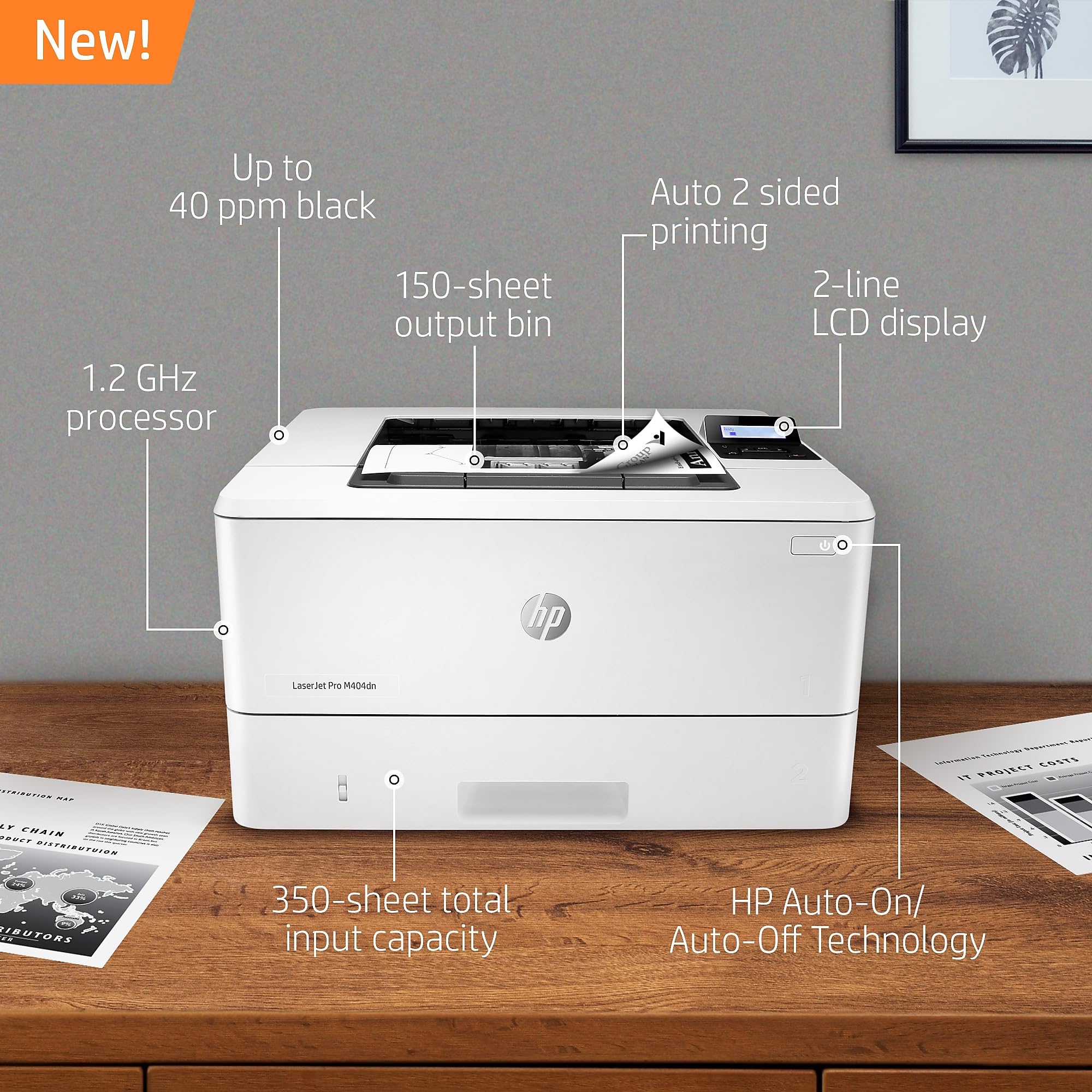
The HP LaserJet Pro M404dn is a monochrome laser printer designed for busy professionals who demand fast, reliable printing with advanced security. Featuring automatic duplex printing, built-in Ethernet for easy network sharing, and HP Wolf Pro Security to protect sensitive data, it delivers up to 40 pages per minute at 600 dpi resolution. Engineered for energy efficiency, it reduces power consumption by 18% compared to previous models, making it an eco-conscious choice for modern offices. Compact and robust, it supports a 250-sheet input tray and uses original HP 58A/58X toner cartridges for consistent, high-quality output.


| ASIN | B07RPCQX25 |
| Additional Printer functions | Scan |
| Batteries | 1 A batteries required. |
| Best Sellers Rank | #213,915 in Office Products ( See Top 100 in Office Products ) #322 in Laser Computer Printers |
| Compatible Devices | Laptops, PC |
| Control Method | Voice |
| Controller Type | Amazon Alexa |
| Customer Reviews | 4.2 4.2 out of 5 stars (1,261) |
| Date First Available | May 13, 2019 |
| Department | Printers |
| Dual-sided printing | Yes |
| Duplex | Automatic |
| Global Trade Identification Number | 00192018902855 |
| Hardware Interface | Ethernet, USB 2.0 |
| Included Components | Getting started guide, HP LaserJet Pro M404, Power cord, Preinstalled HP 58A Black LaserJet Toner Cartridge (yield ~3,000 pages), Regulatory Flyer, Support flyer, Warranty guide |
| Ink Color | black |
| Is Discontinued By Manufacturer | No |
| Item Weight | 19.14 pounds |
| Item model number | M404dn |
| Language | English |
| Manufacturer | HP |
| Max Copy Speed (Black & White) | 40 ppm |
| Max Input Sheet Capacity | 350 |
| Max copy resolution black-white | 600 x 600 dpi |
| Maximum Black and White Print Resolution | 600 dpi |
| Maximum Media Size | 8.5 x 14 inch |
| Memory Storage Capacity | 256 MB |
| Model Series | LaserJet Pro |
| Number of USB 2 Ports | 1 |
| Output sheet capacity | 150 |
| Power Consumption | 495 Watts |
| Print media | Card stock, Envelopes, Glossy photo paper, High-resolution paper, Labels, Paper (plain) |
| Printer Ink Type | Laser |
| Processor Count | 1 |
| Product Dimensions | 8.5 x 14.06 x 15 inches |
| Scanner Type | Sheetfed |
| Sheet Size | 3 x 5 to 8.5 x 14, Letter, Legal, Envelope |
| Specific Uses For Product | Office, business |
| Total USB Ports | 1 |
| UPC | 192018902909 192018902886 192018895157 192018902855 192018902893 192018902862 192018902916 192545283168 192018895140 192545283144 192018902879 192018895133 192545283151 |
| Warranty Type | limited warranty |
| Wattage | 495 watts |
W**C
Windows 7 might give you an issue.
I love the output of this product and the speed. The specific customer I installed this for is still using Windows 7 (no worries, they're on the extended service) and ran into occasional output problems. I was able to resolve the issue by connecting the printer to the LAN and printing to it via network connection (instead of the USB port.) Not sure why this fixed the issue, but I'm taking the win. I'd imagine the USB printing problem does not exist with Windows 10, but cannot confirm.
J**T
Buy this LASER JET and not those cheap bubble jet printer !
Best deal you can get. Do not get those cheap "bubble jet" printers. HP will try to kind of force you to buy the ink or the printer cartridge will stop working. This LASER jet has excellent quality, can use HP or compatible ink cartridge, and "does support WIFI printing" from mobile phone or PC if you configure it right. Toner cartridge lasts long long time. I used the same one for many years and still print like new. I am a very happy customer !
B**E
Incredible Laser Printer Value!
For black-and-white-only printing you can't beat the value of this HP laser printer. Its cost-per-page is MUCH lower than that of comparable inkjet printers and it prints up to 38 pages per minute (a page every 1 - 2 seconds!). The printer comes equipped with every network configuration setting known to man so it is appropriate for the smallest business or home office and the largest enterprise. HP has done a great job of securing the Web server that comes standard with the printer that is used for configuring its settings. This is a small printer that fits in tight spaces but performs like much larger, more expensive, competitive printers.
R**H
Fast - toner expensive but maybe not per page
Had a many years old HP 5 that served well for many many years. This new HP LaserJet Pro M404dn is much faster when printing. There is a pause after clicking the print key while the printer figures out what to do. Then when it starts to print it is fast. So far so good. This printer does NOT have wifi. I don't want wifi in my house because of the EMF radiation. (Beware 5G) Con: I give it 4 stars because I copy images from pictures and put them on pages in Word files about subjects and resize them on the page by dragging the corners. 80% of the time when printing the page the printer will not print the page as you see it after resizing. (What you see is what you get - WYSIWYG.) It will print the page with the picture as it was before being resized. If it originally was a large picture that won't all fit on the page it will print the page with just a portion of the picture on the edge of the page and the rest of the picture is lost. If anyone knows how to fix this please reply and let me know. Thank you. Otherwise I am happy with the printer.
S**H
Great Printer...When It Works (HOW TO FIX "OFFLINE" ISSUE)
I have to say, my experiences with this printer have mostly been positive, but the printer occasionally has network connectivity issues, and the most recent bout with these issues had me thinking the printer was finally done for. Thankfully, that wasn't the case, but I'll use this opportunity to (hopefully) help you fix that seemingly permanent "offline" printer status when you're using this printer over a network. I'll assume you're using a Windows PC. I'm unsure whether these instructions work on other platforms. Of course, these steps assume that your network isn't the problem and that the printer is turned on. First, get a USB printer cable. Disconnect the ethernet cable from the back of the printer if you haven't already done so. See the part marked [OPTIONAL?] below? Skip it for now if you want to potentially save time. If this guide doesn't work without the [OPTIONAL?] steps, then start from the beginning and do every step, including the [OPTIONAL?] ones. [OPTIONAL?] Remove the printer from Printers & Scanners within Settings in Windows. Connect the printer to your PC using the USB printer cable. Go to https://123.hp.com/laserjet to download drivers for the printer. Run the setup program and follow the steps to set up the printer over USB. When installation completes, try printing a page to ensure the printer works. Disconnect the USB printer cable from your PC. [OPTIONAL?] Remove that copy of the printer from Printers & Scanners within Settings in Windows, as this copy of the printer will only work over USB. Plug the ethernet cable back into your printer. [OPTIONAL?] Run the setup program again and follow the steps to set up the printer over ethernet. Try printing a page. The printer should be working now. [OPTIONAL?] Stoop down in front of the printer so you're at eye level, then lean in toward it so your face is close to the front of the printer. Now, sternly say to the printer, "Now, don't you EVER do that again!" as you point your index finger authoritatively at the printer. Aggravating? Very much so. Will the "offline" issue pop up again? Probably. Printers gonna printer. They're all ultimately junk, and they'll all ultimately break, and there's nothing anyone can do about it. This printer's quite good when it works, though. Honest.
M**K
Good little printer
Good print quality. It was ready out of the box, with no need to pull it apart to remove little pieces of tape from all over the insides. It's easy to set up, IF you know your way around networks (at least the basics). The Windows software, once located and installed, couldn't find the printer until it was set to its own static IP address. That was the only complication encountered, and the end results are quite pleasing.
S**N
Works well for infrequent print jobs.
We rarely need or want to print anything. 99 percent of the time we need or want to print something B/W is either what we want or acceptable for the use. We had an inexpensive color inkjet printer that did what we needed, but the cartridges were drying up before we were using up the ink. For that reason I wanted to get a laser printer. I also use various versions of Linux OS. This HP printer works natively with the Linux versions that I use. No need to install drivers. It just worked with all of our OS very easily. This printer continues to work well for us after several months. It works well for us.
S**.
Boa impressora. Qualidade a que nos habituaram. Compraria de novo.
G**.
Acquistata per uso ufficio con decine di stampe giornaliere, a distanza di 2 anni dall'acquisto continua a macinare stampe senza mai fermarsi o dare problemi, ottimo prodotto hp con fronte/retro automatico. Un muletto indistruttibile
G**T
£165 less £50 cash back. Prints well, come with a full toner, nice and compact
A**V
Bon rapport qualité-prix, reçu rapidement. Parfait pour un usage professionnel. Merci à Amazon pour votre efficacité et votre rapidité.
A**R
But once you have worked that out it does the job. It did crash a few times and then you have to re-install which is really not easy, nearly impossible to do when you are the plug and play type. This printer is not. But as long as is functions, it works fine. That is with 1 papers size the first paper drawer is unusable.
TrustPilot
vor 3 Wochen
vor 3 Tagen



