We remain fully operational. Our teams are working around the clock to ensure your deliveries continue safely.

Laden Sie die App herunter


Kundendienst
Copyright © 2025 Desertcart Holdings Limited
Laden Sie die App herunter
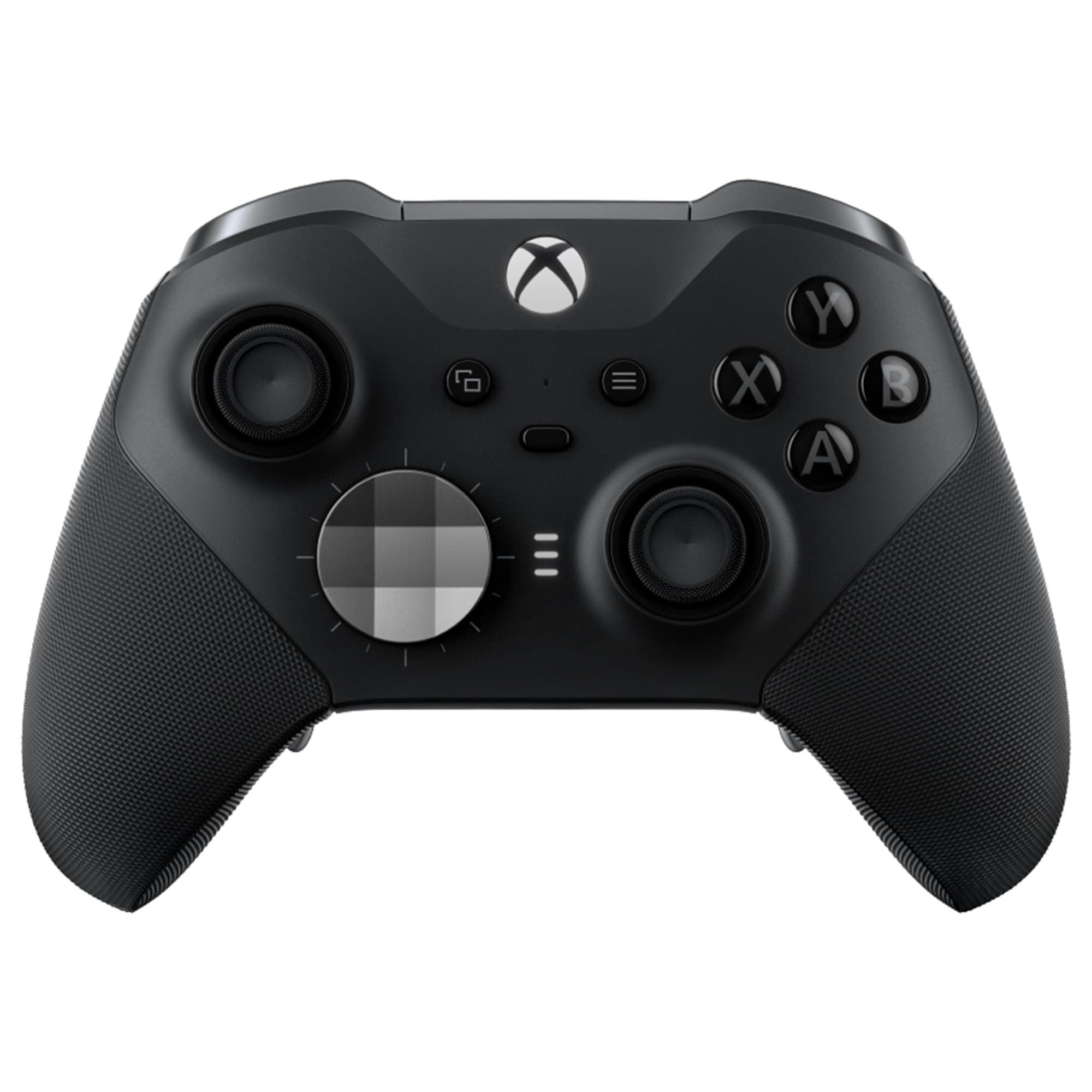
🎯 Elevate your game with the ultimate pro controller experience
The Xbox Elite Series 2 Core Wireless Controller is a premium, customizable gamepad designed for Xbox Series X|S, Xbox One, Windows PC, Android, and iOS. Featuring adjustable thumbsticks, hair trigger locks, interchangeable components, and up to 40 hours of rechargeable battery life, it offers unparalleled precision and endurance. With multiple connectivity options and the ability to save custom profiles, it’s engineered for serious gamers seeking competitive performance and personalized control.


| ASIN | B07SFKTLZM |
| Additional Features | Wireless,Adjustable Thumbsticks |
| Best Sellers Rank | #47 in Video Games ( See Top 100 in Video Games ) #4 in Xbox One Controllers #5 in Xbox Series X & S Controllers |
| Brand Name | Xbox |
| Button Quantity | 18 |
| Color | Black |
| Compatible Devices | Windows |
| Connectivity Technology | Wireless / Cable |
| Controller Type | Gamepad |
| Customer Reviews | 4.3 4.3 out of 5 stars (46,662) |
| Hardware Platform | Microsoft |
| Item Dimensions | 8 x 8 x 4 inches |
| Item Dimensions D x W x H | 8"D x 8"W x 4"H |
| Item Type Name | Elite Series 2 Controller - Black |
| Item Weight | 1 Pounds |
| Manufacturer | Placeholder |
| Model Name | FST-00001 |
| Package Quantity | 1 |
| Power Source | Battery Powered |
| UPC | 889842196344 889842613926 750466003847 |
| Unit Count | 1.0 Count |
| Warranty Description | Limited Warranty |
A**R
High quality controller
I got this for playing games on Steam (pc). I am an avid gamer and have used many different controllers from GameCube to Xbox. My prior controller that I was using was an Xbox Scuff controller. It had worn down after 100+ hours of use: the RB and several paddles had broken. I got this new controller as a replacement. It has several key qualities that I like: 1.) The shaft of the sticks are metal. My prior controller used plastic for the shafts and they would slowly shred from use and leave dust behind. This created an issue where the dust would get into the controller and cause drift. (All controllers have stick drift. It’s where your controller will move your character onscreen without you doing anything. Games incorporate dead zones where the stick inputs are not read. Overtime, controllers get worse and worse drift that go above the dead zone thresholds causing drift.) I have not had any issues with drift on the new controller. 2.) Metal Paddles. These are levers under the controller that allow you to hit your A, B, X, etc… buttons so that you don’t need to move your fingers off of the sticks. Paddles are not included, but you can buy them separately. I highly recommend getting paddles. They make a big difference. My prior controller used plastic paddles that all eventually broke. These paddles are metal and won’t break. They are easy to put on and off. They are placed better for your fingers too. 3.) Adjustable hair triggers. Your RT and LT buttons can be adjusted so that you don’t go all the way down. This is helpful if you only need them to act as “buttons” rather than “triggers” and don’t need the full press down. I personally don’t restrict my triggers, but if you like to then that function exists here. On the back of the controller you can slide a button into 3 different positions to have them be unrestricted, partially restricted, and almost fully restricted. 4.) Braided type C cord. The controller is wireless, but you can use the cord it comes with to have a wired connection to your computer through any USB port. The braided cord feels high quality and is much better that the plastic incased cords. My prior controller used a micro USB connection on the controller which was a crappy connection that would disconnect all the time. The Type C connection is stable and never disconnects while I’m playing. 5.) Satellite D-pad. It looks a little silly but I like the feel of this d-pad better that the “plus” d-pad. Easy to rotate around all of the directions. Here are some of the cons so far: 1.) I got the blue one. The letters inside the A, B, X, Y buttons are blue. So it’s hard to read what button is which. I can see this being annoying for new players. This only bothers me when I go from using a Nintendo Pro controller to this one because they reverse the X and Y (also A and B). I always get them mixed up and I’ll look down at this controller looking for the X button, but it’s hard to see. 2.) Changing the buttons the paddles are linked to is more difficult on this controller than the Scuff controller. The Scuff controller had a much better solution. This one needs a separate app to do it. 3.) The face plate is more difficult to remove. Another minor gripe. Scuff does this better too where you can remove the face plate easily as it is held on with magnets. You probably will never need to do this, but it does help if you need to replace buttons or clean the inside. Overall, I would recommend this controller to a gamer who is looking for a step up from the basic Xbox controller. Definitely geared for a more competitive player. If you are a casual player, then you would be better off with a cheaper controller. Compared to the Scuff controller, I think this one is better overall. From a price standpoint, it is also better.
M**F
Best controller ever made... I own 5 lol
These feel greatand are very responsive. Compared to dual sense edge they have superior battery life and don't have that sticky plastic feel. However, I have owned 7 elites since the first one and they tend to fail in about a year with significant use... so probably expected. Currently have 2 black, and red, white and blue core. Idk...i have a controller buying issue. I own ebout 40 for all different systems and these are by far the best controllers ever made.
M**Y
Comes with everything and very high quality!
This is my favorite controller of all time. You can adjust the bumpers to decide how much you want to press in on them to register. Plus you can adjust the sensitivities of the thumb sticks. There are three settings for each going for least to most sensitive. The thumb sticks and D-pad are interchangeable with magnetic bits. Plus you can add the back bumpers in. The controller is easy to grip and has some rubber on the sides that help if your hands sweat and it won’t fall out of your hands easily. I use this with my Steam Deck and it’s awesome. I was looking for the standard version as I heard the Core version is cheaper but only comes with the controller. After looking at reviews- it looks like despite this product being labeled as “core” on amazon- it still (at least in the case of the black controller) comes with the case and paddles and everything else. The case is super high quality too. Pretty sure I could launch it off a cliff and it would do an excellent job protecting the controller inside. The case can also act as a charging dock. I couldn’t go back to another controller even if I tried. You can tell just how high quality it is and being able to adjust everything is such a great perk I didn’t realize I’d love.
J**S
Very solid with good weight
Worked great for about a year. Then stick drift showed up. Get insurance if you are a hard player. I think they will just replace the device.
M**.
An issue with the controller compounded by trying to use warranty. ***UPDATE **** It gets so bad.
******UPDATE******05/13/25 I have sent it back twice more since my last post. Again, the RB button does not function. On 04/27/25, I spoke with Ridon about another replacement. I was sent an email requesting that I verify my shipping address: "Dear Michael, Thank you for reaching out regarding your Xbox controller concern. Since your device is still within the warranty period, we can proceed with a replacement request for you. To move forward, kindly provide your updated shipping address. Once we receive this information, we will document your request and initiate the replacement process." I replied within 10 minutes and did not receive a shipping label or any further correspondence. I sent another email on 05/03/25 and again did not receive a response (I verified with a MS employee that this is an email address that receives email). On 05/12/25, I requested another phone call so I could speak to somebody about my open case. I never received a call back. Today, 05/13/25, I requested a call again and did receive a call back. After I explained the issue and verified my information including a number I could be reached at if we were disconnected, the call was disconnected, and I never received a call back. That is the go-to move for Microsoft customer service. I might be able to understand if I was rude or angry in any way. I just explain the situation and ask how I can return for a replacement. I keep going down this path because I have to believe there will be one person that works for Xbox that will just replace the controller for a new, working one. Controller is great when working but I have sent it back 5 times for repair in 9 months. ******UPDATE***** 11/12/24 I received a replacement on 09/20/24. It worked for approximately a month before the RB button no longer functioned. (Had to press 5+ times for it to be registered). I have sent it back once again and haven't received the replacement yet. Honestly, I cannot wait until it has been a year since I purchased so it will be out of the Microsoft warranty and I will be able to use the Assurion warranty I purchased and just get refunded. My kid does say that when it works, it is great. The issue is that we haven't had a working one for more than a month and a half in the past five months. ****UPDATE**** 10/10/24 On 09/15/2024 I received my second replacement controller that did not function correctly. This time the headphone jack did not work along with the original issue of stick drift. I go through the arduous process of trying to talk with somebody and this person sounds like they are going to assist. They tell me they will send out a "new" controller as a replacement right away because of all of the issues I have had. All I have to do is give them my credit card number so that it can be charged in the chance that I do not return the unworking controller. I agreed to the $196.02 charge if I didn't return the controller. On 09/20/24, I received the new, unboxed controller and it worked. Within an hour, I sent the unworking controller back to Xbox with the provided shipping label. I received an email from Xbox later that day stating that it looks like I received the controller and requesting that I send the tracking number. i do so immediately. On 09/26/2024, I received an email that they had not received the controller and that if they did not receive the controller within a few days, I would be charged for the replacement. I attempted to call but I got disconnected (this happens 50% of the time, in my experience). I then sent another email with the tracking number again. I could see that the controller was delivered to El Paso on that very same day. Over the next week, I see a charge and a credit authorized on my credit card for 196.01. I assumed that they charged and realized they received the controller and then credited my account. Neither had posted. I checked my credit card yesterday and the charge had posted, and the credit disappeared. I have been attempting to get in contact with them for the past 40 minutes since customer service opened. I have been unable to request a phone call back. They appear to have a system issue. They have many issues. Sidenote. I called Chase last night to contest the charge. They were great. They, themselves, removed the charge. They just ate the charge. I am still working on this through Xbox because Chase shouldn't compensate me for Microsoft's thievery. My goal is to get refunded though Xbox for the product I returned and to have Chase recover their nice gesture. ****UPDATE**** 08/19/2024 I have not received any communication from Jefry (Microsoft) regarding my missing controller that I sent in under warranty. Jefry did assure me 3-4 times that he would contact me every 3 days with an update on the status of the lost controller. I called Microsoft today and went through the process of requesting customer service to call me. The call was estimated to be in approximately 22 minutes. 5 minutes later (I was in the shower) the phone rang and it was Microsoft. I was pleased until I got to wait on hold for 35 minutes before speaking to a person. Finally, an advocate (customer service agent) got on the line. I explained the entire situation again and she asked for the support request number. She asked that I wait a few minutes while she looked into the case. She got back on the line and stated that since the case was previously escalated that she was unable to access any information, but I should be assured that she will forward this information to Jefry (the "advocate" that was previously assisting me and the "advocate" that failed to keep me updated as promised multiple times) and Jefry will contact me either today or tomorrow. I asked if I could get a copy of what she is sending to Jefry so I have something if I were to need to call back. She stated that she was not permitted to send me a copy, but I should be assured that Jefry will contact me by tomorrow with an update. I kindly stated that I was sure that she did send this information to Jefry but she should not assure me that Jefry will follow through as he has already failed to do so previously. The conversation ended and I currently have 3 1/2 hours into trying to get a working controller for my son so he could have his birthday present back. ------------------------------------------------------------------------------------------------------------------------- I purchased the controller on June 15, 2024, and received June 22, 2024. During the first week my kid was complaining that the controller had "stick drift" (basically the controller stick would not recenter itself so there would be movement without touching the controller). I did not really think that was likely of the new controller and thought he may be just making excuses for not winning a game. I hear him complain about it off and on for the next month until he forced me to look at how bad it was on August 1, 2024. I observed the same thing that he was complaining about. I went online to look into this issue and saw that it may be fixed by recalibrating the controller. I did that and it did not fix the issue. There were many videos online on how to take a part the controller and replace a few parts, but I did not want to take that route because that would certainly void the warranty. The 30 day return window closed 9 days earlier on July 22, 2024 so I attempted to go through the regular warranty process (the warranty on Xbox controllers are usually 90 days but on Elite Series 2 the warranty was extended from 90 days to a year because of how many issues that were being reported about this controller). Microsoft contracts the warranty portion of the process to Asurion. Asurion is a company that you can purchase extended warranties for a variety of items. I have dealt with Asurion in the past and they have been easy to work with. I speak with the Asurion agent for over an hour to get this warranty process started and I receive a shipping label emailed to me. I pack up the item and have it at UPS within a half an hour. I can track that Microsoft received the controller on August 6, 2024. On August 7, 2024, I receive an email that states: "Your device has shipped, Great news. Your repaired or replaced device has left our service center and is on its way to the shipping address that you provided or the Microsoft-authorized location that you selected. You can track the status of your delivery. Tracking may take 24 to 48 hours to populate." The tracking number never updates with any information except for: "UPS doesn’t have possession of the package yet. Estimated delivery date will be available as soon as we get the package." It is now August 14, 2024, and I decide that I should call Microsoft to check on the status of this controller. I went through the process so that I may receive a call to speak to somebody. After a few minutes, I did receive a call that was immediately disconnected from their end. I go through the process again to request another call and did receive one a few minutes later. I verified a bit of information so he could look further into the issue. This is where I felt like it went off the tracks. The agent told me that he could see the item was shipped and should have been delivered. I stated that it had not been delivered and we compared tracking numbers. Then he stated that it was most likely an issue with UPS not updating their system. This went on for about ten minutes where he would ask for a few minutes to check on something and come back about miscommunication with UPS. Finally, the agent (who spoke extremely fast, and I had to restate for clarification) told me that he was going put in a "support request" and he would follow up with me every few days until he could determine the status of the controller (he would have somebody else contact UPS and the repair facility). I asked him what timeframe that a warranty claim usually took and he stated 15 days on the high end. I asked if I should expect my controller 15 days from when Microsoft received it on August 6, 2024 and he said it would be 15 days from today, August 14, 2024. I asked what would happen if I didn't receive the controller in 15 days and he stated that I should call back and inquire about it again but there wasn't a definite timeframe that could be stated because of unforeseen issues like communication with UPS. I then asked if the controller was repaired or replaced, and he didn't have that information. I told him that I had a different solution. I started by stating that I thought it wasn't appropriate to blame this on UPS. I told him that I was conducting my business with Microsoft and that if Microsoft has an issue with a company that they do business with then that should not be used as an excuse with their customers. I asked if a new or working controller could be sent immediately rather than my son waiting for their issues to be sorted, and he stated emphatically that would not be done. I contended that I did not want anything except for a working controller that I had purchased. I then questioned if a new controller as a replacement was out of line as my son had issues with this immediately and also logically that if the repair facility received the item on August 6, 2024, and sent an email saying that it was "repaired or replaced" early on August 7, 2024, that there was a good possibility that a new controller was sent out as a remedy because the turnaround time was so short. I also reiterated that I just wanted a working controller and that it did not have to be new. The agent restated that this could not be done and there wasn't a way to tell if a new or repaired item was sent. Maybe my expectations are too high. The amount of time I have put into getting a working controller for my son is not reasonable. I do think that a replacement being sent (new or used, just working) was not an unreasonable request given the Microsoft's failures to create a reliable product and to be able to adequately manage a warranty system so that the customer would not have to waste additional time following up on their purchase. Lesson learned.
E**M
Great controller
This controller is a bit pricey but still worth it to me. It feels really smooth and the charging dock in the case makes it even better
X**G
Elite 2 controller is NOT fully XBox Series X compatible: NO SHARE BUTTON!
I had no idea that the "XBox Elite Series 2" controller was actually developed in 2020, before the XBox Series X was released. What Microsoft still sells, manufactures, and advertises today is the EXACT SAME controller from back then. That means that it was developed BEFORE the XBox Series X was developed, and it has NO SHARE BUTTON. Yes, you can map a screenshot button or a record video button to any of the controller inputs, but there is NO button assignment possible that has the exact same functionality as the Share button. The center button on this controller which you would think is the share button is a profile select button so you can change button mappings on the fly. So keep that in mind: This is essentially an XBox One X controller from 2020. It is compatible with the Series X and works fine with it, but there's no share button, and no direct equivalent for the share button is available through any of the button assignment functions. Pros: - Works great - Has built in battery with USB-C charging port, no batteries needed. - Paddles on the back are SUPERB; easy to use and super helpful. They are the primary reason I bought this. - Software to remap buttons to the paddles is easy to use. - Multiple profiles allows you to set up unique mappings for 3 games and pick them with the profile button instead of messing with the button reconfiguration app every time. Cons: - NO SHARE BUTTON :( - Very heavy compared to a standard controller - This Core edition comes with no paddles so the four paddle inputs on the back are worthless unless you buy them separately. I just bought some 3rd party kit instead of giving Microsoft more money. - The "XBox Button" is clicky with no travel compared to a XBox Series X controller where it pushes in and has some travel. From a tactile perspective it feels weird, but isn't hard to use. I didn't like it. Overall it's good controller but man am I salty over the share button missing. Microsoft should have clearly stated that this is an "Xbox One" product and NOT a "Xbox Series S|X" product. It also blows my mind that they never made an updated Elite controller FOR the Xbox Series X either! It's been six years!
A**V
Best Xbox controller to date.
I was skeptical with a built in battery. If you're worried, don't be. I stream my 12-16 hour game sessions and so far this controller has stood up. The battery hasn't died mid pvp sweat match yet! It does come with a slow usb c charger that I reccomend always using. Do not opt for a high speed port. The slower charger ensures no over charge and a long battery life for your controller. You may be tempted to use a quick charger, and it will in fact work and quick charge but then limit the battery charge duration and the life of the battery resulting in a dead forever contoelelr, don't do it! Charge it overnight with its provided charger and you'll be golden. The core is where it's at with the missing accessories only being about $9 on Amazon, that's a huge win! Controller comes with 3 different profiles you can setup, ability to tighten sticks to barely push them helping if you ever get stick drift tighting will instantly fix said issue! Removable magnetic twist thumb sticks are a huge win here. Curved rear triggers for better shooter grip with 3 adjustable trigger locks that are instantly read when locked so no settings changed mandatory, but would fine tune in Xbox accessories app for better tuning. You can customize in profile for trigger settings for instant head taps. Customizable down to changing the Xbox light color on the controller per profile to help know which profile you're using by color or by 3 light system. Does not have a share or capture button. You'll need to remap one of your buttons as a shift button to hold while you press another button to capture, share, record start, record stop, and record what previously happened. I do this with a paddle then a, b, x, y as shift keys. This controller is heavier than your normal controller, textured triggers and bumpers, the curve on the back triggers it steep so not good if you play games where you have to hold bumper and click trigger as the curve will start to hurt your finger quickly because it is very steep. All in all this is an excellent controller and if you're like me who gets stick drift on new controllers quickly, worry not with this controller. It is excellent and no stick drift issues. Do pre tighten the sticks slightly, quarter turn when you first get it. It will break on and be brilliant for you.
TrustPilot
vor 2 Wochen
vor 2 Wochen