We remain fully operational. Our teams are working around the clock to ensure your deliveries continue safely.

Laden Sie die App herunter


Kundendienst
Copyright © 2025 Desertcart Holdings Limited
Laden Sie die App herunter
Buy anything from 5,000+ international stores. One checkout price. No surprise fees. Join 2M+ shoppers on Desertcart.
Desertcart purchases this item on your behalf and handles shipping, customs, and support to GERMANY.
⚡ Power your network, not your worries — seamless speed meets smart design!
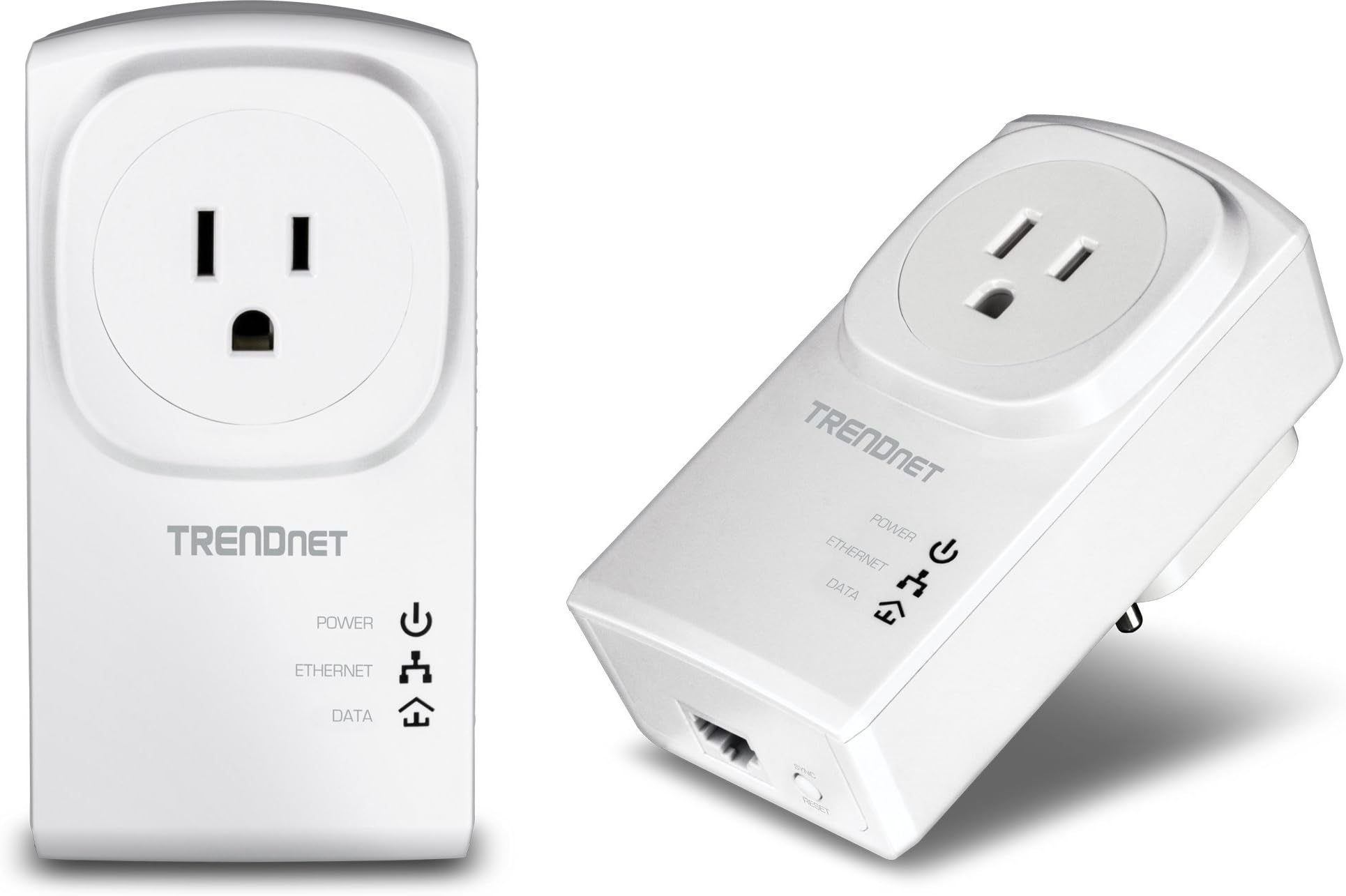
The TRENDnet TPL-407E2K Powerline 500 AV Adapter Kit transforms your home’s electrical wiring into a reliable 500 Mbps Ethernet network. Featuring a built-in power outlet to save space, NDAA compliance for government-level security, and easy plug-and-play setup, it’s ideal for HD streaming, lag-free gaming, and stable remote work. Backed by a 3-year warranty and expert support, it’s the smart choice for professionals craving fast, stable connectivity without the clutter.


| ASIN | B009ZRBXMI |
| Best Sellers Rank | #54 in Powerline Network Adapters |
| Brand | TRENDnet |
| Built-In Media | 2 x Network cable (1. |
| Color | White |
| Compatible Devices | Backward compatible with all Powerline 600, 500, and 200 adapters |
| Customer Reviews | 4.1 4.1 out of 5 stars (996) |
| Data Link Protocol | Ethernet |
| Data Transfer Rate | 500 Megabits Per Second |
| External Testing Certification | CE, FCC |
| Global Trade Identification Number | 00710931506679, 00803982820266 |
| Hardware Interface | Ethernet |
| Item Dimensions L x W x H | 4.4"L x 2.7"W x 1.1"H |
| Item Type Name | TrendNet 500Mbps Nano Powerline AV Kit (TPL-407E2K) |
| Item Weight | 102 Grams |
| Manufacturer | TRENDnet |
| Mfr Part Number | TPL-407E2K |
| Model Number | TPL-407E2K |
| UPC | 163120658565 163121400972 031112862071 151903617359 132017935072 898029712130 069060118292 172302743685 079531859630 014445566403 939647622767 523160957552 172304262016 803982820266 168141529108 710931506655 031112050416 031112580913 710931506679 012304278214 |
| Warranty Description | 3 year Warranty |
D**.
Works surprisingly well, streams HD video
I've never tried Powerline adapters before. Reviews of the first-generation models were all terrible, and I was one of those people who wrote the technology off completely. But fast-forward a few years, and I'm moving into a large apartment with a cable modem in the bedroom and my HDTV in the living room. I can pick up 40 Wi-Fi SSIDs on my laptop, I can't get into the ceiling so I can't do drop cables, and my girlfriend would kill me if I started stringing up cat-5 cable along the walls. I needed something fast, cheap, and largely invisible, and while I was skeptical since this apartment's wiring is so old it still has an honest-to-goodness fuse box, I still figured I'd at least try a Powerline adapter. I settled on the Trendnet brand because they'd gotten some fairly decent reviews on sites like SmallNetBuilder, and seemed pretty fast at least compared to other brands. Installation was simple; basically you plug them both in, press and hold the sync button on the side (I had to do it a few times before I learned how long to hold the button down) on one and then the other, and then wait for them to sync up. Once they do, you're all set! I connected one to my router in the bedroom, and the other to a gigabit switch in the living room, and then plugged all my home theater devices into the switch. AV receiver, Roku, Blu-Ray player, Xbox, they all appeared on the network right away, and voila, Internet access for my entertainment center. Roku does streaming Internet radio, and within minutes I had Pandora playing to my heart's content. The real test, though, was whether I could stream video. I've been using this setup for a couple of weeks now, and let me tell you, Hulu, Netflix, and Amazon Prime all work like a charm. I can stream Bones, Castle, and even Downtown Abbey now in HD with Dolby Digital and I've never had a hiccup. Satisfaction with these really comes down to what you need. The "500 Mbps" claim is a little misleading, because these things only have 10/100 Ethernet and can only connect to your router/switch/Roku at up to 100 Mbps. But like all other Powerline adapters, they're actually slow enough that it doesn't matter; I've read lots of reviews where these "500 Mbps" routers never really work at higher than 50 Mbps in real-world testing. If you're a power user, don't buy these things to connect your workstation and your NAS. But if you're like me, and you have 15 Mbps cable service and want to stream HD video to your Roku, these things may be just what you need.
A**O
FOR PC GAMERS WHO DON'T HAVE AN ETHERNET CONNECTION - BUY THIS
I built my gaming pc in June, and as a complete newbie to the scene I did not realize the important of an ethernet connection. I've tried multiple different usb wifi antennas, and nothing could provide a stable enough connection for my to play games reliably on. I'd get about 10-15 seconds of gameplay before a random PING spike would interfere. So my $1000 build was effectively rendered useless for online gaming, and since I don't play much single-player on my PC, I was basically only using this computer for school, work, and web-browsing. After months of reading through various Reddit posts, I was on the fence about trying powerline. Boy am I glad I went for it. Let me just say this right off the bat - if you for whatever reason can't use an ethernet connection of any kind and you want to play games online, TRY THIS. I'm only pulling about 75 mbps when I typically get about 150mbps on wifi, but with how stable the connection is, I have no PING issues whatsoever. If any of you play Rocket League, you'd know how annoying PING spikes are that cause your car to start flying all over the field. With my powerline connection, I've put in about 8 hours of online playing without one ping spike, and I'm finally able to take advantage of my hardware. Seriously, if you're on the fence and you play online games, GIVE THIS A SHOT. I've tried so many wifi antennas in all different price ranges, and none have come close to the performance I get here. Yes, the connection is much slower, but the stability is what matters most especially for online games. Don't listen to the Redditors who completely write this off - if you have no other options and can't use ethernet, give this a try and see if it works. Super simple to setup and a true plug and play. If I could give it 6 stars I would. Seriously, I'm so shocked at how well it works, and I'm glad I decided just to give it a try. A true job well done by this company.
G**G
Broken Unit Replaced
They both worked great for a while, with one connected to my router and the other to an iMac. Even with the iMac on a sub panel off the main electrical panel it worked great. Based on that I bought the non-pass-through model with 4 ethernet ports for my home theater, also on a sub panel circuit. But shortly afterward, the pass-through model on the iMac quit. Of the 3 lights on it, only power (PWR) is lit, no powerline (PL), no ethernet (ETH). I tried it all over the house in different outlets and no change. I also tried all the suggested tricks to make it work again, including resetting all units to factory settings, nothing worked. 4/20/14 Update: TrendNet replaced the broken unit and I installed it 8 days ago. It works fine. The other 2 units continue to work as well. Overall I'm very pleased with the speed increases, so am upgrading my rating from 2 to 4 stars. The design considerations must be difficult for this type of device. It can't have a surge supressor or UPS between it and the electrical outlet, so the electronics must be more robust and resistant to surge damage, or not - maybe they are not robust and that's what caused my one unit to fail. I set up a cheap wireless N router as a wireless access point at the other end of the house and connected it to one of the TrendNet units. It works great and my iPad now has MUCH better connectively and speed.
K**E
Excelente calidad
A**R
Have so much on WIFi needed something direcct to connest to the router. what a good solution. hidden wires and plugs into wall the u can plug your T.V. on top .. excellent
K**E
I was not expecting much, just slightly better than what I have been using. I live in an older building with solid concrete wall and a single phone jack on the complete opposite side of the unit. I have struggled to get a decent WiFi signal to pass through 4 solid concrete walls. I have run bridges, run through various routers, even at one point set up a commercial grade APs. I have multiple VLANS giving priority to my workstation. No matter what I have done, my internet speed always seemed to cap out at 15M, which is almost unusable for streaming / gaming. Purchased this on a whim to see if it could help, and Huzzuh. Network speeds have been a solid 40M all morning, which isn't too bad considering I only have a 50M connection and multiple connected devices. I am not sure how this would hold up to a higher speed connection, however I have to say, for my application, I am quite pleasantly surprised.
E**Y
kleine technische Raffinesse , einfach mal den Fest-PC über das Stromnetz mit LAN versorgt . Sicherheitsbedenken ... ja wie überall (WLAN usw.) nichts ist wirklich 100% sicher , liegt eher am kriminellen Potenzial was wohl nie wirklich zu vermeiden sein wird. Etwas weniger Strahlung (WLAN) kann ja nicht schaden , zumal das Signal durch bauliche Gegebenheiten nicht immer das gewünschte Ergebnis bringt. Top Artikel , Verarbeitung sehr gut und einfachste Installation .
P**T
Articles qui correspondent à mes atteintes. De plus ces nouveaux produits sont compatibles avec les anciens (TPL402) donc c'est vraiment parfait. Livraison qui a été reçue dans les temps.
TrustPilot
vor 2 Monaten
vor 3 Wochen